
The same ad, the same bid, and the same keyword can perform very differently depending on where the ad appears on Amazon.
An ad shown at the top of the search results might convert at 15%, while the same ad shown somewhere else might convert at 6%. Placement adjustments exist specifically so you can account for that difference and get more out of the money you are already spending.
Amazon gives advertisers several ways to raise bids when an ad appears in a certain location or in front of a certain type of shopper. The main options are:
- Top of search
- Rest of search
- Product pages
- Amazon Business shoppers
- Amazon-built audiences
- Custom Amazon Marketing Cloud audiences
- Video placements
The basic setting is not difficult to use. The harder part is understanding how it interacts with your base bids, campaign structure, and dynamic bidding settings.
If you need a broader explanation of where these settings fit, read our guide to Amazon PPC campaign structure. Campaign-level settings such as bidding strategies and placement adjustments apply to everything inside the campaign.
What Is an Amazon Placement Adjustment?
When you set a bid for a keyword or product target, that number is your base bid.
A placement adjustment tells Amazon that it can raise that bid when your ad is eligible to appear in a specific location.
For Sponsored Products campaigns, the three main placement categories are top of search, rest of search, and product pages.
Top of Search
Top of search means the sponsored placements at the top of the first search-results page.
These are usually some of the most valuable placements because a lot of shoppers do not scroll very far. They search for what they want, click one or two of the first results, and make a purchase.
Rest of Search
Rest of search means the search-result placements below the top-of-search area.
These shoppers may behave differently. Someone farther down the page is more likely to be comparing several products, looking at prices, reading reviews, and doing more research before buying.
That does not mean rest-of-search traffic is bad. It means the conversion rate may be different, so you may not want to bid the same amount for it.
Product Pages
Product-page placements are ads shown on the detail pages of other products.
A shopper may be looking at a competing product, see your ad on that listing, and click over to compare. These placements can work very well for some products and very poorly for others.
Placement adjustments let you bid differently for these situations instead of treating every possible click as though it has the same value.
Main Amazon Ad Placements
| Placement | Where the Ad Appears | Typical Shopper Behavior | What to Watch |
|---|---|---|---|
| Top of search | At the top of the first Amazon search-results page | Shoppers often click one of the first few results and buy quickly | Conversion may be stronger, but higher CPCs can offset the advantage |
| Rest of search | Below the top placements on the search-results page | Shoppers may compare more listings, prices, reviews, and features | Conversion may be lower, but the traffic can still be profitable |
| Product pages | On another product’s detail page | Shoppers are already viewing a competing or related product | Results depend heavily on relevance, price, reviews, and category |
Your Targeting Type Does Not Restrict Your Ad to One Placement
One of the most common misunderstandings is that keyword-targeting campaigns only appear in search results and product-targeting campaigns only appear on product pages.
That is not how Amazon necessarily delivers ads.
A keyword-targeting campaign can still show ads on product pages.
A product-targeting campaign can also show ads in search results.
The targeting type helps Amazon decide when the ad is relevant. It does not guarantee that the ad will only appear in one location.
This is why placement reporting matters even when the campaign name or targeting type makes it sound like the campaign should be limited to one area.
Where to Find Placement Adjustments
- Open the campaign in the Amazon Ads console.
- Look at the campaign-level navigation.
- Click Bid adjustments.
- Review the placement and audience tabs.
Inside the placement section, you should see separate fields for top of search, rest of search, and product pages.
Depending on the campaign and the features available in your account, you may also see settings for Amazon Business, audiences, and video placements.
These adjustments are generally made at the campaign level. That means one change can affect multiple keywords, targets, ads, or ad groups inside the campaign.
Do not change a campaign-level adjustment without thinking about everything that campaign contains.

Image above: Open the campaign and select “Bid adjustments” from the campaign-level navigation.
How the Placement Percentage Changes Your Bid
A placement adjustment is a percentage increase applied on top of your base bid.
For example, assume your base bid is $0.50 and you set a 50% top-of-search adjustment.
- Base bid: $0.50
- Top-of-search increase: 50%
- Amount added: $0.25
- Adjusted bid: $0.75
Amazon can therefore bid $0.75 when the ad is competing for a top-of-search placement. The base bid remains $0.50 when that particular adjustment does not apply.
Amazon allows placement increases of up to 900% in many of these settings. That gives advertisers a lot of control, but it also creates a lot of room for mistakes.
Amazon does not currently give you a simple negative placement adjustment. You cannot directly tell Amazon to lower the bid below the base amount for one particular placement.
Suppose you want to bid aggressively for top of search but keep bids low everywhere else. One way to do that is to use a relatively low base bid and then apply a large top-of-search adjustment.
That can work, but you have to remember that the campaign is set up that way every time you make changes.
Placement-Adjustment Math
| Base Bid | Placement Adjustment | Increase Added | Adjusted Bid |
|---|---|---|---|
| $0.50 | 0% | $0.00 | $0.50 |
| $0.50 | 50% | $0.25 | $0.75 |
| $0.50 | 100% | $0.50 | $1.00 |
| $0.50 | 300% | $1.50 | $2.00 |
| $1.00 | 300% | $3.00 | $4.00 |
A 300% adjustment does not mean a $1.00 bid becomes $3.00. It means Amazon adds 300% of the original bid. The adjusted amount is therefore $4.00 before any additional dynamic bidding adjustment.
Placement Adjustments Can Stack With Dynamic Bidding
The placement-adjusted bid may not be the final amount Amazon uses.
If the campaign is using dynamic bidding, Amazon may make another adjustment based on how likely it believes the click is to convert.
- You set a base bid.
- Amazon applies the placement adjustment.
- Amazon applies the dynamic bidding adjustment.
This means a bid that looks low in the keyword or targeting table may become much higher once the campaign-level settings are applied.
Before changing bids, check:
- The base bid
- The top-of-search adjustment
- The rest-of-search adjustment
- The product-page adjustment
- The dynamic bidding strategy
- Any audience adjustment
- Any Amazon Business adjustment
- Any video-placement adjustment
The actual amount Amazon may bid can be very different from the number you first see.
For a more detailed explanation of the additional bidding layer, read Amazon bidding strategies: Dynamic Down Only, Up and Down, and Fixed Bids.

Image above: Amazon provides separate percentage adjustments for top of search, rest of search, and product-page placements.
Why Top of Search Often Converts Better
Top of search commonly performs better because of how many shoppers use Amazon.
Some shoppers know what they want before they search. They type in a product or category, click one of the first results, and buy within a few minutes.
They are not spending a lot of time comparing every option. They may never scroll far enough to see most of the listings on the page.
Clicks from farther down the search results often come from shoppers in a different mode. Those shoppers may:
- Open several listings
- Compare pricing
- Read reviews
- Look at product images
- Compare package sizes
- Check delivery dates
- Return to a previous listing before purchasing
They can still buy, but they are usually doing more research.
The research in the prep document cited typical conversion-rate ranges of 10% to 20% for top of search, 3% to 8% for rest of search, and 5% to 10% for product pages.
Typical Placement Conversion-Rate Ranges
| Placement | Typical Range Cited in Prep Research | General Pattern |
|---|---|---|
| Top of search | 10%–20% | Often the highest-converting placement |
| Rest of search | 3%–8% | Often lower because shoppers are comparing more options |
| Product pages | 5%–10% | Can work well when the product is a strong alternative or complement |
These numbers should not be treated as a guarantee for your campaigns. Your own results may be very different depending on the product, category, price, reviews, competition, listing quality, and brand recognition.
The point is that meaningful performance differences between placements are normal.
How to Decide Whether to Raise Your Top-of-Search Bid
The goal is not to raise top-of-search bids simply because top of search usually performs well.
The goal is to look at your own campaign data and decide whether that placement can support a higher bid.
Suppose top of search is converting significantly better than the rest of the campaign. You may be able to bid more aggressively for that placement and still maintain a similar advertising cost of sales, or ACoS.
- Review the campaign’s placement report.
- Compare top-of-search performance with rest of search and product pages.
- Look at conversion rate, cost per click, ACoS, and return on ad spend.
- Increase the top-of-search adjustment gradually.
- Let the campaign collect enough data.
- Review whether the additional traffic remained profitable.
- Continue adjusting until the placement is roughly in line with your targets.
A reasonable goal is to raise the top-of-search adjustment until its ACoS or ROAS is roughly comparable to the other placements.
If top of search converts much better, the campaign may be able to tolerate a higher cost per click there.
The mistake is assuming that a higher conversion rate automatically means you should use an enormous adjustment. You still have to watch the actual economics.
Be Careful With Large Placement Adjustments
Large placement modifiers can work, but they make a campaign easier to misunderstand.
A common setup is:
- Very low base bids
- A 300% top-of-search adjustment
- Dynamic bidding enabled
The advertiser intentionally keeps the base bid low because the campaign is designed to become aggressive only when the ad is eligible for top of search.
The problem comes later.
Someone goes into the campaign, sees the low keyword bid, and raises it without remembering that a 300% top-of-search adjustment is already sitting on top of it.
Suppose a target has a $0.50 base bid and a 300% top-of-search adjustment. The adjustment adds $1.50, producing a top-of-search bid of $2.00 before any additional dynamic bidding adjustment.
If someone later raises the base bid to $1.00 without checking the campaign settings, the top-of-search bid becomes $4.00 before any dynamic adjustment.
The person making the change may think they only raised the bid by $0.50. In reality, they doubled the adjusted top-of-search bid.
Put Large Adjustments in the Campaign Name
One simple way to avoid this problem is to put the adjustment in the campaign name.
- Brand Name – Exact – TOS +300%
- Main Keywords – TOS +150%
- Product Targeting – PDP +100%
- Campaign Name – TOS +300 – Down Only
The exact naming system does not matter as much as making the important setting visible.

Image above: Adding “TOS +300” to the campaign name makes the large modifier visible before someone changes the base bids.
When you open the campaign list, you should be able to tell that the base bids are not the whole story.
This becomes especially useful when:
- Several people manage the account
- An agency and an internal team both make changes
- The campaign has been running for a long time
- You revisit the campaign months after setting it up
- The campaign uses unusually low base bids
- The campaign uses unusually high placement modifiers
You can also make it part of your normal process to check the bid-adjustment screen every time you make a major bid change.
Rest-of-Search Adjustments
Now that Amazon provides a separate rest-of-search adjustment, you can treat that part of the campaign independently.
Rest of search is not automatically unprofitable.
Some products may perform well farther down the page. This can happen when:
- Shoppers need to compare several options
- Your price is competitive
- Your review count is strong
- Your main image stands out
- Your product has a feature that becomes more appealing after comparison
- The category has a longer research process
The right adjustment depends on your own data.
Do not increase rest-of-search bids just because the option exists. Use the placement report to see whether the additional exposure is likely to be profitable.
Product-Page Adjustments
Product-page placements can behave very differently from search placements.
A shopper on a product detail page is already looking at another item. Your ad has to interrupt that process and give the shopper a reason to leave the current listing.
That can work well when your product is:
- A clear alternative to the product being viewed
- Less expensive
- Better reviewed
- Available in a preferred size or color
- A complementary product
- A replacement or accessory
- Visually distinctive
Product-page advertising can also struggle when the shopper is already highly committed to the product they are viewing.
The prep research found that product-page placements often produced lower click-through rates and, in some cases, worse ACoS than top of search.
That does not mean you should avoid product pages entirely. It means you should not apply a large product-page adjustment without evidence that it works for your product.
Audience Bid Adjustments
Amazon also lets you apply bid increases based on the audience seeing the ad.
You can find these settings in the bid-adjustment section by selecting the Audiences tab.
The standard Amazon-built audiences include:
High Interest Based on Shopping History
This audience includes shoppers whose recent activity indicates a strong interest in buying the type of product being advertised.
Amazon is using shopping behavior to identify people who may be more likely to purchase.
Clicked or Added the Brand’s Product to Cart
This audience includes people who clicked or added one of the brand’s products to their cart within the last three months but did not purchase.
These shoppers have already shown some interest in the brand.
They may have been comparing options, waiting for a later date, or simply not ready to buy during the original visit.
Purchased the Brand’s Product
This audience includes people who bought a product from the brand within the last three months.
Depending on the product, these shoppers may be good candidates for:
- Repeat purchases
- Refills
- Replacements
- Additional sizes or variations
- Complementary products
- Other products from the same brand
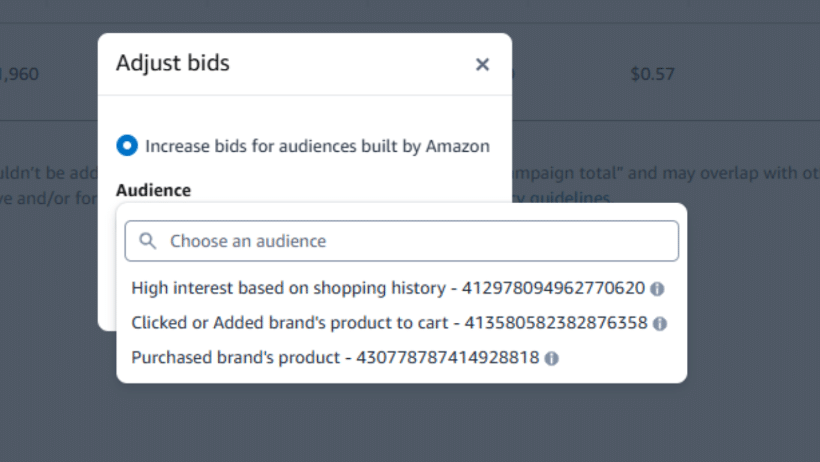
Image above: Amazon’s built-in choices include high-interest shoppers, recent cart or click engagers, and people who recently purchased from the brand.
Amazon Audience Options
| Audience | Who It Includes | Possible Use |
|---|---|---|
| High interest based on shopping history | Shoppers whose recent Amazon activity suggests a strong interest in the advertised product category | Reaching shoppers who may already be close to purchasing |
| Clicked or added the brand’s product to cart | Shoppers who engaged with one of the brand’s products within the last three months but did not purchase | Re-engaging people who already showed interest |
| Purchased the brand’s product | Shoppers who purchased from the brand within the last three months | Repeat purchases, replenishment, complementary products, or other products from the brand |
| Amazon Marketing Cloud audience | A custom audience created through Amazon Marketing Cloud | More specialized strategies based on the audience definition you build |
Adding an Audience Does Not Restrict the Campaign
This is an important distinction.
Adding an audience to a campaign does not make the campaign show only to people in that audience.
The campaign still runs normally.
The audience setting gives Amazon permission to raise the bid when the shopper belongs to that group. It also gives you reporting so you can compare the audience’s performance with the rest of the campaign.
That reporting is one of the main reasons I recommend adding an audience even when you are not ready to use a meaningful bid increase.
Without an audience selected, you may not see how that segment performed.
With an audience added, you can compare its conversion rate, ACoS, and ROAS against the overall campaign.
If Amazon will not allow a zero-percent adjustment, you may need to use a very small adjustment, such as 1%, simply to activate the audience and reporting.
The goal in that situation is not to materially change the bid. The goal is to collect more information.
You Can Only Apply an Adjustment to One Audience at a Time
Amazon currently limits the campaign to one audience bid adjustment at a time.
That means you may see several available audiences, but you cannot necessarily apply separate adjustments to all of them inside the same campaign.
You have to choose the one that is most useful for that campaign.
For example:
- A consumable product may benefit from targeting previous purchasers.
- A new product launch may benefit from shoppers who recently engaged with the brand.
- A category with a long consideration period may benefit from the high-interest audience.
If you want to test different audience strategies separately, you may need to use separate campaigns.
That makes it easier to control bids and evaluate results without mixing several different approaches together.
Amazon Marketing Cloud Audiences
If you use Amazon Marketing Cloud, you can build custom audiences and make them available inside supported ad campaigns.
These audiences can be more specific than the standard Amazon-built options.
Once the audience has been created and becomes available, it can appear as an option in the campaign’s audience adjustment settings.
The same limitation still applies: you can only apply a bid adjustment to one audience at a time in a campaign.
Custom audiences can be useful, but they also add another layer of complexity. Make sure the campaign name, audience definition, and reporting structure are clear enough that someone can understand the setup later.
Amazon’s Reported Audience Results
Amazon reported that campaigns increasing bids for its high-likelihood audience saw a median 77% lift in ROAS across 1,700 campaigns.
That does not mean every advertiser should expect a 77% improvement.
Amazon’s result is based on a particular group of campaigns, and your product may perform differently.
The practical takeaway is that the feature is worth testing.
At a minimum, adding an audience can give you additional reporting. If the audience clearly outperforms the rest of the campaign, you can then test a larger bid adjustment.
Start with the data instead of assuming the audience will automatically perform better.
Amazon Business Bid Adjustments
Amazon also provides a separate bid adjustment for Amazon Business shoppers.
This can be useful for products commonly purchased by companies, including:
- Office supplies
- Industrial products
- Janitorial supplies
- Shipping materials
- Restaurant supplies
- Bulk consumables
- Maintenance products
- Equipment used in workplaces
The campaign still runs for normal retail customers.
When the shopper is using an Amazon Business account, Amazon can apply the higher bid.
This is similar to the other bid adjustments. The campaign is not restricted to business customers. Amazon is simply bidding more aggressively when the shopper belongs to that group.
Amazon allows B2B bid increases of up to 900%.
That does not mean you should immediately use a 900% adjustment. It means you have room to raise the bid if the business traffic performs well enough to justify it.
Amazon Business Adjustment vs. Business-Exclusive Campaign
| Feature | Amazon Business Bid Adjustment | Amazon Business-Exclusive Campaign |
|---|---|---|
| Shows to regular Amazon shoppers | Yes | No |
| Shows to Amazon Business shoppers | Yes | Yes |
| Raises bids specifically for business shoppers | Yes | The campaign uses its own bids and settings |
| Requires a separate campaign | No | Yes |
| Best use | Keep broad delivery while bidding more aggressively for business buyers | Build a campaign specifically for business buyers |
| Consumer-only equivalent available | No | No |
A bid adjustment keeps the campaign broad and changes the bid for business shoppers.
A business-exclusive campaign restricts delivery to business shoppers.
Amazon does not currently offer the opposite option. You cannot create a consumer-only campaign that excludes Amazon Business shoppers.
When B2B Adjustments Make Sense
A B2B adjustment is most useful when you have evidence that business shoppers are valuable to the brand.
That may include:
- Larger average order quantities
- Higher repeat purchase rates
- Better conversion rates
- Lower ACoS
- Products that businesses routinely buy in bulk
- Products with a clear commercial use
If the product is rarely purchased by businesses, the setting may not have much effect.
If business buyers represent a meaningful part of the market, test the adjustment and compare the results before deciding whether to create a separate business-only campaign.
Video-Placement Bid Adjustments
Amazon also provides an adjustment for placements where a Sponsored Products video is shown.
If you have video ads available in the campaign, you may be able to raise bids specifically for those video opportunities.
- You start with a base bid.
- Amazon identifies an eligible video placement.
- The video-placement adjustment increases the bid.
Video can perform very differently from a standard product ad because it gives you more room to demonstrate the product, show how it works, or explain a feature.
Do not assume the video adjustment should always be high. Check whether the video placements actually produce better conversion rates or stronger returns for your product.
A Practical Way to Test Placement Adjustments
Step 1: Review Existing Performance
Before changing anything, look at performance by placement.
Review:
- Spend
- Sales
- Clicks
- Conversion rate
- Cost per click
- ACoS
- ROAS
You need enough data for the comparison to mean something.
A placement with two clicks and one sale may look incredible, but that is not enough information to make a major bidding decision.
Step 2: Choose One Main Change
Do not raise top of search, rest of search, product pages, audiences, B2B, and video all at once.
If performance changes, you will not know which adjustment caused it.
Choose the placement with the clearest opportunity.
Step 3: Start With a Modest Increase
Unless you are intentionally using a low-base-bid campaign structure, start with a modest percentage.
The right amount depends on the campaign, but the point is to avoid making a huge change before you understand the effect.
Step 4: Document the Adjustment
Put the adjustment in the campaign name or in your internal account notes.
This is especially important for large modifiers.
Step 5: Let the Campaign Gather Data
Do not change the adjustment every day.
The campaign needs enough time and traffic for the new setting to produce meaningful results.
Step 6: Compare the New Results
Check whether the placement received more traffic and whether that traffic remained profitable.
A higher conversion rate does not automatically mean a better result if the cost per click increased too much.
Step 7: Adjust Again
If the placement still performs well, you may be able to raise the modifier further.
If ACoS becomes too high, lower the modifier or reduce the base bid.
The Main Mistakes to Avoid
Looking Only at the Base Bid
A base bid does not tell you the full story when placement modifiers and dynamic bidding are active.
Always review the campaign-level settings.
Using a Huge Modifier Without Labeling the Campaign
A 300% adjustment may be intentional, but someone can easily forget it later.
Put it in the campaign name.
Raising Every Adjustment at Once
This makes the test difficult to evaluate and can raise costs quickly.
Change one main variable at a time.
Assuming Top of Search Is Always Best
Top of search often performs well, but your own data matters more than a general benchmark.
Some products may perform better on product pages or farther down the search results.
Ignoring Audience Reporting
Adding an audience can give you useful information even when the bid increase is minimal.
Without it, you may not be able to see how that group performed.
Confusing an Audience Adjustment With Audience-Only Targeting
Adding an audience does not restrict the campaign to that audience.
The campaign still shows to other shoppers.
Confusing a B2B Adjustment With a Business-Only Campaign
A bid adjustment increases the bid for business shoppers.
A business-exclusive campaign only shows to business shoppers.
They are two different tools.
Forgetting That Adjustments Stack
Placement adjustments, dynamic bidding, audience settings, and other modifiers can combine.
The final bid may be much higher than expected.
When a campaign is barely receiving traffic, do not assume the only solution is raising every placement modifier. Our guide to why Amazon ads have low impressions explains other settings that may be reducing delivery.
How I Would Approach Placement Adjustments
For most brands, I would start by reviewing placement data before creating a complicated campaign structure.
If top of search is clearly converting better, test a moderate top-of-search increase.
If you eventually move to a low-base-bid and high-modifier structure, label the campaign clearly and make sure everyone working in the account understands it.
I would also add an audience to the campaign so you can collect reporting on that segment. If the audience performs better, test an increase.
For products commonly purchased by companies, review Amazon Business performance and test either a B2B adjustment or a separate business-only campaign.
The main idea is to make each increase earn its place.
Do not use an adjustment because it is available. Use it because the data shows that a certain placement or shopper is worth a higher bid.
Frequently Asked Questions
Can a keyword-targeting campaign appear on product pages?
Yes. Keyword-targeting campaigns can appear on product pages, and product-targeting campaigns can appear in search results. The targeting type does not limit the campaign to one placement.
Can I lower bids for a specific placement?
Amazon currently allows advertisers to increase bids for placements but does not provide a simple negative placement adjustment that lowers the bid below the base amount for one location.
How high can placement adjustments go?
Amazon allows increases of up to 900% in many placement-adjustment settings. Large modifiers should be used carefully because they can stack with dynamic bidding and other adjustments.
Why does top of search often convert better?
Many shoppers click one of the first few results and buy without scrolling far down the page. Shoppers farther down the page may be doing more comparison and research.
Should I always use a top-of-search adjustment?
No. Review your own placement data first. A top-of-search adjustment makes sense when the placement converts well enough to justify a higher bid.
Does adding an audience restrict who sees the ad?
No. The campaign continues running normally. The audience setting adds a bid adjustment and reporting for that group.
Can I add more than one audience adjustment?
Amazon currently limits a campaign to one audience bid adjustment at a time.
What is the difference between a B2B adjustment and an Amazon Business-only campaign?
A B2B adjustment keeps the campaign open to all shoppers but raises the bid for Amazon Business users. A business-only campaign shows only to Amazon Business shoppers.
Should I put the placement adjustment in the campaign name?
For large adjustments, yes. A name such as “TOS +300%” makes the setup visible and reduces the chance that someone changes the base bids without realizing the modifier is active.
Final Takeaway
Placement adjustments let you tell Amazon that certain ad opportunities are worth more than others.
That can be useful because top of search, rest of search, product pages, audiences, business shoppers, and video placements do not all perform the same way.
The setting itself is simple. The risk comes from forgetting how the modifiers interact.
Review the full campaign setup, make one controlled change at a time, label large adjustments clearly, and keep checking whether the higher bid is producing enough additional sales to justify the cost.
If you want a walkthrough, the video above covers this step-by-step. And if you’ve got a quick question about your situation, leave a comment on the video and I’ll try to point you in the right direction.