
If you’re new to Amazon Ads, the terminology can get confusing pretty quickly.
You’ll hear people talk about campaigns, ad groups, keywords, search terms, bids, budgets, placements, portfolios, and ads. Some of those sound like they should mean the same thing, but they don’t. And if you don’t understand where each piece lives inside Amazon’s ad system, it gets harder to build campaigns that are organized, controllable, and easy to troubleshoot.
Here’s the basic structure:
- Campaigns contain ad groups.
- Ad groups contain keywords, negative keywords, search terms, and ads.
- Campaign-level settings apply to everything inside that campaign.
That’s the main idea. Once you understand that hierarchy, a lot of Amazon PPC starts to make more sense.
The Basic Amazon PPC Hierarchy
Amazon’s ad structure has three main levels:
| Level | What It Is | What Usually Lives There |
|---|---|---|
| Campaign | The top-level container | Budget, bidding strategy, placement adjustments, portfolio assignment |
| Ad Group | The container inside a campaign | Keywords, negative keywords, search terms view, ads/products |
| Keywords / Ads | The targeting and products being advertised | Keyword targets, match types, advertised ASINs or SKUs |
The campaign is the top level. Inside the campaign, you have one or more ad groups. Inside each ad group, you have the actual targeting and the products being advertised.
For Sponsored Product ads, the “ad” is usually just the product you’re choosing to advertise. You’re not writing a display ad the way you might on another platform. You’re picking the product, setting up the targeting, and Amazon shows that product in ad placements when shoppers search or browse.
A simple way to think about it is this:
- Campaign = container with budget and bidding settings
- Ad group = container for targeting and advertised products
- Keywords = what you tell Amazon to target
- Search terms = what shoppers actually typed
- Ads = the product or products being advertised
This same basic terminology also applies to other ad platforms, like Google Ads, and it will probably feel familiar if you’ve used other PPC systems before. But Amazon has its own quirks, especially around budgets, portfolios, variants, and search term reporting.
For a deeper related breakdown of match types and negatives, you may also want to read Amazon PPC Match Types & Negatives.
What Lives at the Campaign Level?
Certain settings only exist at the campaign level. That means they apply to everything inside the campaign.
The most important campaign-level settings are:
- Daily budget
- Bidding strategy
- Placement adjustments
- Campaign start and end dates
- Portfolio assignment, if you’re using portfolios
The big thing to understand is that you cannot set these separately for each ad group if those ad groups are inside the same campaign.
So if you have two ad groups inside one campaign, both ad groups share the same campaign budget. They also share the same bidding strategy and placement adjustments.
That matters because Amazon decides how the campaign budget gets spent across the ad groups. You don’t get to say, “Give 70% of the budget to this ad group and 30% to that one.” If one ad group spends most of the budget and the other barely gets impressions, there is not much you can do inside that same campaign besides restructuring it.
Why I Usually Prefer One Ad Group Per Campaign
Because campaign-level settings affect everything inside the campaign, I usually prefer using one ad group per campaign.
That is a very common Amazon PPC structure, and there’s a practical reason for it: it gives you more control.
If each campaign has one ad group, then the campaign budget is effectively the budget for that ad group. The placement adjustments apply only to that ad group. The bidding strategy applies only to that ad group.
That makes the campaign easier to manage.
If performance changes, you know exactly which group of products and keywords is using the budget. If you need to increase or decrease spend, you can do that at the campaign level without worrying that Amazon is going to allocate the money to some other ad group inside the same campaign.
| Structure | Main Benefit | Main Problem | When It Makes Sense |
|---|---|---|---|
| One ad group per campaign | More budget and settings control | More campaigns to manage | Most normal Amazon PPC setups |
| Multiple ad groups per campaign | Cleaner account structure in some cases | Less control over budget allocation | When ad groups truly should share the same budget and settings |
| Multiple campaigns in a portfolio | Campaigns stay separate but can be grouped | Still requires good naming and organization | When several campaigns advertise the same product or product group |
This doesn’t mean multiple ad groups are always wrong. Sometimes it makes sense to put multiple ad groups in one campaign if you truly want them to share the same budget, bidding strategy, and placement settings.
But most of the time, especially for brands that are still learning Amazon Ads, one ad group per campaign is cleaner and easier to control.
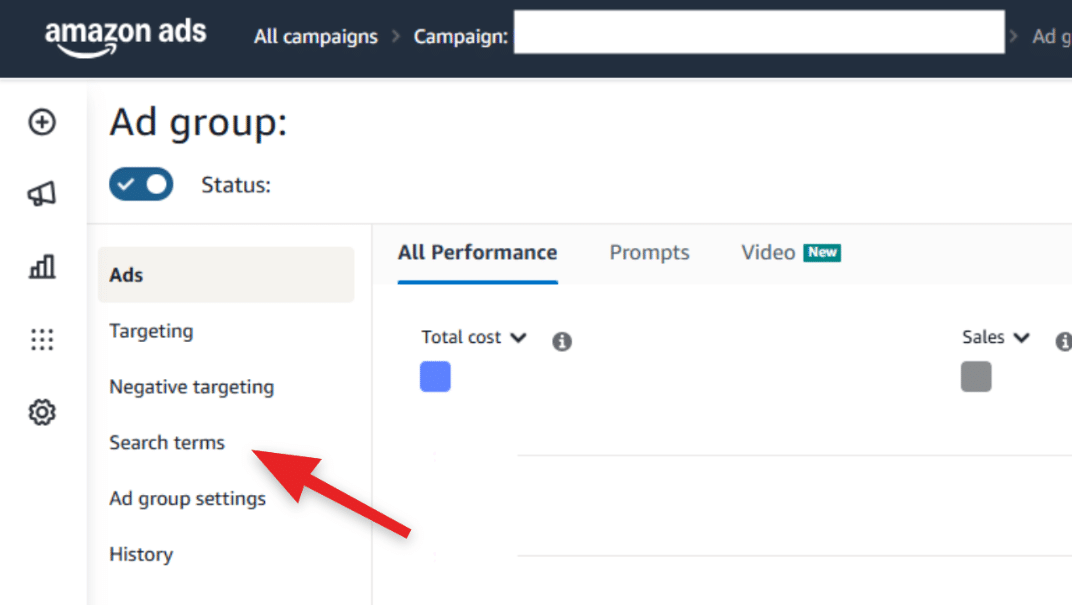
Image above: Inside an ad group, the Search terms tab shows what shoppers actually typed when your ad appeared.
The Budget Problem With Multiple Ad Groups
Here’s the issue with putting multiple ad groups inside one campaign.
Let’s say you have one campaign with two ad groups:
- Ad Group A is targeting your main product keywords.
- Ad Group B is targeting competitor keywords.
Both ad groups share the same campaign budget.
If the campaign has a $50 daily budget, Amazon may spend most of that money on Ad Group A. Or it may spend most of it on Ad Group B. You don’t have precise control over how that budget is divided.
That can be a problem if the ad groups have different goals.
Maybe the main product keywords are profitable and the competitor keywords are more experimental. In that case, you probably don’t want the experimental ad group accidentally using most of the budget.
If those ad groups were separated into different campaigns, you could give one campaign $40 per day and the other campaign $10 per day. That gives you much clearer control.
That’s why the “one ad group per campaign” structure is popular. It turns the campaign into a more controllable unit.
What If You Want Multiple Campaigns to Share a Budget?
Sometimes you actually do want multiple campaigns to share a budget.
Amazon has a feature for this called portfolios.
You can group campaigns into a portfolio, and a portfolio can be used to help organize campaigns and manage shared budget settings. This is useful when you have several campaigns advertising the same product or product group, and you have an overall budget for that group.
For example, maybe you have several campaigns for one product:
- Exact match campaign
- Phrase match campaign
- Broad match campaign
- Product targeting campaign
- Automatic campaign
You might not care exactly how the budget gets split between those campaigns. You just know you want that product to spend up to a certain amount overall.
In that situation, a portfolio can make sense.
The important difference is that portfolios let you group campaigns while still keeping campaign-level control. You can still have separate campaigns with separate settings, but organize them under a shared structure.
You can also browse more Amazon advertising topics in the Five Star Commerce Amazon Advertising archive.
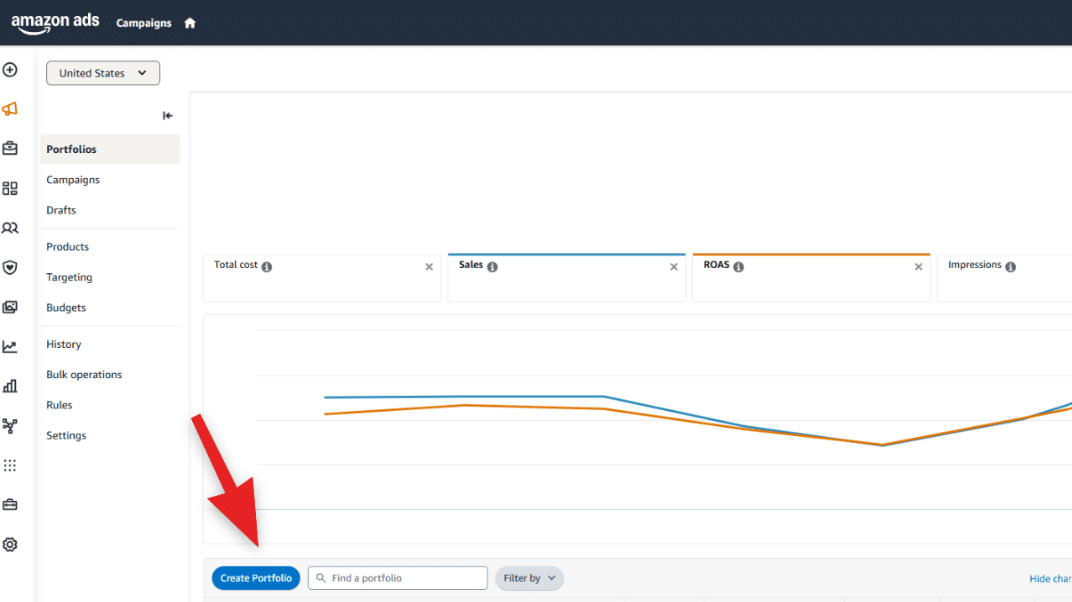
Image above: The Create Portfolio button is where you can start grouping campaigns together inside Amazon Ads.
What Lives at the Ad Group Level?
Inside the ad group, you’ll find the targeting and the product ads.
At the ad group level, you can have:
- Keywords
- Negative keywords
- Search terms view
- Ads or products being advertised
- Ad group settings
For Sponsored Product campaigns, the ad is usually the product itself. So when you’re setting up the ad group, you’re choosing which product or products Amazon is allowed to advertise.
You’re also setting up the targeting that tells Amazon when to show those ads.
This is where keywords come in.
Keywords vs. Search Terms
Keywords and search terms sound similar, but they are not the same thing.
A keyword is what you tell Amazon to target.
A search term is what the shopper actually typed into Amazon.
That difference is really important.
For example, let’s say you add the keyword:
water bottle
Depending on the match type and campaign setup, Amazon might show your ad when someone searches:
large insulated water bottle for hiking
In that example, “water bottle” is the keyword. “large insulated water bottle for hiking” is the search term.
The keyword is your targeting instruction. The search term is the real-world result of that instruction.
| Term | Meaning | Example | Why It Matters |
|---|---|---|---|
| Keyword | What you tell Amazon to target | water bottle | This is your targeting instruction |
| Search term | What the shopper actually typed | large insulated water bottle for hiking | This shows what actually triggered the ad |
| Negative keyword | What you do not want Amazon to show for | cheap plastic water bottle | This helps reduce wasted spend |
This is where a lot of PPC optimization comes from. You don’t just look at the keywords you added. You look at the actual search terms Amazon matched you to, and then you decide what to do next.
Some search terms may perform well, so you might want to target them more directly. Other search terms may waste money, so you might want to add them as negative keywords.
Match Types Control How Broad the Keyword Can Go
When you add keywords, you usually choose a match type.
The match type helps determine how broad the pool of possible search terms can be.
A keyword does not always match only one exact shopper search. It can pick up a range of related search terms depending on the match type.
That’s why search term reporting matters so much. You may think you’re targeting one thing, but Amazon may be showing your ad on a broader set of shopper searches.
Sometimes that’s good. It helps you discover new converting search terms.
Sometimes it’s bad. It causes wasted spend on irrelevant searches.
The only way to know is to look at the search terms.
Where to Find Search Terms in Amazon Ads
To see the actual search terms, you go into the campaign, click into the ad group, and then click the Search Terms tab.
That view shows you the actual searches shoppers used when your ad appeared. It also shows which keyword triggered the search term and how that search term performed.
This is one of the most useful areas in Campaign Manager once you start optimizing PPC.
You can use it to answer questions like:
- What are shoppers actually typing before they click my ad?
- Which searches are generating sales?
- Which searches are spending money without converting?
- Which keyword caused Amazon to show my ad for that search?
- Are my broad or phrase keywords going too wide?
- Are there search terms I should target directly?
- Are there search terms I should negate?
If you’re only looking at keyword performance and never looking at search terms, you’re missing one of the most important parts of Amazon PPC.
Negative Keywords Also Live at the Ad Group Level
Negative keywords are keywords or search terms you do not want your ads to show for.
For example, if you sell a premium stainless steel water bottle, you may not want to show up for searches that include “cheap plastic water bottle.”
If Amazon is showing your ad for those searches, you can add negative keywords to block some of that traffic.
Negative keywords are one of the main ways you clean up wasted spend over time.
They’re especially important when using broader match types or automatic campaigns, because those campaign types can discover a lot of search terms you may not have expected.
How Budget Pacing Works
Another thing that confuses sellers is budget pacing.
Amazon generally thinks about budget over roughly a 30-day period. That means the campaign may spend less than the daily budget on some days and more on other days.
So if your daily budget is $50, that does not always mean the campaign spends exactly $50 every single day.
You may see days where spend is under budget, and you may see days where it goes over the daily amount. Amazon is trying to pace spend over time.
When a campaign says it is “limited by budget,” that usually means the campaign may be running out of budget before the day is over. In practical terms, your ads may stop showing earlier in the day because the budget has already been used.
That can be a problem if the campaign is profitable and you want it to keep running throughout the day.
It can also be a sign that you need to look more closely before raising the budget. More spend is only helpful if the campaign is actually producing the kind of results you want.
Placement Adjustments: Top of Search and Other Placements
Placement adjustments are also set at the campaign level.
Amazon allows you to raise bids for certain placements, such as top of search.
For example, you might tell Amazon you’re willing to pay 50% more for top of search placement.
That means if your base bid is $1.00, a 50% top of search adjustment could allow Amazon to bid higher for that placement.
This can be useful because different placements perform differently. Top of search may convert better for some products and keywords, but it can also be more expensive.
The key point for campaign structure is that placement adjustments apply at the campaign level. So if you have multiple ad groups inside the campaign, they all share those placement settings.
That’s another reason why separating campaigns can give you more control.
Should Variants Be in the Same Campaign?
A common question is whether variants should be advertised together or split into separate campaigns.
For example, let’s say you sell a water bottle in multiple sizes:
- 32 oz
- 18 oz
- 6 oz
Should those all be in the same campaign, or should each size have its own campaign?
In most cases, if they are true variants of the same product, I would usually combine them rather than split them into lots of separate campaigns.
Amazon is generally pretty good at matching the right variant to the right search, especially when the listings are clear. If someone searches for a 32 oz water bottle, Amazon can usually figure out that the 32 oz version is the most relevant option.
That becomes even more true once the products have sales history. Early on, Amazon may rely more heavily on keywords and listing content. Over time, Amazon gets more data about which variant shoppers click and buy for different searches.
So the listing clarity matters.
If you have a 32 oz listing, don’t stuff the page with references to 6 oz and 18 oz in a way that confuses the targeting. Make sure the 32 oz listing is clearly about the 32 oz version. Avoid overlapping size terms unnecessarily so Amazon can do a better job matching the right shopper to the right variant.
Why Over-Splitting Campaigns Can Hurt
Some sellers want to split everything into its own campaign.
- One campaign for every size.
- One campaign for every color.
- One campaign for every match type.
- One campaign for every small keyword group.
There are cases where segmentation helps, but splitting too much can create problems.
Overly complicated campaign structures are harder to manage. They take more time, they create more places for mistakes, and they can cause you to lose some of the efficiency Amazon gets from having more data grouped together.
If you split campaigns too aggressively, each campaign may have less data. That can make optimization harder and can sometimes make performance worse.
It also creates more hassle. You have more budgets to monitor, more campaigns to adjust, and more reports to review.
For a small catalog, you can usually afford to be more organized and intentional. For a very large catalog with thousands of products, you may need to combine more products together just because of scale.
The goal is not to create the most complicated structure possible. The goal is to create a structure that gives you enough control without making the account impossible to manage.
When You Might Split Variants Into Separate Campaigns
There are exceptions.
One big exception is price discrepancy.
If one variant costs $150 and another variant costs $10, those probably should not always be treated the same in PPC.
The economics are different. The bids that make sense for a $150 product may not make sense for a $10 product. The conversion rate, profit per sale, and allowable ad cost may be totally different.
In that case, separating them into different campaigns may make sense because you need different budgets, bids, and expectations.
You might also separate products if the variants are not really targeting the same customer.
For example, if the products are totally different styles, serve different use cases, or target different keywords, they should probably be in separate campaigns with separate budgets.
The question is not just “Are these technically variations?” The better question is, “Do these products need the same budget, bidding strategy, placement settings, and keyword strategy?”
| Situation | Usually Combine? | Usually Split? | Why |
|---|---|---|---|
| Same product, different sizes, similar price points | Yes | Not usually | Amazon can often match the right variant when listings are clear |
| 32 oz / 18 oz / 6 oz water bottle variants | Usually | Only if economics differ | They are still closely related product variants |
| $150 variant and $10 variant | Not usually | Yes | The bids and profitability math may be very different |
| Different styles for different customers | Not usually | Yes | Customer intent, keywords, and budget priorities may differ |
| Very large catalog with thousands of products | Often more than a small catalog | Selectively | Scale may require more grouping to keep the account manageable |
If the answer is yes, combining them may be fine.
If the answer is no, separate campaigns may make more sense.
Products That Target Different Customers Should Usually Be Split
If products are different enough that they target different shoppers, they should usually have their own campaign structure.
For example, if one product is a premium hiking bottle and another is a small kids’ lunchbox bottle, those may be technically related, but the customer intent is different.
- The keywords may be different.
- The price point may be different.
- The conversion behavior may be different.
- The budget priority may be different.
Trying to force those into one campaign can make performance harder to understand.
When products target different customers or different search terms, they usually deserve separate campaigns with their own budgets and campaign settings.
Campaign Structure Should Match the Control You Need
A good PPC structure is really about control.
You separate campaigns when you need separate control over:
- Budget
- Bidding strategy
- Placement adjustments
- Product group
- Keyword theme
- Reporting
- Optimization decisions
You combine campaigns or products when the items are similar enough that sharing those settings makes sense.
That’s why there is no single perfect structure for every brand.
A brand with five products may need a very different structure than a brand with 5,000 products. A brand with several similar variants may need a different setup than a brand with products that all serve different customers.
The mistake is thinking more campaigns automatically means better PPC.
Sometimes more segmentation gives you control. Sometimes it just creates unnecessary complexity.
A Simple Starting Structure
For a basic Sponsored Products setup, a simple structure might look like this:
- Campaign 1: Product A automatic campaign — one ad group with Product A.
- Campaign 2: Product A manual keyword campaign — one ad group with your main keyword targets.
- Campaign 3: Product A product targeting campaign — one ad group targeting competitor products or related products.
If you have variants that are very similar and share the same economics, you might include multiple variants in the same campaign.
If you have products with very different pricing, customer intent, or keyword targets, you might split them.
That’s a clean starting point. It gives you control without making the account overly complicated.
For brands thinking through whether to manage this internally or bring in outside help, this article on Amazon agency pricing models explains why the billing model matters when PPC work changes month to month.
Common Mistakes With Amazon PPC Structure
| Mistake | Why It Causes Problems | Better Approach |
|---|---|---|
| Putting too many unrelated products into one campaign | The data becomes harder to read and the settings may not fit all products | Split products when customer intent, keywords, or economics differ |
| Using multiple ad groups when separate budgets are needed | Amazon controls how the shared campaign budget gets allocated | Use separate campaigns when budget control matters |
| Ignoring search terms | You miss the actual shopper searches that triggered your ads | Review search terms regularly and add winners or negatives as needed |
| Splitting campaigns too much | The account becomes harder to manage and may lose efficiency | Only split when the extra control is actually useful |
| Treating all variants the same when pricing is very different | A profitable bid for one variant may not make sense for another | Separate variants when price, margin, or bid strategy is meaningfully different |
The first mistake is putting too many unrelated products into one campaign.
If the products target different customers or keywords, the data becomes harder to read. You may not know which product is actually driving performance, and the campaign settings may not fit all products equally well.
The second mistake is using multiple ad groups when you actually need separate campaign budgets.
If two ad groups need different budgets, they probably should not be in the same campaign.
The third mistake is ignoring search terms.
Keywords are not enough. You need to know what shoppers actually searched. That is where you find wasted spend, good opportunities, and targeting problems.
The fourth mistake is splitting campaigns so much that the account becomes hard to manage.
More structure is not always better. The structure should serve a purpose.
The fifth mistake is not thinking about variant economics.
A 32 oz, 18 oz, and 6 oz version of the same water bottle may be fine together if the pricing and targeting are similar. But a $150 product and a $10 product may need very different bids and budgets.
FAQ: Amazon PPC Campaign Structure
What is the difference between a campaign and an ad group?
A campaign is the top-level container where settings like budget, bidding strategy, and placement adjustments are set. An ad group lives inside the campaign and contains the targeting, search terms view, negative keywords, and advertised products.
Why do people use one ad group per campaign?
Using one ad group per campaign gives you more control. Since the budget and placement settings are controlled at the campaign level, one ad group per campaign makes it easier to control how much money goes to that specific group of targeting and products.
Can multiple ad groups share the same campaign budget?
Yes. If multiple ad groups are inside one campaign, they share the campaign budget. The downside is that you cannot precisely control how much budget goes to each ad group.
What is a portfolio in Amazon Ads?
A portfolio is a way to group campaigns together. It can be useful when you want several campaigns to be organized under the same product, brand, or budget structure.
What is the difference between keywords and search terms?
Keywords are what you tell Amazon to target. Search terms are what shoppers actually typed into Amazon before your ad appeared. A keyword like “water bottle” could trigger a shopper search like “large insulated water bottle for hiking.”
Where do I find search terms?
Click into the campaign, then click into the ad group, then go to the Search Terms tab. That report shows the actual shopper searches that triggered your ads.
Should I put all variants in the same campaign?
Usually, if the variants are similar and have similar economics, combining them can make sense. For example, different sizes of the same water bottle may often work together. But if the variants have very different price points, like $150 versus $10, you may want to separate them because the bids and budgets may need to be very different.
Is it bad to create lots of separate campaigns?
Not always, but over-splitting can create problems. Too many campaigns can be harder to manage, can reduce efficiency, and can make optimization more complicated. Split campaigns when you need separate control, not just for the sake of making the structure look more detailed.
Final Thoughts
Amazon PPC campaign structure is not just an organizational detail. It affects how much control you have over budget, bidding, placements, targeting, and reporting.
The basic hierarchy is simple:
- Campaigns contain ad groups.
- Ad groups contain keywords, search terms, negative keywords, and ads.
- Campaign-level settings apply to everything inside the campaign.
That’s why I usually prefer one ad group per campaign. It gives you cleaner control over the budget and campaign settings. If you want multiple campaigns to share a budget, portfolios can help with that.
For variants, don’t automatically split everything. If the variants are similar and Amazon can clearly tell which listing matches which search, combining them often makes sense. But if the products have very different prices, keywords, or customer intent, separate campaigns may be better.
For a walkthrough, the video above covers this step-by-step. For a quick question about your situation, leave a comment on the video. For more complex Amazon advertising help, you can reach us at customerservice@fivestarcommerce.com or learn more about our Amazon marketplace services. You can also review common questions on our FAQ page.