Amazon Bidding Strategies Explained: Dynamic Down Only vs. Up & Down vs. Fixed
Amazon has a setting at the campaign level called the bidding strategy.
This is one of those Amazon PPC settings that sounds simple, but it can have a pretty big effect on whether your campaigns spend efficiently, overspend, or barely spend at all.
There are three core bidding strategies most sellers are usually deciding between:
- Dynamic bids — down only
- Dynamic bids — up and down
- Fixed bids
These settings do not control what your bid is.
That is a separate number you set on each keyword, product target, or ad group depending on how your campaign is built. The bidding strategy controls what Amazon is allowed to do with that bid in the actual auction.
So if you set a $1.50 bid, Amazon may not actually use $1.50 every time. Depending on the bidding strategy, Amazon may be allowed to lower that bid, raise it, or leave it alone.
That difference matters.
One of these strategies is usually the right long-term default. One of them is almost always a bad idea because it tends to drive ACoS too high. And one of them is the fix a lot of sellers do not realize they need when a new product launch is not getting enough visibility.
Amazon’s own Sponsored Products documentation explains that Sponsored Products use cost-per-click bidding, meaning your bid is the amount you are willing to pay when someone clicks your ad. Amazon also explains that dynamic bidding can adjust your bid using real-time signals, while fixed bids use the exact bid you entered. You can read Amazon’s explanation here: Amazon Sponsored Products bidding documentation.
What Amazon Bidding Strategies Actually Control
The bidding strategy controls how much authority you give Amazon to adjust your bid in real time.
Amazon is trying to estimate whether a click is likely to convert. Based on that estimate, it may decide a click is worth competing harder for, or it may decide the click is probably not worth very much.
The important thing to understand is this:
Your keyword bid is the starting point. Your bidding strategy tells Amazon whether it can move that bid up, move it down, or not touch it.
So when people say, “My bid is $1.50,” that is not always the full story. With some bidding strategies, Amazon may be using less than that. With others, it may be allowed to use more than that.
That is why two campaigns can have the same keywords, the same targeting, and the same base bids, but behave very differently.
If you are newer to how Amazon PPC is structured, this helps explain why campaign-level settings matter so much. Campaigns contain ad groups, and ad groups contain your keywords, targets, and advertised products. I explain that hierarchy more in this article on Amazon PPC campaign structure.
Quick Comparison: The Three Amazon Bidding Strategies
| Bidding Strategy | What Amazon Can Do | Main Benefit | Main Risk | Best Use Case |
|---|---|---|---|---|
| Dynamic bids — down only | Amazon can lower your bid when it thinks a conversion is unlikely, but cannot raise it. | Usually helps reduce wasted spend and lower ACoS. | Can be too conservative, especially on new products. | Default long-term setting for most Sponsored Products campaigns. |
| Dynamic bids — up and down | Amazon can raise your bid when it thinks a conversion is likely and lower it when it thinks conversion is unlikely. | May increase conversion volume in some cases. | Often drives ACoS too high. | Rare test situations where sales volume matters more than efficiency. |
| Fixed bids | Amazon does not adjust your bid. It uses the bid you entered. | Gives you more control and can force visibility. | Removes Amazon’s ability to reduce bids on weak clicks. | New product launches or situations where down only is not spending enough. |

Image above: These are the campaign-level bidding strategy options that determine whether Amazon can lower, raise, or leave your bid alone.
Image source/reference: BidX case study on Amazon dynamic bidding strategies.
Dynamic Bids — Down Only
Dynamic bids — down only is usually the best default bidding strategy.
With this setting, Amazon is allowed to lower your bid when it thinks a conversion is unlikely. But Amazon is not allowed to raise your bid.
It only moves in one direction: down.
So if you set a $1.50 bid and Amazon thinks a particular shopper or search is unlikely to convert, Amazon can reduce that bid significantly. In some cases, it can reduce the bid close to zero.
That means you may pay less for that click, or you may not compete very aggressively for that impression at all.
This is useful because not every search that matches your keyword is equally valuable.
Some shoppers are highly likely to buy. Others are just browsing, comparing, clicking around, or searching in a way that technically matches your keyword but probably will not lead to a sale.
Down only gives Amazon permission to back off when the click looks weak.
Over time, that usually means:
- Lower average cost per click
- Less wasted spend
- Lower ACoS
- More efficient campaigns
This is why down only is the most popular option and why I usually think of it as the normal long-term setting for most Sponsored Products campaigns.
Example: How Down Only Works
Let’s say you sell a bag.
You set a $1.50 bid for the keyword “handbag.”
If your campaign is using dynamic bids — down only, Amazon can look at a particular auction and decide, “This click does not look very likely to convert.”
In that case, Amazon may lower your bid from $1.50 to something like $0.40.
It could also lower it even more. In some situations, the bid can be reduced close to zero.
That does not mean your keyword bid changed in Seller Central. Your keyword bid is still $1.50. It means Amazon used a lower bid for that specific auction because the system decided that click was probably not worth the full amount.
That is the whole point of down only.
| Scenario | Your Keyword Bid | What Amazon Might Do | Why |
|---|---|---|---|
| Shopper looks unlikely to buy | $1.50 | Lower the bid to $0.40 or less | Amazon thinks the click is less likely to convert. |
| Shopper looks moderately likely to buy | $1.50 | Use something closer to the original bid | Amazon does not see as much reason to reduce the bid. |
| Shopper looks very likely to buy | $1.50 | Still cannot raise above $1.50 | Down only does not give Amazon permission to increase your bid. |
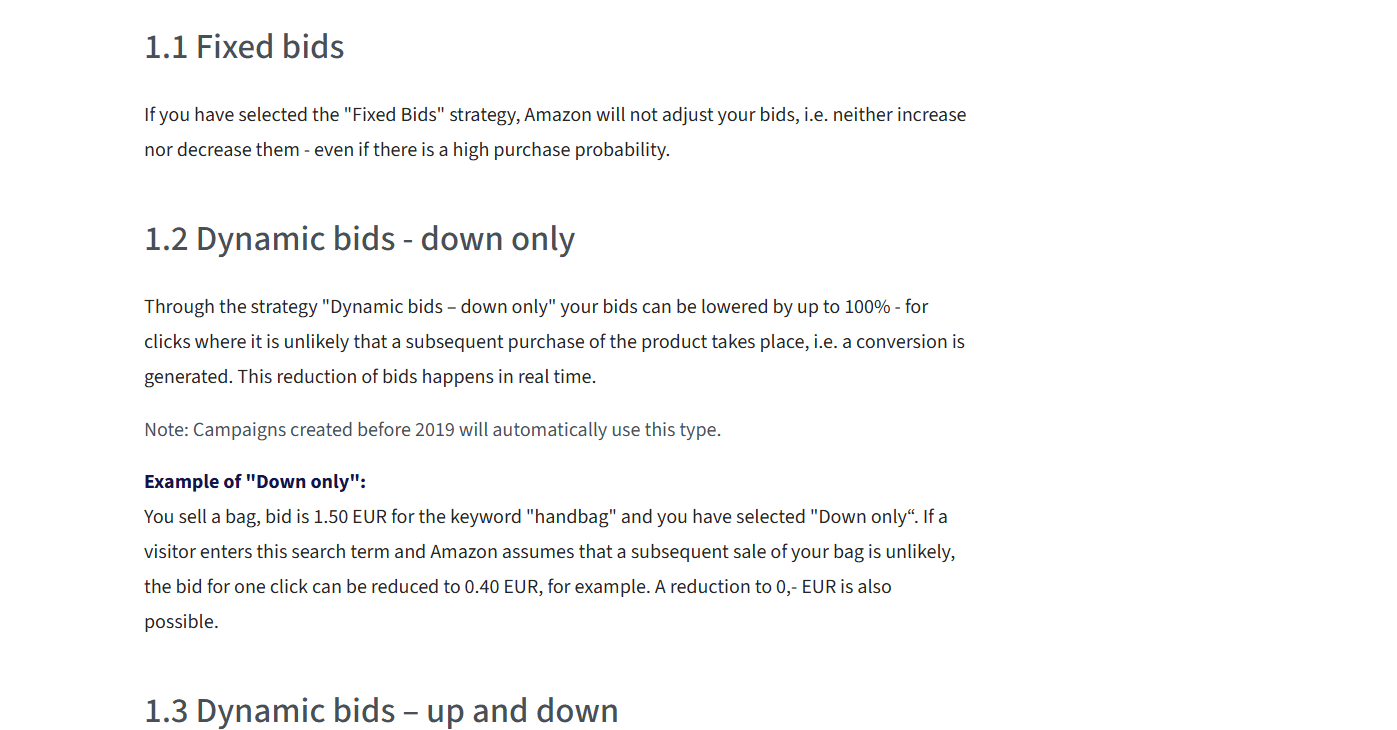
Image above: Down only lets Amazon reduce your bid when it thinks a click is unlikely to convert, but it does not let Amazon raise the bid.
Image source/reference: BidX case study on Amazon dynamic bidding strategies.
The Trade-Off With Down Only
Down only is usually the best long-term setting, but it does have one important trade-off.
Sometimes Amazon is too conservative.
This is especially common with new products.
When you first launch a product, Amazon does not have much sales history. It does not know yet whether shoppers are going to buy the product. Your listing may have no reviews, limited conversion data, and very little history for Amazon to use.
So Amazon may assume the product is unlikely to convert.
If you are using dynamic bids — down only, Amazon can start lowering your bids in the background because it thinks those clicks are risky.
That is normally a good thing.
But with a new product, it can become a problem.
You launch the product, set up campaigns, choose keywords, set bids, and then almost nothing happens. The campaign is active. The budget is available. The targeting looks right. But the campaign barely spends.
A lot of sellers respond by raising bids higher and higher. Sometimes that helps, but sometimes the real issue is that down only is pulling those bids down because Amazon does not yet trust the product to convert.
This is one of the main situations where fixed bids can make more sense.
I also have a related article on why Amazon ads have low impressions, because this same issue shows up all the time when a campaign is active but barely getting visibility.
Dynamic Bids — Up and Down
Dynamic bids — up and down sounds good on paper.
With this setting, Amazon can lower your bid when it thinks a conversion is unlikely, and raise your bid when it thinks a conversion is more likely.
So in theory, Amazon backs off when the click looks bad and pushes harder when the click looks good.
That sounds reasonable.
Amazon has historically promoted this strategy pretty heavily. In some campaign setup flows, Amazon has described up and down in a way that makes it sound like it can lead to more conversions at a lower cost per conversion. Amazon’s current guide also presents dynamic bids — up and down as an option for Sponsored Products campaigns: Amazon dynamic bidding guide.
The problem is that in practice, I almost never like this setting.
In my experience, and in most serious discussions from people actually managing Amazon PPC accounts, up and down tends to drive ACoS too high.
It may get more conversions, but those extra conversions often cost too much.
That is the key distinction.
More sales are not automatically good if the cost of getting those sales makes the campaign less profitable.
Why Up and Down Usually Performs Poorly
The issue with up and down is that you are giving Amazon permission to spend more aggressively when it thinks a click is likely to convert.
That sounds helpful, but Amazon’s incentives are not exactly the same as yours.
Amazon wants more ad spend and more sales. You want profitable growth.
Those are related, but they are not identical.
A campaign can produce more sales and still be worse for the business if the ACoS is too high.
A BidX case study analyzing roughly 10,000 campaigns compared the bidding strategies head-to-head. In that analysis, up and down produced a conversion rate about 10% higher than down only, but ACoS was about 50% worse. Here is the study: BidX case study on Amazon dynamic bidding strategies.
That matches what I have seen in practice.
Yes, up and down may get more conversions in some cases. But the extra conversions are often not worth what you paid to get them.
| Metric | Down Only | Up and Down | Practical Takeaway |
|---|---|---|---|
| Conversion rate | Lower in the BidX comparison | About 10% higher | Up and down may generate more sales. |
| ACoS | Better in the BidX comparison | About 50% worse | The extra sales may cost too much. |
| Default recommendation | Usually yes | Usually no | Down only is normally the safer long-term setting. |

Image above: This comparison is the main reason I usually avoid up and down. A higher conversion rate does not help much if ACoS gets significantly worse.
Image source/reference: BidX case study on Amazon dynamic bidding strategies.
Is Up and Down Ever the Right Choice?
Theoretically, maybe.
If you are running a very high-budget campaign where maximizing sales volume matters more than controlling cost, you could make an argument for testing up and down.
For example, maybe you are in an aggressive launch, you are trying to gain rank, and you are willing to tolerate a worse ACoS for a period of time.
Even then, I am usually skeptical.
When I have tested it, I generally have not found it to be more helpful. It tends to waste more money and often gives you results you could have gotten more efficiently with down only.
So my practical answer is this:
For most brands, most of the time, up and down is not the right call.
It is basically never my default recommendation.
Fixed Bids
Fixed bids means Amazon does not adjust your bid.
Whatever bid you set is the bid Amazon uses.
If you set a $1.50 bid, Amazon does not lower it because it thinks the click is unlikely to convert. It also does not raise it because it thinks the click is more likely to convert.
You get full control.
That sounds good, and sometimes it is.
But fixed bids are usually not the best long-term setting for most campaigns because you lose the efficiency benefits of Amazon lowering your bid on lower-quality clicks.
Amazon is not perfect, but it is often pretty good at identifying situations where a click is less likely to convert. Down only lets you benefit from that.
Fixed bids remove that filter.
So if down only is usually the long-term setting, fixed bids are more of a specific tool.
You use them when you want to force Amazon to show your product more than it otherwise wants to.
When Fixed Bids Make Sense
The best example is a new product launch.
When you launch a new product, Amazon does not have much conversion data. The product may not have reviews yet. It may not have sales history. Amazon does not really know whether shoppers will buy it.
Because of that, Amazon may view the product as unlikely to convert.
If your campaign is using down only, Amazon may lower your bids so much that the ads barely show.
That creates a frustrating cycle:
- The product has no sales history.
- Amazon thinks it is unlikely to convert.
- Amazon lowers the bids.
- The ads barely get visibility.
- The product does not get clicks.
- The product does not get sales.
- Amazon still has no data.
- Nothing really changes.
This is where fixed bids can help.
By switching to fixed bids early, you are telling Amazon, “Do not lower my bid. Use the bid I entered.”
That can help force spend and visibility.
The goal is not to stay on fixed bids forever. The goal is to get the product enough exposure, clicks, and early sales that Amazon starts to form a real conversion estimate.
If you are planning a launch, this also connects to the broader launch timeline. Most brands underestimate how much setup and troubleshooting happens before a product actually gains traction. I cover that bigger launch timeline here: what the first three months selling on Amazon actually look like.
Example: New Product Campaign Not Spending
Here is the common situation.
You launch a new product.
You build Sponsored Products campaigns.
You choose your keywords.
You set bids that seem reasonable.
You set a budget.
Everything is active.
Then you check back and the campaign has barely spent anything.
This is where a lot of sellers get confused. They think something must be broken.
Sometimes something is broken. But often, nothing is technically broken. Amazon is just not giving the product much visibility because the product does not have enough history yet.
If the campaign is set to down only, Amazon may be lowering the bids in the background.
In that situation, switching to fixed bids for the first month or two can make sense.
You are not doing it because fixed bids are more efficient. You are doing it because you need visibility.
You need the product to actually get shown.
Assuming the listing is in decent shape, the price is competitive, and the product is something people want, those clicks can start turning into sales. Once you have a few weeks of sales history, Amazon has more data to work with.
At that point, you can switch the campaign back to down only and let Amazon start trimming inefficient clicks.
| Product Stage | Common Problem | Bidding Strategy to Consider | Reason |
|---|---|---|---|
| Brand new launch | Campaign is active but barely spending. | Fixed bids | Helps force visibility when Amazon has little conversion data. |
| First month or two after launch | Need clicks and early sales history. | Fixed bids, monitored closely | Gives Amazon enough data to start understanding the product. |
| Established product with sales history | Campaign is spending but needs better efficiency. | Dynamic bids — down only | Lets Amazon reduce bids on clicks that look less likely to convert. |
| Aggressive growth push | You intentionally want more visibility even if ACoS rises. | Fixed bids or carefully tested up and down | Useful only when sales volume matters more than short-term efficiency. |
Fixed Bids Are Also Useful When You Want to Be Aggressive
New product launches are the clearest example, but fixed bids can also be useful anytime you want to be extra aggressive and down only is not spending enough.
Maybe you have a product where visibility matters more than efficiency for a period of time.
Maybe you are trying to push a specific product harder.
Maybe you have a strategic reason to accept a higher ACoS temporarily.
In those cases, fixed bids can be a useful tool because they stop Amazon from being conservative.
But again, this is not usually where I want campaigns to stay forever.
Fixed bids are for situations where you need to override Amazon’s caution.
Down only is usually where you go once you want the campaign to become more efficient.
Simple Rule of Thumb
Here is the basic framework I would use.
- Use dynamic bids — down only as your default long-term setting.
- Use fixed bids when you need to force visibility, especially during the first month or two of a new product launch.
- Avoid dynamic bids — up and down in almost every situation.
That is the simple version.
Down only is usually the best balance between control and efficiency.
Fixed bids are useful when you need control and visibility more than efficiency.
Up and down gives Amazon too much room to spend more, and in practice it usually drives ACoS too high.
How This Fits With Bid Strategy vs. Keyword Bids
One mistake sellers make is confusing bidding strategy with keyword bid management.
They are related, but they are not the same thing.
Your keyword bid is the amount you set for a specific target.
Your bidding strategy controls how Amazon can adjust that amount in the auction.
So changing from down only to fixed bids is not the same as raising your keyword bids. And raising your keyword bids is not the same as changing your bidding strategy.
Sometimes the right move is to raise or lower bids.
Sometimes the right move is to change the bidding strategy.
For example, if a mature campaign is spending too much at a high ACoS, switching from fixed bids to down only may help Amazon reduce inefficient clicks.
If a new launch campaign is not spending at all, switching from down only to fixed bids may help the campaign finally get visibility.
The right choice depends on the problem you are trying to solve.
What About Placement Adjustments?
Bidding strategy is only one part of how Amazon decides what you pay and where your ad shows.
There is also placement bidding.
Placement adjustments let you increase bids for specific placements, such as top of search. Amazon’s help documentation explains that placement bid adjustments can work alongside dynamic bidding, which means the final bid in an auction may be affected by more than just the base keyword bid. You can read Amazon’s placement adjustment documentation here: Amazon placement bid adjustment documentation.
That is a separate topic, but it is important because sellers sometimes look at their keyword bid and assume that is the whole story.
It usually is not.
Your final auction behavior can be affected by:
- Your keyword or target bid
- Your bidding strategy
- Your placement adjustments
- Your relevance
- Your listing’s conversion likelihood
- Your budget
- Your competition
So if your ads are not behaving the way you expect, do not only look at the keyword bid. Look at the campaign bidding strategy too.
Why Relevance Still Matters More Than People Think
Bidding strategy controls what Amazon is allowed to do with your bid.
But it does not guarantee visibility by itself.
There is another factor that can have an even bigger effect on your cost and visibility: relevance.
Amazon does not just show ads because someone is willing to pay. It wants to show ads that are relevant to the customer’s search and likely to convert.
That means two sellers can bid the same amount and get very different results.
If your product is more relevant, has stronger conversion history, better reviews, better pricing, and a better listing, Amazon has more reason to show it.
If your product is new, unproven, poorly optimized, or not clearly relevant to the search term, Amazon may be more cautious.
This is why bidding strategy alone does not fix bad campaigns.
You still need:
- Relevant keywords
- A strong listing
- Competitive pricing
- A good main image
- Enough reviews, or at least a plan to get early traction
- A product that actually fits the search term
If those pieces are weak, changing the bidding strategy may help with visibility, but it will not magically make the campaign profitable.
Which Amazon Bidding Strategy Should You Use?
For most established products, I would start with dynamic bids — down only.
That gives Amazon permission to reduce bids when clicks look weak, but it does not let Amazon raise your bids above what you set.
For new products that are not getting impressions or spend, I would consider fixed bids temporarily.
That can help force visibility while Amazon gathers early data.
For up and down, I would generally avoid it.
There may be unusual cases where you want to test it, but I would not use it by default. And if you do test it, watch ACoS closely. Do not just look at conversion volume.
A campaign that gets more sales at a much worse ACoS is not automatically better.
FAQ
What is the best Amazon bidding strategy?
For most Sponsored Products campaigns, dynamic bids — down only is usually the best default. It lets Amazon lower your bid when a conversion looks unlikely, but it does not allow Amazon to raise your bid above what you set.
What does dynamic bids — down only mean?
Dynamic bids — down only means Amazon can lower your bid in real time if it thinks a click is unlikely to convert. It cannot raise your bid. This usually helps reduce wasted spend and lower ACoS.
What does dynamic bids — up and down mean?
Dynamic bids — up and down means Amazon can lower your bid when a click looks unlikely to convert and raise your bid when it thinks a conversion is more likely. It sounds good in theory, but in practice it often drives ACoS too high.
Why is up and down usually bad?
Up and down gives Amazon permission to bid more aggressively. That may produce more conversions, but those conversions can cost too much. In the BidX case study referenced above, up and down had a conversion rate about 10% higher than down only, but ACoS was about 50% worse.
What are fixed bids on Amazon?
Fixed bids mean Amazon does not adjust your bid. Whatever bid you set is the bid Amazon uses in the auction. This gives you more control, but it also means Amazon will not lower your bids on clicks that look less likely to convert.
When should I use fixed bids?
Fixed bids are useful when you need to force visibility. The most common example is a new product launch where down only is lowering bids so much that the campaign barely spends. In that case, you may use fixed bids for the first month or two, then switch back to down only once the product has some sales history.
Should I use fixed bids forever?
Usually, no. Fixed bids are a tool for specific situations. Once a product has enough data and the campaign is spending, down only is usually the better long-term setting because it lets Amazon trim inefficient clicks.
Why is my Amazon campaign not spending?
One possible reason is that your bidding strategy is set to down only and Amazon is lowering your bids because it thinks the product is unlikely to convert. This is especially common with new products that have little or no sales history. If the listing and targeting are otherwise set up correctly, fixed bids may help force visibility temporarily.
Does changing the bidding strategy change my keyword bids?
No. Your keyword bids stay the same unless you change them. The bidding strategy controls what Amazon can do with those bids in the auction.
Final Takeaway
For most brands, the bidding strategy decision is pretty simple.
Use down only as the default long-term setting.
Use fixed bids when you need to force visibility, especially early in a product launch.
Be very cautious with up and down, because it usually drives ACoS higher than it is worth.
This setting is not the only thing that determines whether your ads work, but it does matter. If your campaigns are overspending, barely spending, or behaving differently than expected, the bidding strategy is one of the first places I would look.
If your situation is more complex and you want help applying this to your brand, email customerservice@fivestarcommerce.com or schedule an info call using the “Schedule info call” button on our website.