
There are six relatively simple things I recommend almost every brand do to prepare its Amazon listings for the holiday season.
My team has served more than 1,000 brands on Amazon, and these are not complicated strategies. They’re fundamental things that a lot of brands either overlook completely or wait too long to do.
The important part is that holiday optimization is not just about changing a banner to red and green or running a Black Friday discount. You want Amazon and the customer to understand that your product is relevant to the specific way people shop during the holiday season.
That can mean ranking for different keywords, changing how the product is presented, adjusting advertising, and making it easier for both shoppers and Amazon’s AI to understand who the product would make a good gift for.
I’ve seen relatively small changes make a huge difference for highly seasonal products.
One brand we worked with sold a small toy that made a great stocking stuffer. During Christmas, they focused heavily on the “stocking stuffer” keyword, and the product did well.
The problem was what happened after Christmas.
Sales dropped, and the business basically treated that product as finished for the year. It would sit there until the next Christmas season.
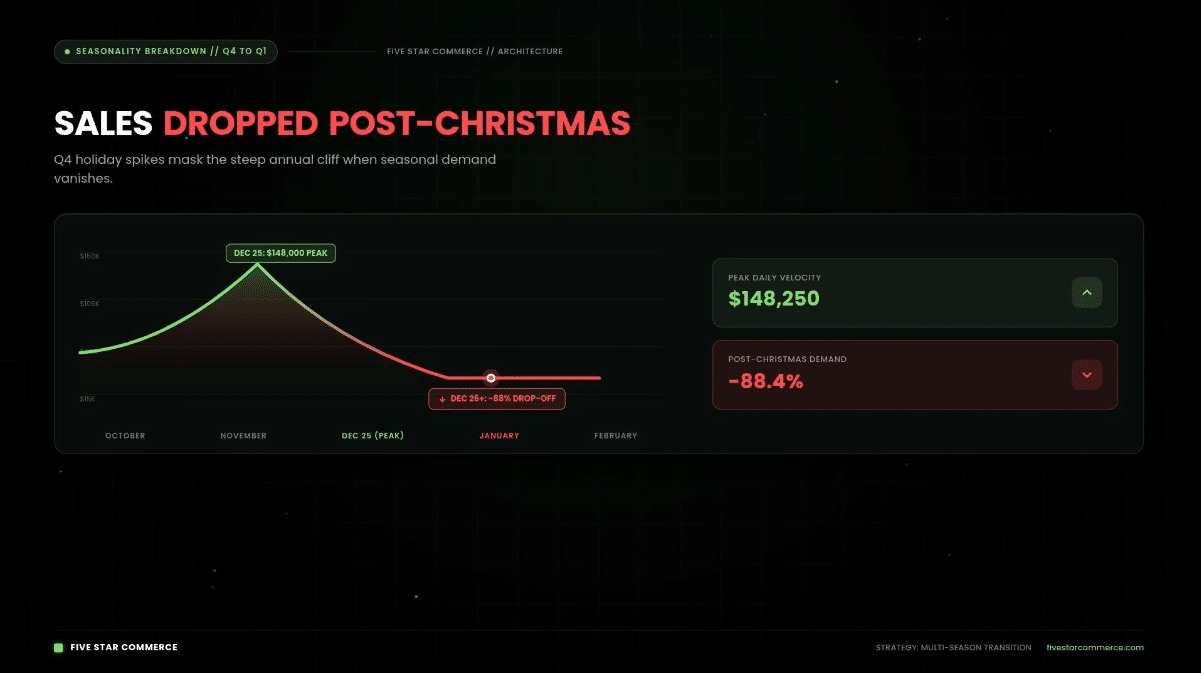
Image above: A highly seasonal product can perform extremely well during the holidays and then fall off quickly once that shopping occasion ends.
Then we noticed something interesting.
The product had previously picked up a few sales from people searching for Easter basket stuffers.
So before Easter, we went through the same basic optimization process I’m going to explain below.
We adjusted the keywords, listing content, positioning, and advertising around the Easter opportunity.
That first year, Easter sales ended up being about one-third of the product’s Christmas sales.
For a product that had previously been sitting nearly dormant after Christmas, that was a major change for the business.
More importantly, it proved that the same product could be positioned for several different seasonal shopping occasions instead of just one.
That is the larger point behind all six of these steps.
Most brands have more seasonal opportunities than they realize.
1. Research Holiday Keywords for Every Product You Sell
The first thing I would do is research holiday-related keywords for every product in your catalog.
A lot of brands skip this because they assume their products simply don’t fit any holiday searches.
Usually, that assumption is wrong.
A product does not have to look like a traditional Christmas gift to perform for gift-related keywords.
For example, a skin moisturizer might be able to rank for a term like “stocking stuffer.”
At first glance, you may not think of moisturizer as a stocking stuffer. But a shopper might.
That distinction matters.
When you’re doing keyword research, you’re trying to understand how customers actually search for gift ideas, not just how your internal team describes the product.
Some common holiday-oriented terms include:
- Stocking stuffer
- Gifts for her
- Gifts for him
- Gifts for dad
- Gifts for mom
- Christmas gifts
- Holiday gifts
Your particular product may also fit much more specific gift searches.
A good way to find those terms is to start with competitors.
Pull several competing products into a keyword research tool such as Helium 10 and export their keyword lists.
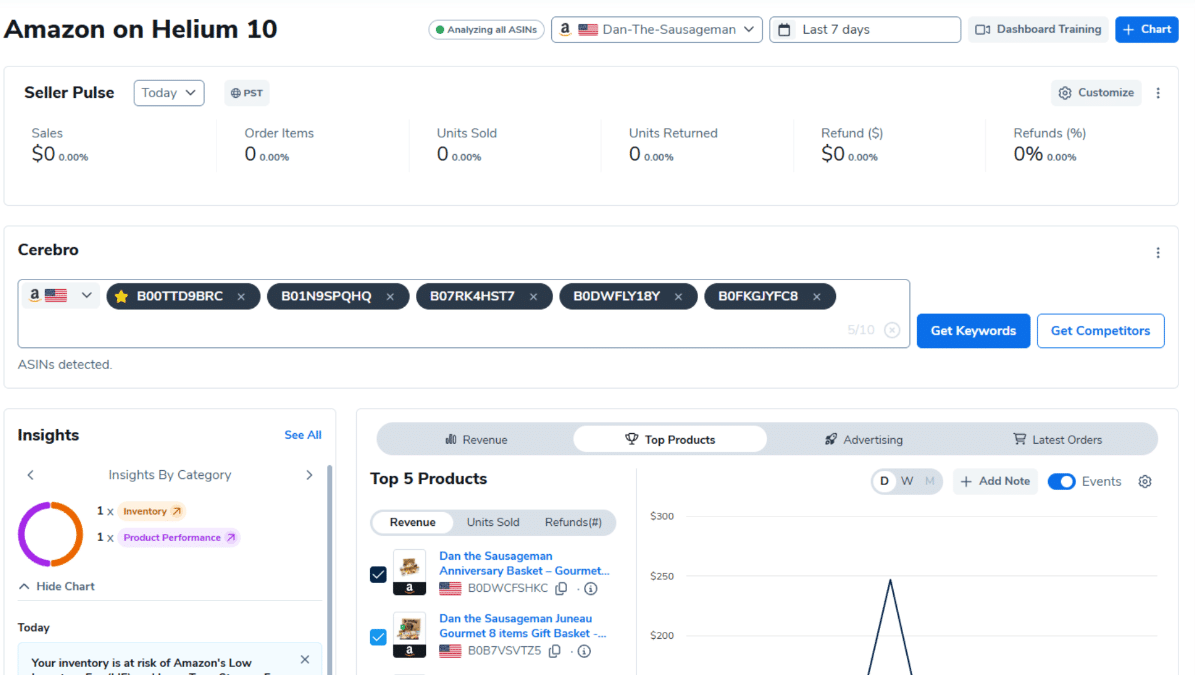
Image above: One way to start is by putting several competing ASINs into Helium 10 Cerebro and looking at the keywords those products already rank for.
Then filter those keywords specifically for holiday and gift-related terms.
You can also use ChatGPT to speed this up.
One approach is to give ChatGPT a large list of holiday keywords, explain what your product is, and ask it to identify every term that could reasonably apply.
You can give it more context than just the product name.
For example, you could paste in:
- Your existing listing title
- Bullet points
- Product description
- A+ Content text
- Product details
- Product images
The more accurately the product is described, the easier it is to identify terms that actually fit.
The goal here is not to cram every holiday phrase you can find into the listing.
You’re trying to create a list of relevant opportunities first.
Then you decide where each keyword belongs.
2. Place Holiday Keywords Based on How Closely They Match the Product
Once you have your holiday keyword list, don’t treat every keyword equally.
Where you place a keyword should depend largely on how relevant it is to the product.
The strongest placements in the listing generally deserve your strongest keywords.
The title and item highlights carry the most weight, followed by the bullet points. That makes deciding what deserves title space especially important as Amazon continues changing how titles and Item Highlights are presented. For more detail, see our guide to Amazon’s AI title suggestions and Item Highlights.
So the better a holiday keyword fits your product, the higher in the listing I would consider placing it.
Holiday Keyword Placement Guide
| Holiday Keyword Relevance | Where to Put It | Example | What to Keep in Mind |
|---|---|---|---|
| Very strong match | Title or item highlights | “Stocking stuffer” for a small, highly giftable product | Only replace an existing keyword if the holiday term is more valuable during that season |
| Strong match | Bullet points | “Gift for travelers” for a travel-related product | Work the phrase naturally into copy that explains why the product fits |
| Relevant, but secondary | Backend generic keywords | Additional gift or holiday variations | Customers do not see these terms, but Amazon can still use them for indexing |
| Weak or questionable match | Leave it out | A holiday phrase that only loosely relates to the product | Don’t add keywords simply because they have holiday search volume |
Strong Matches Can Go Higher in the Listing
If your product is an extremely strong match for a particular holiday keyword, it may make sense to place that term in the title.
But I would only do that when the seasonal term is more valuable during that period than whatever keyword you are removing or pushing out.
You don’t want to take a listing that already ranks for a high-value core product term and replace that term with a weak holiday phrase just because Christmas is coming.
You have to compare the value.
For a highly giftable item, “stocking stuffer” might be worth including prominently during Q4.
For another product, it might be only loosely relevant, and replacing a strong year-round search term would hurt more than it helps.
Use Bullets for Secondary Terms
Terms that are relevant but not important enough to justify title space can go into the bullet points.
This gives you another opportunity to explain why the product works as a gift instead of simply inserting the phrase with no context.
For example, if a product is useful for travelers, you might naturally explain why it makes a useful gift for someone who travels frequently.
That is better than forcing “gift for travelers” into a sentence where it does not belong.
Put Weaker but Still Relevant Terms in the Backend
For holiday keywords that reasonably apply to the product but are not strong enough to feature prominently, the backend generic keywords field is one of the easiest places to put them.
Customers do not see the generic keyword field, but Amazon can still use those terms when indexing the listing.

Image above: The backend Generic Keyword field gives you a place to include secondary relevant terms without forcing them into customer-facing copy.
The effect is generally smaller than putting an important term in the title, item highlights, or bullet points, but it gives you a useful place for secondary searches without making the visible listing awkward.
This is particularly useful when you have several variations of the same gift concept.
You may decide that one term deserves visible placement while several related phrases belong in the backend.
The point is to create a hierarchy instead of treating keyword placement like a checklist.
Your best terms get your best placements.
Your secondary terms get secondary placements.
And the terms that are relevant enough to index for but not important enough for the customer-facing copy can go into the generic keyword field.
3. Add One Holiday-Themed Secondary Image
The third thing I recommend is adding at least one secondary image that clearly communicates the gift or holiday use case.
This does not mean you need to redesign the entire image stack.
In many cases, one image is enough.
You might show the product:
- Next to wrapped presents
- Inside or next to a stocking
- In a gift basket
- Being given to another person
- Packaged in a way that makes it look gift-ready
- In a setting that communicates the type of person it would make a good gift for
The purpose is simple.
A shopper should be able to look at the image and immediately understand that this product could work as a gift.
That can be especially helpful for products that people normally buy for themselves.
A moisturizer may be an obvious skincare product to its normal customer, but a holiday image can help a gift shopper immediately picture it in a stocking or gift bundle.
That changes the context of the product without changing the product itself.
There is another reason I think this matters more now than it used to.
Amazon’s AI can interpret images.
So these images are not necessarily useful only to the human shopper looking at the detail page. They may also help Amazon better understand the circumstances in which the product is relevant.
That could become particularly important as Amazon uses AI shopping tools to help customers discover and compare products. We’ve also written more about optimizing Amazon listings for AI shopping assistants such as Rufus.
If someone asks for a gift idea and Amazon is trying to determine whether your product makes sense, clear product information and imagery give Amazon more to work with.
In some situations, you might even be able to change the primary image for the holiday period.
That is not something every product should do, but it can make sense in certain situations.
The larger point is that you usually do not need to rebuild the entire listing.
One strong secondary image can communicate a lot.
4. Update Your Amazon Brand Storefront If It Gets Meaningful Traffic
The fourth step is to decide whether your Amazon Brand Storefront is worth updating for the season.
This one depends heavily on your brand.
The more traffic your storefront receives, and the more frequently your products are bought as gifts, the more worthwhile this becomes.
If practically nobody visits the storefront, you may be better off putting your time into listing optimization, advertising, or other work that will affect more customers.
You do not need to update something simply because Amazon gives you the option.
But if the storefront gets meaningful traffic, a holiday version can be useful.
One straightforward way to handle this is to copy your current storefront, create a holiday version, and schedule that version to publish for the season.
Then, after the holiday period ends, you can switch back to the regular version.
At the very least, I would consider changing the header banner to something seasonally appropriate.
For some brands, it may make sense to update the banners on multiple storefront pages.
Brand Stores, Sponsored Brands, and A+ Content are among the additional marketing tools available to eligible Brand Registered sellers. If you need more context on those tools, see what Amazon Brand Registry does and doesn’t do.
Build the Storefront for Gift Buyers, Not Just Your Normal Customers
A holiday storefront should not only look festive.
Think about how the customer is different.
Your normal customer may already understand the product category.
A gift shopper may not.
They may be buying the product for a spouse, parent, child, coworker, friend, or another family member and know very little about the product itself.
That means the storefront may need to explain things that would normally be obvious to your core customer.
- Who is this product for?
- What type of person would use it?
- Why would someone want it?
- Which product should a gift buyer choose?
- Are there different versions for different types of users?
- What makes one model or variation different from another?
The storefront can help guide someone who wants to buy a gift but does not know your category well enough to make an easy decision.
That is more useful than simply placing snowflakes around the same storefront design.
5. Advertise for Gift and Holiday Keywords
Once the relevant holiday keywords are actually included in the listing or backend, the next step is advertising.
This sequence matters.
In general, trying to advertise heavily for a holiday keyword that Amazon does not associate with your listing is much less effective.
If a keyword appears in your advertising campaign but is nowhere in the listing or generic keyword fields, the product is less likely to receive impressions or be considered relevant for that search.
So I would normally handle the listing relevance first and then build advertising around it.
Existing Campaign vs. Separate Holiday Campaign
| Approach | Best When | Advantage | Tradeoff |
|---|---|---|---|
| Add holiday keywords to an existing campaign | You want a simple setup and already have a relevant campaign | Less campaign management and faster to launch | Seasonal performance is mixed with normal keyword performance |
| Create a separate holiday campaign | You want to measure seasonal keywords independently | Easier to see exactly how holiday searches perform | Requires additional campaign setup and monitoring |
| Use Sponsored Brands with holiday creative | You have the appropriate advertising options and useful seasonal creative | Lets you combine keywords with gift-related images, video, and headlines | Creative needs to clearly communicate why the product works as a gift |
Option 1: Add Holiday Keywords to an Existing Campaign
If you already have a campaign that makes sense, you can add the holiday and gift terms there.
You may also want to raise bids on the most important seasonal terms so that they have a better chance of receiving traffic during the relatively short period when demand is high.
The advantage is simplicity.
You are not creating an entirely new advertising structure.
Option 2: Put Holiday Terms Into Separate Campaigns
The other option is to create dedicated seasonal campaigns.
This can make performance easier to monitor because the holiday searches are separated from your normal evergreen keywords.
If you are taking this route, I would generally want both Sponsored Products and Sponsored Brands involved where appropriate.
Sponsored Brands give you some additional creative opportunities because you can use custom images, videos, and headlines.
If you are already creating seasonal ad creative, make it actually look seasonal.
Use holiday- or gift-related images and write headlines that connect the product to that buying situation.
Again, the goal is not just to insert the word “gift.”
The customer should understand why this particular product makes sense as a gift.
If you want a deeper breakdown of how Amazon keyword targeting behaves, our Amazon PPC match types guide explains broad, phrase, exact, and negative targeting.
6. Decide on Your Holiday Deal Strategy Before the Event
The sixth step is to decide how you are going to handle holiday deals.
Amazon gives sellers multiple opportunities to run discounts around major shopping events.
I do not think every brand should automatically participate in every single event.
In fact, there can be value in deliberately running deals during some events and skipping others.
That gives you something to compare against.
If you discount every event every year, it becomes harder to know how much incremental sales volume the discount actually created.
Instead, you can start building your own historical data.
You might participate in one event and skip another.
Then compare:
- Sales volume
- Units sold
- Revenue
- Advertising performance
- Margin
- Normal sales before and after the event

Image above: Comparing current performance with prior periods can help you judge whether a holiday event or deal actually created meaningful lift.
Over a year or two, that gives you a much clearer idea of whether these deal periods are actually helping your particular brand.
That matters because two brands can have completely different outcomes from the same Amazon event.
One brand may generate enough extra volume that the discount is clearly worthwhile.
Another may discount products that customers would have bought anyway.
You want to learn what works for your catalog instead of assuming that participating in an event automatically means better results.
If You Do Not Know Which Deal Type to Start With
If you are unsure what type of promotion to run, a standard price discount where you select the applicable event from the dropdown is a reasonable place to start.
For the holiday period, that could mean selecting the Black Friday/Cyber Monday event when that option is available.
Then measure what happens.
The goal is to create a repeatable strategy based on your own historical results.
This is also why I would not automatically assume that a sales spike proves a promotion worked. We recently compared actual results from nine brands in our Prime Big Deal Days 2026 analysis, including brands that discounted and brands that did not.
The 6-Step Amazon Holiday Optimization Plan
Here is the whole process in one place.
| Step | What to Do | Main Goal |
|---|---|---|
| 1. Research holiday keywords | Pull competitor keyword lists and identify gift and holiday terms that genuinely fit your product | Find seasonal searches you may currently be missing |
| 2. Update keyword placement | Put the strongest terms in prominent listing locations and secondary terms in backend keywords | Help Amazon associate the product with the right holiday searches |
| 3. Add a holiday image | Add at least one secondary image showing the product as a gift or in a holiday context | Help shoppers and Amazon better understand the gift use case |
| 4. Update the storefront | Create a holiday version or at least update important banners if the storefront gets meaningful traffic | Make it easier for gift shoppers unfamiliar with the product to choose |
| 5. Advertise seasonal terms | Add holiday keywords to existing campaigns or create dedicated seasonal campaigns | Capture traffic for seasonal searches |
| 6. Choose a deal strategy | Run deals selectively and compare performance with events where you do not discount | Build your own data on whether holiday deals actually increase sales |
None of these steps by itself is especially complicated.
The advantage comes from doing all of them together.
Your keywords tell Amazon what the product is relevant for.
Your listing explains why.
Your images make the gift use case easier to understand.
Your storefront helps unfamiliar gift shoppers choose.
Your ads bring in the seasonal traffic.
And your deal strategy helps you decide how aggressively you want to compete during the major shopping events.
The Bigger Change: Alexa for Shopping and AI-Assisted Gift Discovery
There is one more issue that affects all six of these recommendations.
That is Alexa for Shopping and Amazon’s increasing use of AI to help customers discover products.
Traditionally, a shopper who wanted a moisturizer might go to Amazon and type something like “skin moisturizer” into the search bar.
Gift shopping can look very different.
A customer may not know what exact product to search for.
They may know only the person they are shopping for.
Instead of typing a precise product keyword, they might ask Alexa for help finding something suitable.

Image above: AI-assisted shopping changes the discovery process because customers can ask broad questions instead of searching only with exact product keywords.
That changes the customer journey.
Amazon now has to interpret the shopper’s intent and decide which products fit the request.
That makes the information inside your listing more important.
Your:
- Title
- Item highlights
- Bullet points
- Images
- Product details
- A+ Content
- Backend keywords
all give Amazon information it can potentially use to understand your product.
If Amazon’s AI scans the listing, you want it to be able to answer two basic questions:
How does this product work as a gift?
And:
What type of person is this product a good gift for?
If the listing gives Amazon no information about that, you are making the system figure it out on its own.
A thorough listing gives Amazon more context.
The same is true for the customer.
If someone lands on the page because they are shopping for another person, the listing should make it easy to understand whether the product fits.
How Much Holiday Optimization Does Your Product Actually Need?
Not every product needs the same amount of seasonal work.
A highly giftable product with a major Q4 sales spike deserves more attention than a product that sees only a small seasonal lift.
| Holiday Opportunity | Listing | Images | Storefront | Advertising | Deals |
|---|---|---|---|---|---|
| Major seasonal product | Consider prominent holiday keywords, including the title when justified | Add strong holiday/gift imagery; potentially evaluate the primary image | Create a seasonal version if traffic justifies it | Dedicated seasonal campaigns may make sense | Test event-specific discounts |
| Moderate holiday opportunity | Add relevant terms to bullets and backend fields | Add one holiday secondary image | Update key banners if worthwhile | Add seasonal terms to existing campaigns or test separately | Participate selectively |
| Minor holiday opportunity | Use only clearly relevant secondary/backend terms | Optional | Usually skip | Test only if search relevance is strong enough | Usually keep the normal strategy |
| No real holiday fit | Do not force seasonal keywords into the listing | No change needed | No change needed | Do not advertise irrelevant holiday terms | Base deals on normal business considerations |
This is important because the goal is not to make every listing look like a Christmas listing.
The goal is to put your effort where the opportunity justifies it.
You Can Use the Same Strategy Beyond Christmas
One of the biggest mistakes brands make is thinking about seasonal optimization as a one-time Q4 exercise.
The stocking-stuffer example from earlier is a good illustration.
That toy performed during Christmas because it worked as a stocking stuffer.
But it also worked as an Easter basket stuffer.
Once that became clear, the business had another seasonal sales opportunity.
The same logic can apply to other occasions depending on the product:
- Valentine’s Day
- Mother’s Day
- Father’s Day
- Easter
- Graduation
- Back-to-school
- Birthdays
- Weddings
- Baby showers
- Other gift-giving occasions
You do not need to force a product into a holiday where it does not belong.
But you should check.
The brands that skip the research may never discover that customers already think about their products differently than they do.
Final Holiday Optimization Checklist
- Research relevant gift and holiday keywords. Look at competitor keyword data and identify searches that genuinely fit the product.
- Place those keywords based on relevance. Put the strongest terms in stronger listing positions and use the generic keyword field for secondary terms.
- Add at least one holiday-oriented image. Make it obvious how the product works as a gift and who might want it.
- Decide whether the Brand Storefront deserves a seasonal update. Focus on stores that actually receive meaningful traffic, and design for gift buyers who may not know the category.
- Build advertising around the holiday terms. Add them to existing campaigns or create dedicated seasonal campaigns, and use gift-oriented creative in Sponsored Brands where appropriate.
- Choose your deal strategy intentionally. Do not assume you need to discount during every event. Test different approaches and use your own results to decide what to repeat.
That is how I would prepare an established Amazon catalog for the holiday season.
If you’re deciding whether to run a deal this season, the next thing I would look at is actual performance from brands that did and did not discount during a major Amazon event. Our Prime Big Deal Days analysis goes through examples where deals worked well and others where skipping or limiting the discount made more sense.
Frequently Asked Questions About Amazon Holiday Listing Optimization
When should I start optimizing my Amazon listings for the holidays?
You want the listing changes, seasonal keywords, images, advertising, and deal strategy in place before the main holiday traffic arrives. The exact timing will depend on your products and the holiday you are targeting, but the important thing is not to wait until the shopping event itself to start making changes.
Should I put holiday keywords in my Amazon product title?
Only when the holiday keyword is a very strong match for the product and is more valuable during that season than the keyword it would replace. Your strongest holiday terms can go in the title or item highlights, while secondary terms can go in bullet points or the backend generic keywords field.
Can I use backend generic keywords for holiday search terms?
Yes. The backend generic keywords field is a good place for holiday terms that are relevant to the product but not important enough to include prominently in the customer-facing listing. Customers cannot see those terms, but Amazon can still use them when indexing the listing.
Do I need to redesign all of my Amazon listing images for the holidays?
No. In many cases, adding one strong holiday-themed secondary image is enough. You might show the product next to wrapped gifts, in a stocking, in a gift basket, or in another setting that makes it obvious how the product could be given as a gift.
Should I create separate Amazon ad campaigns for holiday keywords?
You can, but you do not have to. One option is to add holiday keywords to an existing relevant campaign. The other is to create separate seasonal campaigns so you can measure holiday keyword performance independently. If you use Sponsored Brands, holiday-related images, videos, and headlines can also help communicate the gift use case.
Should every Amazon brand run deals during Black Friday and Cyber Monday?
No. I recommend testing deals during some events and skipping others so you have a baseline to compare against. Over time, you can compare sales, units, revenue, advertising performance, margin, and normal sales before and after the event to see whether the discount actually helped your brand.
Can the same seasonal Amazon strategy work outside of Christmas?
Yes. The same product can sometimes fit several seasonal shopping occasions. In one example, a toy that performed well for the “stocking stuffer” keyword during Christmas was also optimized for Easter basket searches. Its Easter sales eventually reached about one-third of its Christmas sales.
Why does Amazon AI matter for holiday listing optimization?
Amazon increasingly uses AI to help shoppers discover products. A customer buying a gift may ask a broad question instead of searching for one exact keyword. That makes thorough listing text, images, product details, A+ Content, and backend keywords more important because they give Amazon more context about how the product can be used as a gift and who it is appropriate for.