
You pull up your Amazon product listing expecting to see the price, the yellow Add to Cart button, and the normal purchase options.
Instead, you see something like “See All Buying Options” or “View Available Buying Options.”
If this is happening to you, there is a problem, but it usually is not the type of listing error people assume it is.
What you are actually dealing with is a Featured Offer issue, which a lot of us in the Amazon industry still refer to as losing the Buy Box.
And yes, this can happen even if you are the only seller of your product, you own the brand, you designed the product, and nobody else is competing with you on the listing.
The important thing is figuring out why Amazon decided your offer is not currently good enough to receive the Featured Offer. Amazon usually does not give you a clear explanation, so you have to diagnose it.
What Is the Featured Offer, or Buy Box?
Amazon calls the main purchase offer on a product detail page the Featured Offer.
A lot of people in the industry still call it the Buy Box. Amazon does not seem to use that terminology as much anymore, but I still use it because it is what most sellers are familiar with.
When you have the Featured Offer, shoppers normally see the price prominently displayed along with the Add to Cart or Buy Now button.
There are actually two different situations people are talking about when they say somebody is “winning the Buy Box.”
Situation 1: Multiple Sellers Are Selling the Same Product
The first is the traditional Buy Box situation.
You have several sellers offering the exact same product on the same ASIN.
Amazon looks at each seller's offer and considers things such as:
- Price
- Shipping speed
- Seller account metrics
- Fulfillment method
- Other seller and offer criteria
Amazon first determines which sellers meet the requirements to be considered for the Featured Offer.
If more than one seller meets those requirements, Amazon then decides which offer is the best one to feature.
If your offer wins, when the customer clicks Add to Cart, it is your product that gets added to the customer's cart and you receive that sale.
That is what people normally mean when they talk about “winning the Buy Box.”
Situation 2: You Are the Only Seller of Your Product
The second situation is different, and this is really what this article is about.
Let's say this is your own private-label product. It is your brand. You created the listing. Nobody else is selling it.
A lot of brands assume that means they automatically get the Buy Box.
They don't.
Even with zero competing sellers, Amazon still evaluates your offer.
Your price, seller account history, shipping performance, fulfillment, and other factors can still determine whether Amazon considers the offer good enough to feature.
So there are really two separate questions:
- Does your offer meet the requirements to receive the Featured Offer at all?
- If multiple offers qualify, which qualifying offer should actually win it?
If you are the only seller, Amazon does not have to worry about the second question.
But you still have to pass the first one.
If Amazon does not want to feature your offer, it can simply choose not to give anybody the normal Featured Offer.
That is when you start seeing something like the example below.
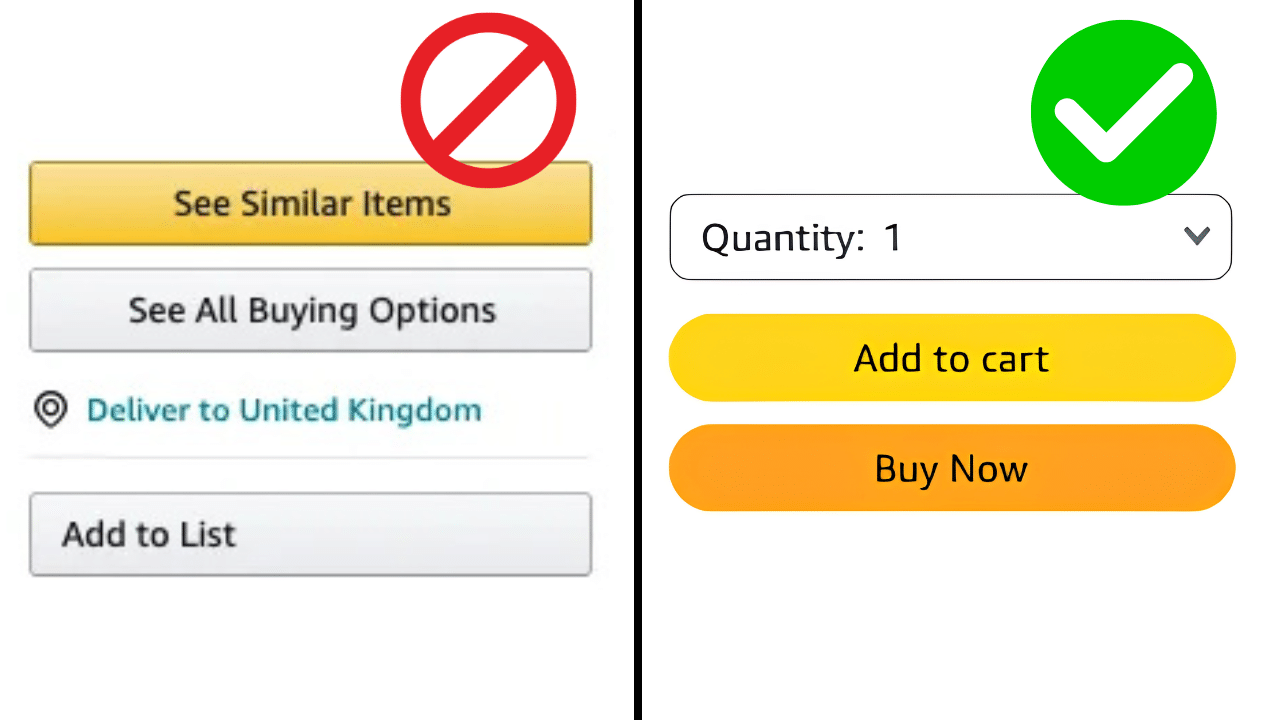
Image above: This is what a product can look like when you are not winning the Buy Box vs when it is.
This Usually Is Not a Broken Listing
One of the biggest misconceptions is that “No Featured Offer” means something is broken with the product listing.
Usually it does not.
Your ASIN is not necessarily suppressed. The listing is not necessarily in violation of anything. Customers can still find the product, open the detail page, and purchase it.
They just have to click through the additional buying-options interface first.
That extra friction matters a lot.
When this happens, conversion rate can drop very significantly. Sponsored Products ads also will not run to the listing normally when your offer does not have the Featured Offer.
If you are seeing zero or unusually low advertising impressions at the same time, I have another guide explaining why Amazon ads can have low or no impressions.
So “See All Buying Options” is not necessarily evidence of a broken ASIN, but it is absolutely something you want to fix because it can hurt sales very significantly.
First, Check Your Seller Account Type
Before spending hours analyzing pricing and shipping metrics, get one simple thing out of the way.
There are two types of Amazon seller plans:
- Individual
- Professional
The Individual account does not have a monthly subscription fee. Instead, Amazon charges an additional $1 for each item sold.
The Professional account costs $39.99 per month, but you do not pay that additional $1-per-item selling fee.
More importantly for this problem, the source materials for this article identify the Professional account as the account type you need in order to be eligible for the Buy Box.
So if you are using an Individual plan, check that first and upgrade the account if necessary.
You can find the selling plan through your account settings under Selling on Amazon.
If you are setting up a new account and are still dealing with the broader signup process, our Amazon seller account setup guide walks through that process in more detail.
If you already have a Professional account, then that particular requirement is met and you need to keep looking.
Amazon Sometimes Tells You the Problem
Most of the time, Amazon does not tell you exactly why you are not receiving the Featured Offer.
The listing simply shows “See All Buying Options” and leaves you to figure out what happened.
Occasionally, though, Amazon gives you a very useful clue.
For example, you might see a warning related to a high price.
If Amazon explicitly says the price is too high, you do not need to start troubleshooting shipping speed or feedback first. Pricing is where I would start.
If Amazon does not give you a reason, then this becomes a longer diagnostic process.
Before you start changing things randomly, there are two places in Seller Central I would look for clues.
Use Business Reports to Find Out When the Problem Started
The first place is Business Reports.
Go to:
Business Reports → Detail Page Sales and Traffic by Child Item
Look for the Featured Offer Percentage column.
You may need to change the columns displayed in the report before you can see it.
This tells you how often you are winning the Featured Offer.
For the type of single-seller brand situation we are talking about here, anything above about 90% is normally fine.
If that percentage suddenly dropped, the report can tell you approximately when the problem started.
That is extremely useful because now you can line up the date with everything else that changed.
For example:
- Did you raise the price that day?
- Did somebody leave negative seller feedback?
- Did you have several late FBM shipments?
- Did another retailer lower its price?
- Did your shipping settings change?
Instead of guessing, you are looking for an event that happened at approximately the same time your Featured Offer Percentage dropped.
There is one important limitation.
The Featured Offer data for roughly the most recent two days may not be complete yet.
If your report looks unusually low only for the last day or two, do not immediately assume that data is accurate. Look farther back for the point where the real decline began.
If you are on a brand-new account and you have never won the Buy Box at all, obviously there may not be a useful “before and after” date. I will cover that situation separately below.
Here is where the Featured Offer Percentage appears in Business Reports.
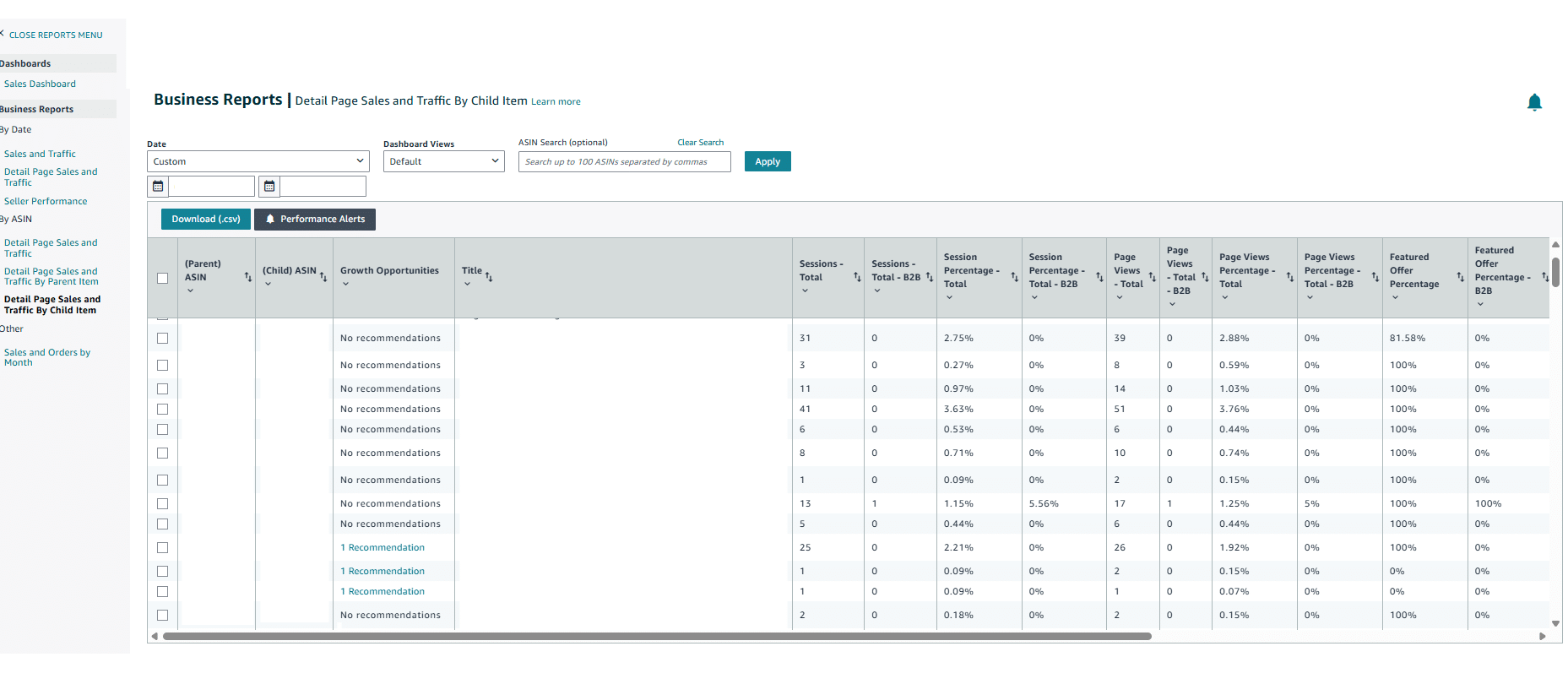
Image above: Use Detail Page Sales and Traffic by Child Item and look for the Featured Offer Percentage column.
Check Amazon's Reference Prices and High Pricing Warnings
The second place I would look is for pricing information inside Seller Central.
One option is to look at reference pricing associated with the product. Amazon can sometimes show you a lower reference price that gives you a clue about why your current offer is not being featured.
If you see a reference price substantially below what you are currently charging, that strongly suggests pricing is involved.
The next question is: Where is Amazon getting that lower price?
Sometimes Amazon makes this even more obvious by directly flagging an offer for a potential high pricing error.
The screenshot below is a good example.
Amazon is showing the message:
“Deactivated due to potential high pricing error.”
It also tells the seller to lower the price and consider the reference prices when making that decision.
Under Reference Prices, Amazon is showing the Featured Offer price.
If you see something this direct, pricing should be one of the first things you investigate.
Do not blindly assume that matching whatever number Amazon displays is automatically the right long-term strategy. Treat the reference price as a clue and figure out why Amazon thinks your price is too high.
There are a few common possibilities:
- The exact product is being sold cheaper somewhere else
- You recently raised the Amazon price
- The product had a lower historical price for a long time
- Amazon's system is still using an older reference price
Here is what that pricing warning can look like inside Seller Central.
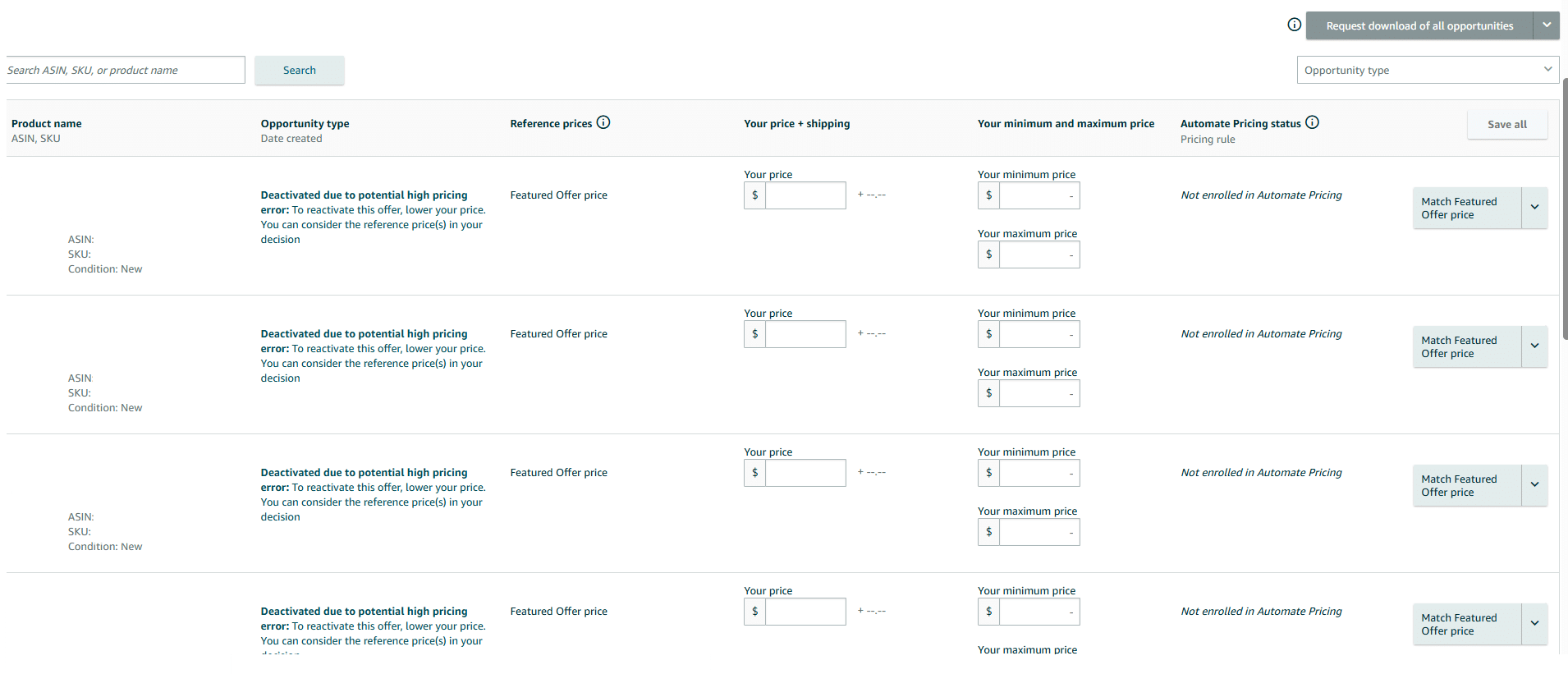
Image above: Amazon is directly flagging these offers for a potential high pricing error and showing the Featured Offer price as a reference price.
This is the type of clue you are looking for.
In this example, Amazon is not making the seller guess whether pricing might be involved. It is directly identifying a potential high pricing problem.
If you see something this specific, I would investigate pricing before spending time editing the listing or opening random Seller Support cases.
Common Reasons You Lose the Featured Offer
Here is a quick reference table before we go through each cause in more detail.
| Possible Cause | What It Looks Like | What to Check |
|---|---|---|
| Amazon price is higher elsewhere | Your website, Walmart.com, or another platform has the exact product for less | Compare the exact product everywhere it is sold |
| Recent price increase | Featured Offer disappears shortly after raising the price | Compare the timing with Featured Offer Percentage |
| Poor FBM shipping metrics | Late shipments or fulfillment problems happen around the same time | Review recent FBM performance |
| Brand-new seller account | Little or no sales history, especially while using FBM | Consider FBA or give the account time to establish history |
| Negative seller feedback | Featured Offer Percentage suddenly drops after feedback appears | Review seller feedback immediately |
| Very slow shipping | FBM delivery time is unusually long | Temporarily test faster shipping |
Cause #1: Your Product Is Cheaper Somewhere Else
This is one of the most common causes.
If your product is being sold anywhere else for less than it costs on Amazon, Amazon may decide not to feature the Amazon offer.
That could be:
- Walmart.com
- Your own website
- Another marketplace
- Another retailer selling the same product
For example, imagine your product is $50 on Amazon but $40 on your website.
Amazon may identify the lower external price and decide your $50 Amazon offer is not competitive enough to receive the Featured Offer.
This creates a common problem for brands.
They look at Amazon's selling fees and think, “Amazon costs us more, so let's charge more on Amazon to make up for the fees.”
I understand the logic, but it can backfire badly.
If you are trying to understand the underlying costs before deciding how to price the product, our Amazon fees guide explains the major fee categories.
But you cannot simply assume you can pass all of those extra costs to Amazon customers by making the Amazon price materially higher than the price everywhere else.
If that causes you to lose the Featured Offer, you can end up selling much less.
Your Sponsored Products advertising can also stop running normally.
So the first thing I would do in a pricing-related situation is search for the exact product everywhere it is sold.
Do not forget your own website. That is a really common one.
Cause #2: You Recently Raised the Price
Your product does not necessarily have to be cheaper somewhere else for pricing to cause the problem.
A recent Amazon price increase can sometimes be enough.
If the product sold at one price consistently for a long time and then you raised it substantially, Amazon may react to the change.
The larger the jump, the more suspicious I would be.
This is where your Business Reports history becomes especially useful.
If your Featured Offer Percentage dropped at almost exactly the same time you raised the product price, that gives you a pretty obvious thing to test.
What to Do If a Price Increase Caused the Problem
| Approach | When It May Make Sense | Tradeoff |
|---|---|---|
| Wait | The increase was small and you think the new price is justified | You may continue losing sales and there is no guarantee the Featured Offer comes back |
| Increase gradually | You made a large jump but still need to reach a higher selling price | Smaller increases every few weeks may work better, but external prices still matter |
| Return to the previous price | The Featured Offer disappeared after the increase and sales are being hurt badly | Often the most reliable test, but you give up the higher price |
| Contact Seller Support | The price matches other platforms and seems reasonable, but Amazon still appears to think it is too high | I have seen this work occasionally, but it is relatively rare |
Option 1: Wait
If the increase was relatively small, you can try leaving the new price in place and waiting.
The problem is that you may be losing sales the entire time.
There is also no guarantee that Amazon will eventually decide the new price is fine simply because enough time passes.
So you need to evaluate whether the additional margin is worth the damage caused by losing the Featured Offer.
Option 2: Raise the Price More Gradually
If you made a large price increase, another option is to move the price back down and increase it more gradually.
Instead of one large jump, try smaller increases every few weeks.
Sometimes that works better.
But remember that your external pricing still matters.
If you also sell the product on your own website, you do not want your website sitting substantially below Amazon while you are trying to increase the Amazon price.
If the intention is to raise the price everywhere, make sure those other channels remain aligned.
Option 3: Return to the Previous Price
Often the most reliable fix is simply returning to the price that was already working.
That may not be what you want to do.
Your manufacturing costs may have increased. Your shipping costs may have increased. Maybe the product should legitimately cost more.
But you still have to look at the economics realistically.
A higher selling price does not help very much if losing the Featured Offer causes conversion to drop dramatically and keeps your Sponsored Products ads from running.
Cause #3: Your FBM Shipping Metrics Got Worse
If you fulfill customer orders yourself through FBM, your fulfillment metrics can also cause problems.
FBM means Fulfilled by Merchant. Your company or your 3PL is responsible for shipping the Amazon orders rather than Amazon fulfilling them through FBA.
If you have a few late shipments and your shipping metrics deteriorate, Amazon may stop giving your offer the Featured Offer even if your pricing is fine.
This is another reason I like looking at the date the Featured Offer Percentage dropped.
If you suddenly lost it immediately after several late shipments, that is a pretty good clue.
Cause #4: You Have a Brand-New Seller Account With No Sales History
This is extremely common for brands launching on Amazon for the first time.
You can have:
- A legitimate established company
- Your own product
- Your own trademark and brand
- Your own listing
- No competing sellers
- Reasonable pricing
And still have trouble getting the Featured Offer.
If your Amazon seller account is brand new, has no sales history, and has little or no seller feedback, Amazon does not have much history to evaluate yet.
This is particularly common when the new account is fulfilling through FBM.
I also see it more often when the product is expensive.
If your product costs several hundred dollars or more, Amazon may be more conservative until the account starts getting actual sales.
For a New Account, FBA Often Fixes the Problem
If your seller account is brand new and you are selling FBM, one of the most reliable things to try is sending some inventory into FBA.
FBA stands for Fulfilled by Amazon.
You send inventory to Amazon's warehouses, and Amazon handles the individual customer shipments as orders come in.
About 80% of the time, FBA is what I would recommend for the brands I work with anyway, even if the Featured Offer was not an issue.
But for a new seller account that is having trouble winning the Buy Box through FBM, moving at least some inventory into FBA can be particularly helpful.
You do not necessarily have to commit to FBA forever.
You could send some inventory in, establish sales history and seller feedback, and then reevaluate whether you want to continue using FBA or go back to fulfilling orders yourself.
If you are deciding between the two fulfillment methods, our FBA vs. FBM guide goes into the broader tradeoffs.
What If You Cannot Use FBA?
Sometimes sending the product into FBA simply is not a practical option.
I once worked with a brand that sold high-end copper sinks.
These were handmade, artisan-crafted sinks.
Many of them cost around $1,000 to $3,000 each, and some were as expensive as $10,000.
These were not products where we were going to send a bunch of inventory into an Amazon fulfillment center.
The brand created its listings, but the products were not receiving the Featured Offer.
Without the Featured Offer, we also could not really launch the normal Sponsored Products advertising strategy.
So we waited.
It took approximately one to two months.
During that time, the brand still received a few sales here and there even though the products did not have the normal Featured Offer.
Then one day it changed.
The products started winning the Buy Box.
We were already working with the company and had everything else ready to go, so once the Featured Offer appeared, we launched the ads and started managing the account normally.
There was not a special listing edit that suddenly fixed everything that day.
In that situation, the account simply needed some time and transaction history.
If FBA is not an option for your product, you may have to do something similar.
Keep the products available. Allow legitimate sales to come through. Build account history and seller feedback over time.
If you already have customers on other platforms, your website, an email list, or another existing audience, you could potentially direct legitimate customers to purchase through Amazon so the seller account starts building transaction history.
There is no guaranteed timeline.
The copper sink account took around one or two months. Another account could take a different amount of time.
New Seller Account: FBA vs. Waiting With FBM
| Option | Why You Might Choose It | What to Expect |
|---|---|---|
| Send inventory to FBA | The product works well in Amazon warehouses | Often the first thing I would test with a new FBM account |
| Use FBA temporarily | You ultimately want to use FBM but need account history first | Build traction and reevaluate fulfillment later |
| Keep selling FBM and wait | The product is too large, expensive, fragile, or otherwise impractical for FBA | Customers can still buy, but sales may be slower while the account develops history |
| Send legitimate existing customers to Amazon | You already have customers on another channel | Can help establish Amazon transaction history, but there is no guaranteed Featured Offer timeline |
Cause #5: Negative Seller Feedback
I have also seen brands lose the Buy Box after receiving negative seller feedback.
A brand can be winning the Featured Offer normally, receive negative seller feedback, and then suddenly see its Featured Offer Percentage drop.
I have even seen this happen with brands using FBA.
Sometimes the percentage drops for a day or two after the feedback appears and then comes back.
This is why I recommend having some type of alert set up for seller feedback.
You do not want to discover several days later that you received negative feedback while your Featured Offer Percentage and sales were dropping.
If feedback comes in, review it immediately.
If it qualifies for removal under Amazon's rules, deal with it as quickly as possible.
Cause #6: Your Shipping Speed Is Too Slow
Shipping speed can also be a factor.
I would normally consider this a smaller factor than pricing or major account-performance issues, but very slow shipping can definitely make it harder to receive the Featured Offer.
If you are fulfilling through FBM and your shipping speed is really slow — for example, more than about five days — try temporarily speeding it up.
You could test something closer to two-day shipping and see whether the Featured Offer returns.
You do not necessarily need to run the test indefinitely.
If you improve the shipping speed for a day or so and nothing changes, that is at least some evidence that shipping speed probably is not the main problem.
Again, sending inventory into FBA will often remove this particular variable because Amazon handles fulfillment.
Sometimes Seller Support Can Fix the Problem
If you have gone through everything and your offer clearly looks like it should be receiving the Featured Offer, you can try opening a case with Seller Support.
I would not start here.
This is relatively rare.
The situations where I have had Seller Support actually help were generally situations where Amazon's system appeared to think the product was priced too high, but we could not find a legitimate reason for it.
In those situations, we were able to show that:
- The Amazon price matched the product on other platforms
- The current price was reasonable
- The current pricing made sense compared with the product's previous pricing
Sometimes Seller Support was then able to do something on their end.
You can also run into a situation where you legitimately increased the price everywhere, but Amazon's system still appears to remember the old lower price.
That is another situation where a support case may be worth trying.
But again, do not make this Step 1.
First rule out real pricing differences, recent price increases, seller feedback, fulfillment issues, account history, and shipping speed.
Where to Look in Seller Central
| Seller Central Area | What to Look For | What It Can Tell You |
|---|---|---|
| Business Reports → Detail Page Sales and Traffic by Child Item | Featured Offer Percentage | Shows how often you are winning and approximately when the problem started |
| Pricing / reference-price information | High pricing errors or a lower Featured Offer/reference price | Strong clue that pricing is causing the problem |
| Selling-plan settings | Individual vs. Professional | Rules out a basic seller-account eligibility issue |
| Seller performance and feedback | Late shipments and negative seller feedback | Can connect account performance with the timing of the decline |
A Practical Order for Troubleshooting “See All Buying Options”
If this is your own brand, you are the only seller, and the normal Add to Cart experience disappeared, here is the order I would generally work through it.
| Step | What to Check | What to Do |
|---|---|---|
| 1 | Seller account type | Confirm you are using the appropriate Professional selling plan |
| 2 | Any reason Amazon is explicitly displaying | If Amazon says “High Price,” start with pricing |
| 3 | Featured Offer Percentage | Figure out approximately when the decline started |
| 4 | Reference prices and pricing warnings | Investigate why Amazon thinks your price is high |
| 5 | Prices on other websites | Look for the exact product being sold for less |
| 6 | Recent Amazon price changes | Test the previous price or gradual increases |
| 7 | FBM fulfillment metrics | Address late shipments and other performance problems |
| 8 | Seller feedback | Review negative feedback immediately |
| 9 | Age and history of the seller account | A new account may need sales history or FBA |
| 10 | Shipping speed / fulfillment method | Test faster FBM shipping or FBA where appropriate |
| 11 | Seller Support | Use support after the more obvious causes have been ruled out |
The Big Mistake Is Treating This Like a Broken Listing
When a brand sees its Add to Cart button disappear, the natural reaction is often to start editing the listing, opening support cases, or assuming the ASIN has been suppressed.
That can send you in the wrong direction.
The listing itself may be completely fine.
The underlying issue is that Amazon is not currently choosing your seller offer as the normal Featured Offer.
Once you understand that, troubleshooting becomes much more logical.
You are looking for something in a relatively specific group of areas:
- Seller account eligibility
- External pricing
- Historical pricing
- Recent price increases
- Seller account history
- FBM performance
- Negative seller feedback
- Shipping speed
- Fulfillment method
And if you already had the Featured Offer before, Business Reports can often help you narrow down exactly when the problem began.
Frequently Asked Questions
Why does Amazon say “See All Buying Options” instead of “Add to Cart”?
Usually it means your offer is not currently receiving the Featured Offer, commonly called the Buy Box. The listing itself can still be active, but the customer has to click through an additional buying-options interface before purchasing.
Can I lose the Buy Box if I am the only seller?
Yes. Being the only seller does not automatically guarantee the Featured Offer. Amazon can still evaluate your price, account history, fulfillment, shipping performance, and other factors before deciding whether to feature the offer.
Can customers still buy the product without the Featured Offer?
Yes. Customers can still click “See All Buying Options” and purchase the available offer. The problem is that the extra friction can reduce conversion significantly, and Sponsored Products ads will not run normally to the listing without the Featured Offer.
Is “No Featured Offer” a listing error?
Usually, no. Your ASIN can still be active and purchasable. The issue is normally that your seller offer is not currently being selected as the Featured Offer.
What Featured Offer Percentage should I have?
For the single-seller brand situations discussed here, anything above about 90% is normally fine. If you normally stay above 90% and suddenly see a major decline, find approximately when the drop began and compare that date with other account changes.
Why did I lose the Buy Box after raising my price?
Amazon may be reacting to the product's previous price or comparing your offer with a lower price elsewhere. If the Featured Offer disappeared immediately after an increase, try evaluating the previous price, smaller gradual increases, and the product's pricing on other websites.
Will FBA fix a Featured Offer problem?
FBA often helps with a new seller account that has little transaction history and is currently fulfilling through FBM. It is not a guarantee, because pricing or another problem can still prevent the offer from receiving the Featured Offer.
How long does a new seller have to wait before getting the Buy Box?
There is no guaranteed timeline. In the copper-sink example, it took approximately one to two months. The brand received a few sales during that period, and then the products eventually began receiving the Featured Offer.
Can negative seller feedback cause me to lose the Featured Offer?
I have seen negative seller feedback correspond with a sudden drop in Featured Offer Percentage, including on accounts using FBA. Sometimes the decline lasts a day or two, which is why I recommend monitoring seller feedback closely.
What if Amazon says my price is too high?
Check the product's external pricing, recent Amazon price changes, historical pricing, and any reference prices Amazon displays. If your price matches other platforms and there is no logical reason for Amazon to consider it too high, Seller Support may occasionally be able to help.
What if I have checked everything and still cannot find the cause?
Once you have checked account type, pricing, external prices, historical pricing, fulfillment performance, feedback, account history, and shipping speed, try opening a case with Seller Support. I have occasionally seen support resolve pricing-related Featured Offer problems, but it is relatively rare.
What to Do Next
If you want a walkthrough, the video above covers this step-by-step. If you have a quick question about your situation, leave a comment on the video and I’ll try to point you in the right direction. If your situation is more complex and you want professional help, email customerservice@fivestarcommerce.com or schedule an info call.