
For brands selling on Amazon, there is one inventory mistake that can create more risk than almost anything else they do.
It is not a bad ad campaign.
It is not a bad listing.
It is not even a normal logistics issue.
Those problems can definitely cost money, but in most cases, they are at least somewhat controlled by your decisions. If you overspend on ads, you can turn the ads down. If your price is too low, you can raise it. If your listing needs work, you can improve it.
This mistake is different because once you make it, you can get stuck.
The mistake is sending too much inventory into FBA.
I have seen this cost brands tens of thousands of dollars. In one case, a brand that was just starting to sell products to customers for the first time ended up facing around $50,000 in costs. Another more established brand had a situation closer to $100,000.
The dangerous part is that a lot of brands make this mistake without realizing they are doing anything risky. They are not trying to be reckless. They are just ordering inventory from a manufacturer, sending it to Amazon, and assuming Amazon is a reasonable place to keep it until it sells.
That is where the problem starts.
Amazon FBA is not meant to be long-term storage. Amazon wants you to send inventory in, have it sell within a reasonable amount of time, and then replenish it with newer inventory. The FBA fee structure is designed around that behavior.
If you use FBA that way, it can work very well.
If you treat FBA as your main warehouse, it can become extremely expensive.
Why Too Much FBA Inventory Becomes a Trap
The trap comes from two fees working together:
- Aged inventory surcharges
- Removal fees
Either one can hurt.
Together, they can put a brand in a position where none of the available options are good.
If inventory sits in FBA too long, Amazon starts charging aged inventory surcharges on top of normal monthly storage fees. These are the fees that used to be commonly called long-term storage fees.
For the first several months, FBA storage fees are usually manageable. But once inventory has been sitting in Amazon’s fulfillment network for about six months, the fee situation changes.
The Amazon aged inventory surcharge starts at 181 days and increases as the inventory gets older. The big jump happens around 271 days, which is roughly nine months. That is where the surcharge jumps from $1.50 per cubic foot to $5.45 per cubic foot.
That is a major jump.
And remember, this is not replacing normal storage fees. It is in addition to normal storage fees.
Table: Amazon Aged Inventory Surcharge Timeline
| Inventory Age | Surcharge Rate | Why It Matters |
|---|---|---|
| 181–210 days | $0.50/cu ft | First warning zone |
| 211–240 days | $1.00/cu ft | Fees start increasing |
| 241–270 days | $1.50/cu ft | Still manageable, but aging |
| 271–300 days | $5.45/cu ft | Major fee jump |
| 301–330 days | $5.70/cu ft | Fees keep climbing |
| 331–365 days | $5.90/cu ft | Inventory is now very expensive to keep |
| 366–455 days | $6.90/cu ft | Long-term storage becomes painful |
| 456+ days | $7.90/cu ft | Worst-case aged inventory tier |
So if you send too much inventory into FBA and it does not sell quickly enough, you eventually have to choose between bad options.
You can keep the inventory at Amazon and keep paying storage and aged inventory fees.
You can remove the inventory and pay Amazon to send it back.
You can try to discount it heavily.
You can liquidate it.
You can dispose of it.
None of those are great if the product is something you intended to keep selling profitably.
Removal Fees Are Often the Part Brands Underestimate
When you send inventory into Amazon, you are usually sending cases or pallets. You get some efficiency from scale. The inbound shipping cost may not be fun, but it is usually manageable.
Getting that inventory back out of Amazon is completely different.
Amazon charges removal fees per unit. For a deeper breakdown of how that works, see our guide on Amazon FBA removal and disposal fees.
That can be a huge difference, especially for larger or heavier products.
We had a client who paid around $50,000 to remove inventory from FBA. What did it cost them to send that inventory into Amazon in the first place?
Around $2,000 to $4,000.
So they paid more than ten times as much to get the inventory back out as they paid to send it in.
That is the part many brands do not understand until they are already stuck. Sending inventory into FBA can feel cheap. Removing it can be painfully expensive.
Why Discounting Usually Does Not Fix the Problem
When brands realize they have too much inventory at FBA, one of the first ideas is usually:
“Can we just discount it and sell through it?”
Sometimes that can help.
But it is not usually the clean solution people hope it will be.
If the product is already not selling well, a discount may not be enough to suddenly make it move quickly. There may be a reason people are not buying it. Maybe the product has not ranked yet. Maybe the listing has issues. Maybe the reviews are not there. Maybe the category is more competitive than expected. Maybe the product was launched before the brand had enough data.
And even if discounting does increase sales, you are still paying the normal Amazon fees on those orders. You may still be paying ads to get the traffic. You may still be paying fulfillment fees. You may be cutting your margin so aggressively that you are not actually escaping the problem in a profitable way.
In many cases, once inventory is truly stuck, paying to remove it is still painful but may be cheaper than trying to advertise and discount your way through it slowly while Amazon keeps charging storage fees.
That is why the real solution is not “figure out the cheapest emergency exit.”
The real solution is to never put yourself in that position in the first place.
A Realistic Example: 2,000 Units Sent Into FBA
Let’s say you are a new brand selling a product like a laundry booster.
You buy 2,000 units and send all of them into FBA because you do not have another warehouse. You launch in July. The product starts selling around 100 units per month.
That might not sound terrible.
You are selling.
Customers are buying.
The listing is active.
But after six months, you have only sold 600 units. That means 1,400 units are still sitting in Amazon’s warehouses.
Here is what the monthly FBA fees looked like in the example:
- Month 1, July: $351
- Month 2, August: $333
- Month 3, September: $315
- Month 4, October: $908
- Month 5, November: $853
- Month 6, December: $798
- Month 7, January: $399
- Month 8, February: $513
- Month 9, March: $605
- Month 10, April: $1,510
- Month 11, May: $1,421
- Month 12, June: $1,310
The first big spike happens in October because Q4 storage rates are much higher than the rest of the year.
Then the aged inventory surcharge starts layering on top of regular storage.
Then, when the inventory reaches the higher aged inventory tier, the monthly fees spike again. In this example, fees go over $1,500 in a single month.
At that point, the brand has a problem.
The product is selling, but not fast enough.
That is one of the most important things to understand. This trap does not only happen to products that sell zero units. It can happen to products that are selling, but selling slower than the amount of inventory you sent in.
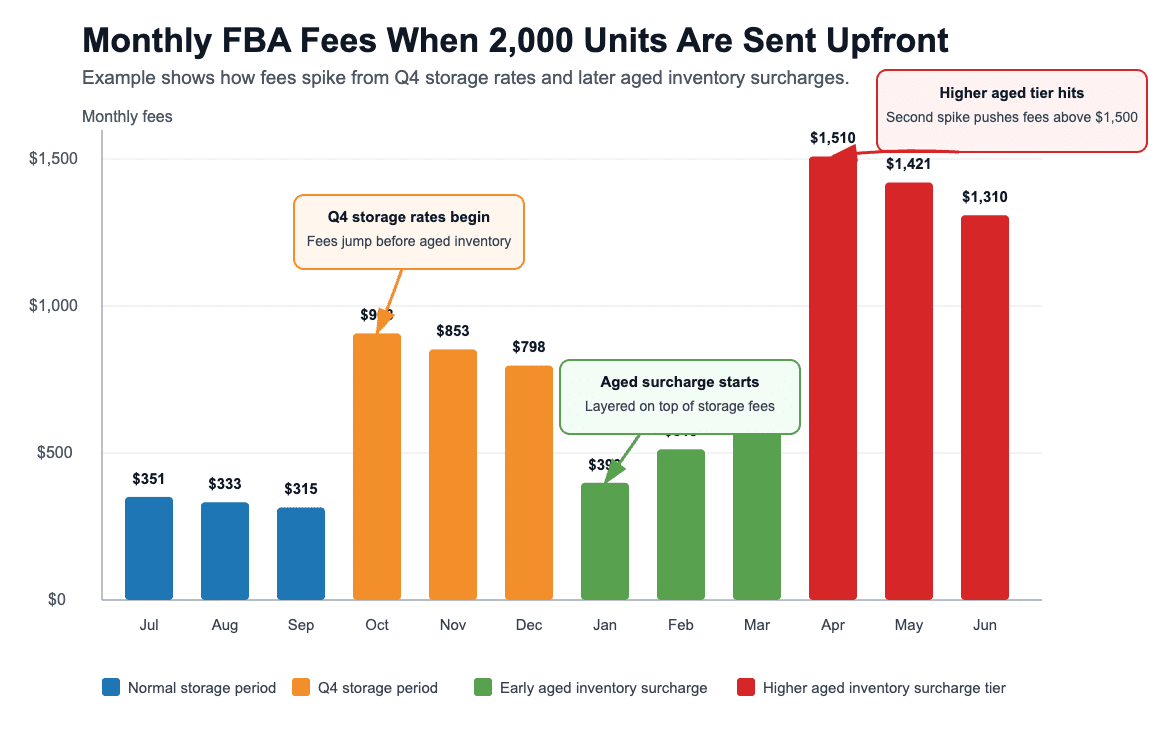
Image above: Monthly FBA fees can spike twice — first when Q4 storage rates hit, then again when aged inventory surcharges climb into higher tiers.
Option 1: Remove the Inventory After Six Months
Let’s say the brand realizes the problem after six months and decides to remove the remaining 1,400 units.
In this example:
- Storage fees already paid: $3,557
- Removal fees: 1,400 units × $8.19 = $11,466
- Total fees: $15,023
- Units sold: 600
- Net result: −$6,509, meaning the fees exceed the profit on all units sold
That is a terrible outcome.
The brand sold 600 units and still ended up with a negative result because the storage and removal fees were so high.
And that does not even include the cost of the inventory itself or the original cost to ship it into Amazon.
Option 2: Keep Selling Through Month 12, Then Remove the Rest
The other option is to keep selling for the rest of the year and hope the product works through more of the inventory.
In this example:
- Storage plus aged inventory fees: $9,314
- Removal fees on the remaining 800 units: $6,552
- Total fees: $15,866
- Units sold: 1,200
- Net profit: $1,166
That is better than losing money, but it is still a bad result.
The brand sold 1,200 units over the year and ended with only $1,166 in net profit in this example. Again, this does not include every possible cost, including the cost of the inventory itself or the inbound shipping cost.
The problem was not the product.
The problem was the inventory strategy.
What the Right Approach Looks Like
Now compare that with a more conservative strategy.
Same product.
Same selling price.
Same 100 units per month.
Same 1,200 units sold over the year.
But instead of sending 2,000 units into FBA upfront, the brand sends 200 units to start and replenishes 300 units every three months through a 3PL.
Table: Same Product, Same Sales, Different Inventory Strategy
| Scenario | Inventory Strategy | Storage + Aged Fees | Removal Fees | Net Profit |
|---|---|---|---|---|
| Scenario A | Send 2,000 units upfront | $9,314 | $6,552 | $1,166 |
| Scenario B | Send 200 units, replenish 300 every 3 months via 3PL | $491 | $0 | $16,542 |
| Difference | Lean FBA strategy | — | — | +$15,376 |
That is the same product and the same sales volume.
The only difference is how much inventory was sent into FBA at one time.
Now, this example does not include the cost of the 3PL. You still have to pay the 3PL to store and ship inventory. But that does not change the principle.
The brand that kept FBA lean avoided aged inventory surcharges, avoided removal fees, and kept far more of the profit.
The Rule: Send 2 to 4 Months of Inventory to FBA
For most brands, the rule should be simple:
Only send what you reasonably expect to sell in the next 2 to 4 months.
For products with a long, consistent sales history, 4 to 5 months may be fine.
But for newer products, new brands, or new product lines, I would be much more conservative.
If you are launching a brand-new product on Amazon for the first time, you do not know how quickly it will rank. You do not know how quickly reviews will come in. You do not know how your conversion rate will compare against competitors. You do not know if Amazon will create unexpected compliance issues. You do not know if the listing will stay active without interruption.
So why send in a huge amount of inventory before you have that information?
If sales take off, you can send in more.
That is a much better problem to have.
Running low for a week is annoying. Being stuck with 1,400 units in FBA that are not moving is a much bigger problem.
New Products Are Especially Risky
This is even more important when launching a brand-new product or a brand-new product line.
A lot of brands assume the only risk is demand.
They think, “If the product sells, we’re fine.”
Not necessarily.
Sometimes the product might be perfectly good and still get stuck because Amazon pulls the listing down, restricts it, asks for extra documentation, or creates a compliance issue.
This is especially common in the first few months of selling, and even more common if the seller account is new or the product category has extra compliance sensitivity.
Sometimes Amazon’s systems get confused. Sometimes a listing gets flagged by mistake. Sometimes Amazon asks for documentation it did not ask for earlier. Sometimes a product gets misclassified. Sometimes an issue happens through no fault of the seller.
While you are working through that issue, the inventory can be sitting in Amazon’s warehouse.
It may not be selling.
It may still be aging.
It may still be costing money.
And if you sent in a huge batch, the problem gets much worse.
This is why new product launches should be treated carefully. You can always replenish if the product moves. There is no reason to send in a massive amount of inventory before you have a few weeks of real sales data.
Why FBA Should Not Be Your Main Warehouse
One reason brands get into this situation is that they do not have anywhere else to put the inventory.
This is especially common for brands just starting out on Amazon.
They order from the manufacturer and want to send everything directly into FBA because it seems efficient.
On paper, that sounds simple.
Manufacturer → Amazon → Customer
But the problem is that Amazon is not designed to be your main long-term warehouse. FBA is designed to be the fulfillment layer closest to the customer.
A better setup is usually:
Manufacturer → 3PL → FBA → Customer
The 3PL holds the bulk inventory. Then you send smaller replenishments into FBA as needed.
That keeps FBA inventory fresh. It keeps your exposure to aged inventory surcharges low. It gives you a place to send inventory if you need to remove it. It gives you more control if Amazon creates a listing issue. It also gives you someone you can actually talk to if there is a problem with the inventory.
That last point matters more than people realize.
Amazon is very good at fulfillment, but it is not the same as having a flexible warehouse partner you can call. If there is an issue with your inventory, a 3PL may be able to inspect it, relabel it, repackage it, separate it, prepare it, or ship it somewhere else.
Amazon is usually not going to troubleshoot your inventory for you in that same way.
If you are still deciding whether FBA or FBM makes sense for your products, this related guide on FBA vs. FBM is a good next read.
What About Amazon AWD?
Amazon does have a longer-term storage option called Amazon Warehousing and Distribution, or AWD.
Amazon AWD is more appropriate for longer-term storage than FBA. If your choice is between sending all of your inventory into FBA or using AWD for bulk storage, AWD may be a much better option.
That said, I usually prefer using a good third-party warehouse or 3PL instead of relying entirely on Amazon AWD.
The reason is not that AWD is useless. There are situations where AWD can make sense.
The issue is flexibility and communication.
With a 3PL, you can usually talk to someone. You can ask questions. You can have them look at inventory. You can have them prep inventory. You can sometimes solve issues before they become bigger Amazon problems.
With AWD, you are still dealing with Amazon’s system. If there is an issue with the inventory, Amazon may not fix it for you. They may just ask where they can send it, and then you have to send it somewhere else anyway.
So AWD can be a decent option in some situations, but I would not think of it as a complete replacement for a good 3PL relationship.
Liquidation Is an Option, But Usually Not a Great One
Amazon also has a liquidation program.
If you are stuck with excess inventory, liquidation might be better than continuing to pay storage fees or paying to remove the product. But it is not usually a great option, especially if the product is part of your ongoing product line.
The money you get back can be extremely low.
I have seen brands get only a few cents per unit after fees on a product that normally sells for over $100.
That is obviously not what anyone wants.
There is another problem too. Once inventory is liquidated, someone else may end up with it and sell it on Amazon or somewhere else below your normal price.
If you care about MAP pricing, brand positioning, or keeping control over your product in the market, that can create a second problem after the first problem.
Liquidation might make sense if:
- You are discontinuing the product
- The product is not worth removing
- You do not care if it shows up at a discount later
- Continuing to pay storage fees is clearly worse
- The brand impact is limited
But I would be careful liquidating inventory for a product you plan to keep selling.
Donation Can Sometimes Be Better Than Removal or Liquidation
For some types of products, donation can be a good exit route.
This can make sense for toys, household items, and other products that can reasonably be donated to a qualifying charity.
You still need to think through the removal costs and logistics. You also need to talk to a CPA before assuming anything about tax treatment. But if the owners of the business itemize and the donation qualifies, there may be a useful tax deduction.
This is not something I would treat casually. You want to make sure the charity qualifies, the documentation is handled properly, and the inventory can actually be donated.
But in the right situation, donation can be better than liquidating the inventory for almost nothing or letting it continue to sit at FBA while fees accumulate.
Capacity and Storage Limits Can Make the Problem Worse
There is another layer to this that sellers sometimes miss.
If Amazon’s system detects that your inventory is moving slowly, it can affect how much inventory Amazon allows you to store or send in.
So if your account has a lot of slow-moving inventory, you may not only be paying regular storage fees and aged inventory surcharges. You may also be dealing with reduced storage capacity or other inventory limitations.
The really frustrating part is that Amazon can change limits after inventory is already in the system.
That means a brand can make an inventory decision based on what seemed reasonable at the time, then later find itself with less flexibility.
This is another reason not to max out your FBA storage or send in more inventory than you need. Even if you technically can send the inventory today, that does not mean it is a good idea.
A lean FBA strategy gives you more room to adapt.
What To Do If You Already Sent Too Much Inventory
If you already have too much inventory in FBA, the first thing to do is stop pretending the problem will fix itself.
You need to look at the numbers.
For each affected SKU, estimate:
- How many units are currently in FBA
- How many units are selling per month
- How many months of inventory you have
- When inventory will hit aged inventory surcharge tiers
- How much storage is already costing you
- What removal would cost
- What liquidation might return
- Whether discounting has a realistic chance of increasing sell-through
- Whether the product will continue being part of your product line
- Whether donation is realistic
- Whether there are listing, ranking, review, or compliance problems slowing sales
Then compare your options.
Do not just ask, “Which option feels less painful?”
Ask, “Which option creates the least total damage?”
Sometimes that means removing inventory now.
Sometimes it means running a promotion before a higher surcharge tier hits.
Sometimes it means liquidating.
Sometimes it means donating.
Sometimes it means keeping inventory at FBA for a short period while you fix a listing or compliance issue.
But you need to make the decision deliberately.
The worst option is usually to do nothing while the inventory keeps aging.
How To Avoid This Going Forward
The best approach is to build your inventory system around the idea that FBA is for short-term fulfillment, not long-term storage.
For most brands, that means:
- Keep only 2 to 4 months of inventory in FBA
- Be even more conservative with new products
- Use a 3PL for bulk storage
- Replenish FBA in smaller batches
- Review inventory age regularly
- Watch products approaching 181 days
- Be especially careful before Q4 storage rates hit
- Do not send inventory to FBA just because Amazon lets you
- Keep a backup plan for products that get restricted or suspended
- Know your removal costs before you send in large quantities
That last point is important.
Before sending a large amount of inventory into FBA, estimate what it would cost to remove that inventory if things went badly. If you want more background on how these costs stack up, see our article on Amazon storage fees.
Most brands do not do that calculation.
They should.
If the removal cost would be painful, that is a sign you should probably send in less and hold the rest somewhere else.
The Right Inventory Strategy Depends on the Product
There is no perfect number that applies to every brand and every SKU.
A tiny, fast-moving product with stable demand is different from a bulky product that sells slowly.
A product with years of Amazon sales history is different from a brand-new launch.
A product with consistent replenishment from a domestic warehouse is different from a product with long international manufacturing lead times.
A product with compliance risk is different from a simple, low-risk product. If you sell expirable products, this also connects closely with Amazon FBA expiration date requirements, because slow-moving inventory can create a separate expiration-date problem.
But the principle is the same:
The more uncertainty you have, the less inventory you should send to FBA upfront.
For a proven product with stable sales, keeping 4 to 5 months of inventory at FBA may be acceptable.
For a new product, I would rather send in too little than too much.
You can send more after a week or two if sales move quickly.
You cannot easily undo sending in thousands of units if the product gets suspended, sales are slower than expected, or the listing does not rank.
This Is Not About Being Afraid of FBA
FBA is still a great fulfillment option for many brands.
It can help with Prime eligibility, customer trust, conversion rate, and operational simplicity. For many products, FBA is the right choice.
The problem is not using FBA.
The problem is using FBA as if it were a cheap, flexible, long-term warehouse.
It is not.
Amazon has structured the fees so that FBA works best when inventory sells through efficiently. If you send in inventory, sell it within a few months, and replenish consistently, the system can work very well.
If you send in a year of inventory and hope it sells eventually, the system can punish you.
FAQ: Amazon FBA Inventory Fee Trap
How much inventory should I send to Amazon FBA?
For most products, aim to send what you expect to sell in the next 2 to 4 months. For products with a long, consistent sales history, 4 to 5 months may be reasonable. For new products, send less than you think you need and replenish once you have real sales data.
Why is sending too much inventory to FBA risky?
Sending too much inventory is risky because inventory that does not sell quickly can trigger aged inventory surcharges. If you later decide to remove the inventory, Amazon charges removal fees per unit. Those two costs can leave you stuck between keeping inventory at Amazon and paying high storage fees, or removing it and paying high removal fees.
When do Amazon aged inventory surcharges start?
Aged inventory surcharges start once inventory has been stored in Amazon’s fulfillment network for 181 days or longer. The surcharge increases as the inventory gets older, with a significant jump around the 271-day mark.
Is it better to discount products or remove inventory from FBA?
It depends on the product, margin, ad costs, and sales velocity. Discounting can help if the product is close to selling through and the discount will realistically move units. But if the product is not selling well, discounting may not be enough, and you may still pay Amazon fees on each order. In some cases, removal is painful but still cheaper than slowly discounting and advertising while storage fees keep accumulating.
Is Amazon liquidation a good option for excess inventory?
Sometimes, but it is usually not ideal for products you plan to keep selling. The recovery amount can be very low, and liquidated inventory may later show up on Amazon or other channels at prices below your normal selling price. Liquidation may make more sense for discontinued products or inventory you truly need to clear.
Should I use Amazon AWD instead of a 3PL?
Amazon AWD can be useful in some situations and is generally more appropriate for longer-term storage than FBA. But many brands are better served by a good 3PL because they can talk to someone, get help with prep or inventory issues, and maintain more flexibility outside Amazon’s system.
What is the safest way to launch a new product with FBA?
Send in a small amount first. Watch sales for the first few weeks. Make sure the listing stays active, the product is not restricted, and the conversion rate is reasonable. Then replenish as needed. The goal is to avoid having a large amount of inventory stuck in FBA before you know how the product will actually perform.
Final Takeaway
The brands that get hurt by this usually do not think they are making a risky decision.
They are just trying to be efficient.
They order inventory, send it to Amazon, and assume it will sell over time.
But FBA is not built for that. Amazon wants inventory to move. If it does not move, the fees can become very expensive.
The safest approach is to keep FBA lean. Send in what you expect to sell in the next few months, especially when launching new products. Use a 3PL or another storage solution for the rest. Replenish regularly. Watch inventory age before it becomes a crisis.
Running low on inventory for a short period is frustrating.
Getting stuck with thousands of units in FBA, high aged inventory surcharges, and expensive removal fees is much worse.
If you want a walkthrough, the video above covers this step-by-step. If you’ve got a quick question, leave a comment on the video. And if your situation is more complex and you want professional help, reach out to us at customerservice@fivestarcommerce.com or schedule an info call using the “Schedule info call” button on our website.