
Amazon Storage Fees Explained (and How They Quietly Destroy Your Margins)
It’s easy to focus on the fees you pay when a product sells on Amazon.
That’s what most brands pay attention to first—referral fees, fulfillment fees, ad spend.
But that’s only part of the picture.
Once you start sending inventory into Amazon’s warehouses, there’s a completely different set of fees that most brands don’t fully understand. And this is where decisions get made that end up costing thousands—or even tens of thousands of dollars—because no one thought through how these fees actually work ahead of time.
In this article, I’m going to walk through:
- What it actually costs to send inventory into Amazon
- How placement fees work (and how your decisions affect them)
- How storage fees are calculated
- Why Q4 can spike your costs
- How aged inventory surcharges escalate (fast)
- And how to avoid getting stuck paying for inventory you can’t sell
The Costly Mistake Most Brands Don’t See Coming
I once spoke with a brand that launched a new product line and sent a large amount of inventory into Amazon upfront.
Their assumption was simple: they expected it to sell quickly.
But once the product went live, it became clear pretty fast that it wasn’t a strong fit for Amazon. Sales didn’t pick up.
So instead of selling through, the inventory just sat there.
At first, they were only paying standard monthly storage fees. But once that inventory crossed the six-month mark, it started getting hit with aged inventory surcharges.
They had two options:
- Leave the inventory in Amazon and keep paying increasing storage fees
- Remove the inventory and pay removal fees
They ran the numbers. Removing the inventory was cheaper.
They still paid around $100,000 just to remove it—and that was the better option.
Inbound Shipping Costs (Getting Inventory Into Amazon)
Quick Cost Overview
| Factor | Impact on Cost |
|---|---|
| Product size & weight | Larger/heavier = higher cost |
| Units per shipment | More units = lower cost per unit |
| Case pack setup | Efficient packing reduces cost |
| Shipping method | SPD vs LTL |
| Warehouse locations | Affects routing cost |
Typical Cost Range
| Product Type | Estimated Cost Per Unit |
|---|---|
| Small, lightweight | $0.10 – $0.30 |
| Medium size | $0.20 – $0.50 |
| Large/heavy | $0.50+ |
Small Parcel vs LTL (Shipping Method Comparison)
| Shipping Type | Best For | How It Works | Cost Behavior |
|---|---|---|---|
| Small Parcel (SPD) | Small shipments | Boxes via UPS | Higher per unit at scale |
| LTL (Freight) | Large shipments | Pallets via freight carriers | Cheaper as volume increases |
Placement Fees (Where Your Inventory Gets Sent)
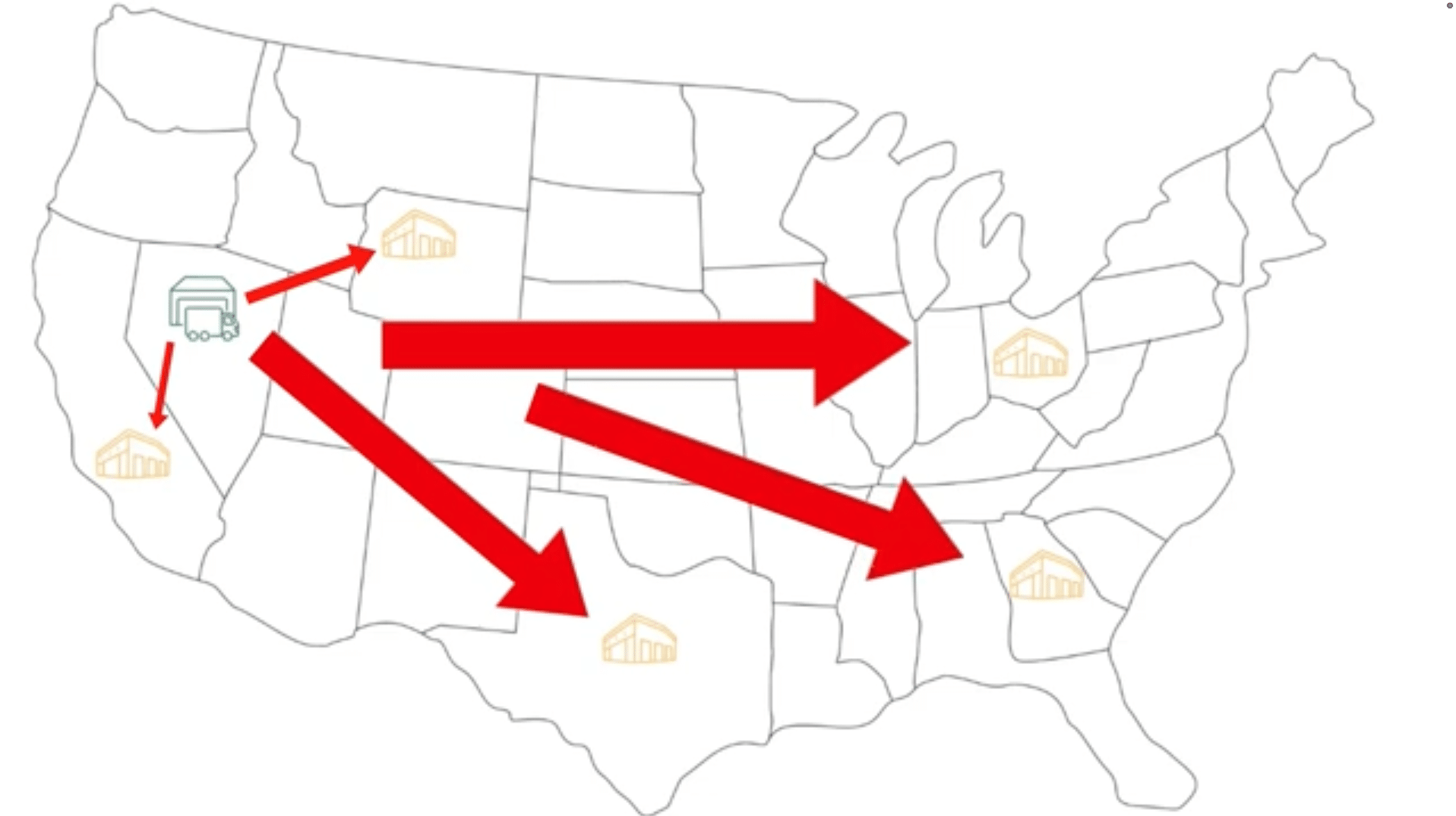
Placement Fee Structure
| Number of Destinations | Placement Fee |
|---|---|
| 1 location | Full fee |
| 2–3 locations | Partial fee |
| 4+ locations | No fee |
Cost Tradeoff Example
| Option | Shipping Cost | Placement Fee | Total Cost |
|---|---|---|---|
| 1 location | Low | High | Medium |
| 2 locations | Medium | Medium | Medium |
| 4 locations | High | $0 | Medium |
Key takeaway: Always compare total landed cost—not just one fee.
FBA Storage Fees (Monthly Cost of Holding Inventory)
How Amazon Calculates Storage
| Factor | Matters? |
|---|---|
| Volume (cubic feet) | Yes |
| Weight | No |
| Time in storage | Yes |
Current Storage Fee Benchmarks
| Product Type | Monthly Fee |
|---|---|
| Standard size | ~$0.78 per cubic foot |
| Oversize | ~$0.56 per unit |
Example: Per-Unit Storage Cost
| Scenario | Calculation |
|---|---|
| Monthly cost per unit | $0.25 |
| Average time in FBA | 3 months |
| Total storage cost | $0.75 per unit |
Q4 Storage Fee Spike (This Catches Brands Off Guard)
Seasonal Fee Multiplier
| Time of Year | Relative Cost |
|---|---|
| Jan – Sep | Baseline |
| Oct – Dec (Q4) | ~3x higher |
Aged Inventory Surcharges (Where Costs Explode)
Fee Escalation Table
| Inventory Age | Additional Fee (Per Cubic Foot) |
|---|---|
| 181–210 days | $0.50 |
| 211–240 days | $1.00 |
| 241–270 days | $1.50 |
| 271+ days (~9 months) | $5.45 |
| 15 months (cap) | $7.90 |
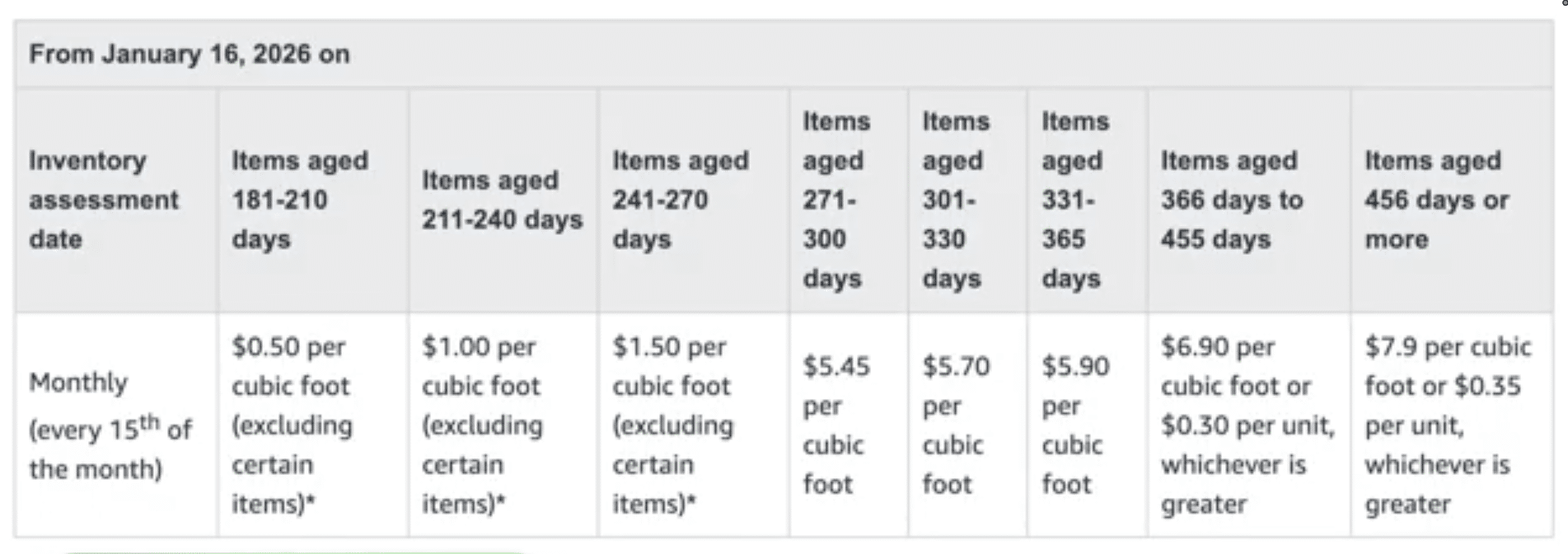
Important: These fees are charged on top of your regular storage fees.
Total Cost Stack (What You’re Actually Paying)
| Fee Type | When It Applies | Avoidable? |
|---|---|---|
| Inbound shipping | Sending inventory in | Partially |
| Placement fees | Shipment routing | Sometimes |
| Storage fees | Monthly | No |
| Q4 storage increase | Oct–Dec | No |
| Aged inventory fees | 6+ months | Yes |
| Removal fees | Removing inventory | Yes |
Why You Never Want Inventory You Can’t Sell
Once inventory sits too long:
- Storage fees increase
- Aged inventory fees stack
- Removal becomes expensive
At that point, every option is bad—you’re just choosing the least bad one.
How to Avoid These Fees (What Actually Works)
Inventory Strategy Framework
| Strategy | Why It Works |
|---|---|
| Start small | Reduces risk |
| Scale with demand | Matches real sales |
| Keep 2–4 months in FBA | Avoids aging fees |
| Use a 3PL | Cheaper storage |
| Monitor sell-through | Prevents dead inventory |
Decision Framework
| Situation | Recommended Action |
|---|---|
| New product | Small test shipment |
| Strong sales | Increase inventory |
| Slow sales | Reduce or pause |
| Aging inventory | Remove early |
Final Thoughts
Amazon makes it relatively cheap to send inventory into their network.
But it becomes very expensive if inventory sits too long or needs to be removed.
If you understand how these fees work, you’ll avoid situations where costs start compounding faster than expected.
If you want a walkthrough, the video above covers this step-by-step. If you’ve got a quick question, leave a comment on the video. And if your situation is more complex and you want professional help, reach out to us at customerservice@fivestarcommerce.com or schedule an info call using the “Schedule info call” button on our website.