
Amazon FBA removal and disposal fees are one of those costs most brands do not think much about until something goes wrong.
And when they do show up, they are usually not small.
Sometimes this happens because inventory sits too long and aged inventory surcharges keep increasing. Other times it happens because a listing gets blocked, inventory becomes stranded, and Amazon gives you a limited window to fix the issue before that inventory has to come out.
That is what makes this category of fees so dangerous. It is relatively cheap to send inventory into Amazon in bulk. It is much more expensive to have Amazon process and send those units back out one by one.
I spoke with a brand that had to pay around $50,000 just to remove inventory from Amazon after an unexpected compliance issue came up. Their cost to send that inventory into Amazon had only been around $2,000 to $4,000. So this is not a small difference. It can completely change the economics of a product.
In this article, I am going to walk through:
- what removal and disposal fees actually are
- when they apply
- why excess inventory creates these situations
- how aged inventory surcharges push brands toward removal decisions
- how to estimate the fees before they happen
- and how I would think about FBA inventory if the goal is to avoid getting into these situations in the first place
If you are trying to understand the other major Amazon fees that apply every time a product sells, I also did a full breakdown of that here: Amazon Fees Explained: Types and How They Work.
A Real Example: Why Removal Fees Can Get So Expensive
I spoke with a brand that was selling a larger product on Amazon. It was a type of kids table, so the product was relatively big and heavy. This was not a large established company. It was an individual starting a brand.
They sent a batch of inventory into Amazon. It may have been a little more than ideal for a first launch, but the product was actually selling well and things seemed to be going smoothly.
Then Amazon requested additional documentation and lab testing for the product, including testing that had to be done through a specific type of lab. The brand did not have that documentation ready because they had used a different type of lab, and it took time to coordinate the new testing.
During that time, the listing was blocked and the inventory could no longer be sold.
When Amazon has inventory for a listing that is blocked, that inventory is considered stranded. Amazon only allows stranded inventory to remain in that status for a limited amount of time. After enough time passed, Amazon automatically created a removal order to send all of the inventory back. Once that process was triggered, there was not a way to stop it.
They ended up paying around $50,000 just to remove that inventory from Amazon's warehouses. Then after that, they still had to complete the testing, wait for approval, and pay to send the inventory back into Amazon again.
The big takeaway is simple: it is cheap to send inventory into Amazon, but it is very expensive to have Amazon send it back.
That is why you do not just want to avoid over-sending inventory. You also want to be especially conservative when your account or product is new, because unexpected issues are much more likely to come up during that stage.
When Amazon Forces You Into Removal
Most brands think of removal as something optional. Sometimes it is. But in other situations, Amazon is effectively forcing the decision.
One of the clearest examples is stranded inventory. If a listing is blocked, deleted, closed, or tied to an account issue, Amazon only allows that inventory to remain stranded for a certain number of days before removal gets triggered.

Image above: This shows the maximum number of days Amazon allows different stranded inventory situations before removal can become unavoidable.
| Stranded Type | Reason | Maximum Days |
|---|---|---|
| Listing-level | Policy violations | 60 days |
| Listing-level | Severe policy violations | 30 days |
| Listing-level | Closed / Merchant fulfilled | 180 days |
| Listing-level | Deleted listing | 30 days |
| Account-level | Account issue | 60 days |
That table matters because it shows that you do not have unlimited time to fix an issue.
If you are dealing with a policy violation, severe restriction, deleted listing, or account problem, the clock is already running. And when that timer runs out, Amazon can create a removal order automatically.
There is one short-term trick that can help in some situations. If Amazon's system creates a removal order automatically, you can go into Seller Central and cancel it manually. But if you do that, Amazon will typically generate a new one the next day. So you would need to go back in and cancel it every day until the issue is resolved.
That is not a permanent solution. But it can buy a little time when you are actively working through an issue and trying to avoid having inventory removed right away.
Aged Inventory Surcharges: The Real Driver Behind Removal Decisions
In most cases, the biggest removal decisions do not start with removal fees. They start with aged inventory surcharges.
If inventory sits in Amazon FBA for six months or more, Amazon starts charging aged inventory surcharges on top of your normal storage fees. Those charges then keep increasing the longer the inventory stays there.
Here is where things start to get painful. The surcharge schedule is not just a slow gradual increase. It jumps sharply once inventory gets older.

Image above: This is the aged inventory surcharge table.
If you look closely at that chart, you can see the cost per cubic foot increases significantly the longer the inventory sits in Amazon's warehouses.
| Inventory Age | Fee |
|---|---|
| 181–210 days | $0.50 per cubic foot |
| 211–240 days | $1.00 per cubic foot |
| 241–270 days | $1.50 per cubic foot |
| 271–300 days | $5.45 per cubic foot |
| 301–330 days | $5.70 per cubic foot |
| 331–365 days | $5.90 per cubic foot |
| 366–455 days | $6.90 per cubic foot OR $0.30/unit |
| 456+ days | $7.90 per cubic foot OR $0.35/unit |
Keep in mind that these are charged in addition to your regular monthly storage fees.
Amazon has designed these to become very high because they do not want sellers using FBA as long-term storage. They want inventory coming in, selling within a few months, and being replaced with fresh inventory.
Once you start getting these surcharges, you are usually deciding between two bad options:
- continue paying more and more to keep the inventory in FBA
- or remove the inventory altogether
And in situations where the product cannot be sold at all for a period of time because of a restriction, you have even less room to wait and hope things improve.
Why Removal Fees Are So Expensive
If you choose to have inventory returned to you, Amazon charges a removal fee.
These fees are charged per unit, and they are based on the size and weight of the product.
When you send inventory into Amazon, you are usually shipping it in bulk, often in cases or palletized shipments. That keeps the cost per unit relatively low.
But when inventory is removed, Amazon is effectively charging you to process and ship each unit individually.
So even if all of your inventory is sitting together in one warehouse, the removal fee is still calculated per unit. That is why the cost of removing inventory is often much higher than the cost of sending it in.
For the kids table example, the cost to ship the inventory into Amazon had only been around $2,000 to $4,000. Then the cost to remove it was around $50,000. Same inventory. Completely different cost structure.
For smaller products, the per-unit fee may not always feel that bad. But as products get larger and heavier, the removal fees increase quite a bit. Then once you multiply that by hundreds or thousands of units, the total cost gets large fast.
Removal Fees vs Disposal Fees
The other option Amazon gives you is disposal instead of removal.
However, Amazon charges the same per-unit amount whether they send the inventory back to you or dispose of it.
So from a fee standpoint, there is no savings from choosing disposal over removal. The only difference is what happens to the inventory.
- Removal makes sense when you want the inventory back so you can inspect it, rework it, store it, or potentially resell it.
- Disposal may make more sense when the inventory is expired, damaged, or clearly not worth receiving and processing.
Most brands choose removal for larger meaningful quantities because it gives them more options. But that does not mean removal is always the best practical choice.
If inventory is being returned to you, you also need somewhere to put it. And if you use a 3PL, they may charge you to receive it, process it, and store it. So even after paying Amazon's removal fee, there can be additional downstream costs.
For small amounts of unfulfillable inventory, especially customer returns or occasional damaged units, many brands eventually switch to letting Amazon dispose of them instead of having them sent back. Early on, newer sellers often want those units returned so they can inspect everything themselves. Over time, many stop doing that once they are comfortable with the process.
If you also sell products with expiration-sensitive inventory, this is worth reviewing too: Amazon FBA Expiration Date Requirements.
How to Figure Out Whether Keeping Inventory Is More Expensive Than Removing It
This is where a lot of brands miss what is really happening. They look at one cost number instead of combining the total monthly impact.
If you already have aging inventory in Amazon, you can often see both your estimated aged inventory surcharge and your estimated storage cost for the next 30 days.
Those numbers need to be viewed together.
For example, if your estimated aged inventory surcharge is $1,832.87 and your estimated storage cost for the next 30 days is $1,642.59, then your real monthly cost is about $3,475.46.
That is a very different picture than just looking at one of those numbers by itself.
| Cost Type | Amount |
|---|---|
| Aged inventory surcharge | $1,832.87 |
| Storage cost (next 30 days) | $1,642.59 |
| Total monthly cost | $3,475.46 |
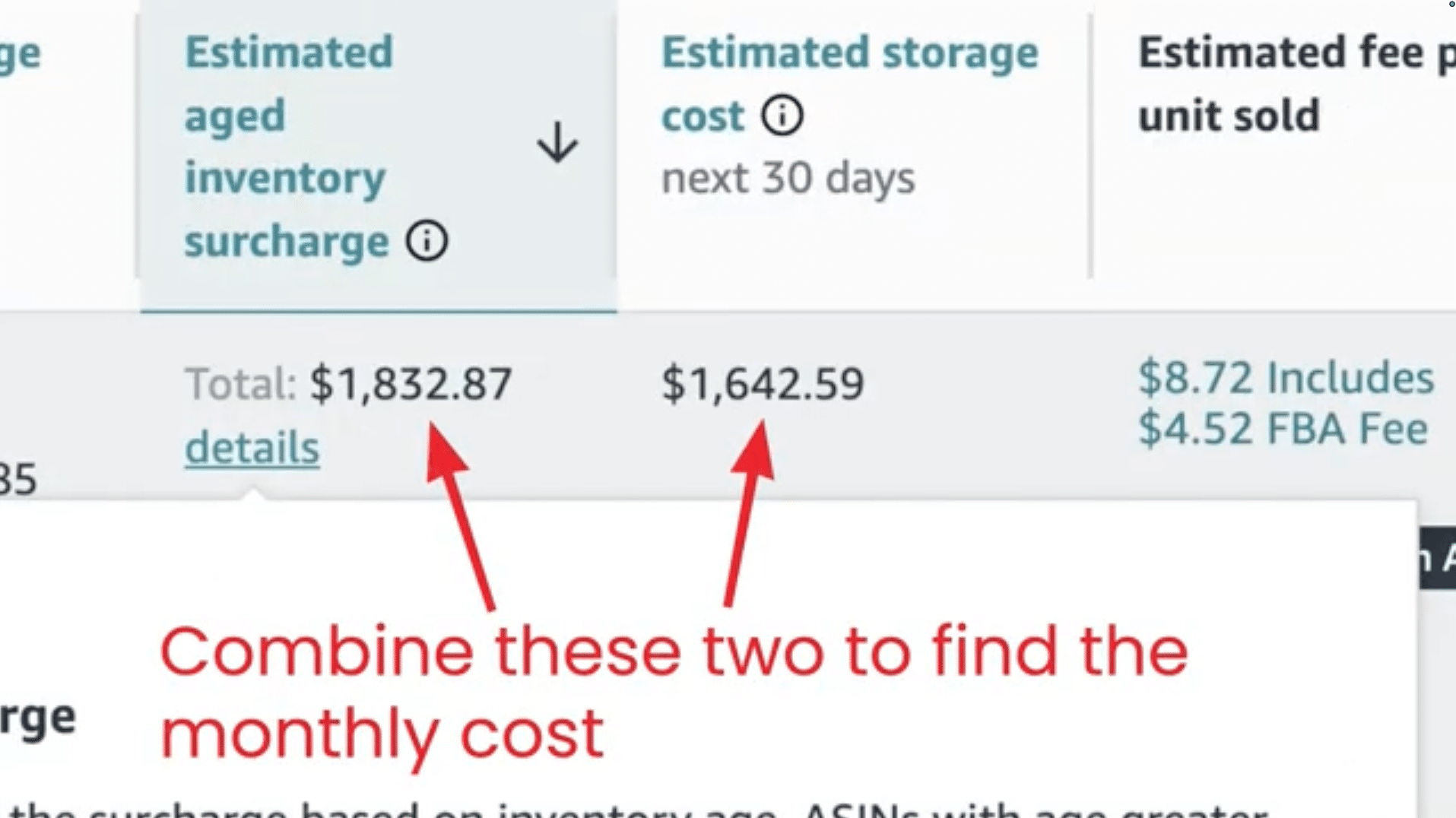
Image above: Combine the aged inventory surcharge and storage cost to understand the real monthly cost of keeping inventory in FBA.
That is usually the point where brands realize the decision is not really about whether removal fees are expensive. It is about whether removal is now the least bad option.
When I have run these numbers with brands, I have often found that it makes sense to keep the portion of inventory you realistically expect to sell over the next one to two months in FBA and remove everything above that amount.
That is not a universal rule for every case, but it is a good practical starting point.
How to Check Amazon Removal and Disposal Fees
At this point, the next question is usually: how do you actually find out what the removal or disposal fee is for one of your products?
There are a couple of ways to do this.
Option 1: Check Inside Seller Central
- Go to Manage All Inventory.
- Find the product.
- Look at the fee preview on the right side.
- Click Calculate Revenue.
- Scroll down in the detailed breakdown.
- Review the removal fee and disposal fee on a per-unit basis.
That is the fastest way to see what Amazon would charge to remove that product.
You will also notice that the removal fee and disposal fee are normally the same.
Option 2: Use Amazon's Revenue Calculator Before You Launch
If you have not started selling a product yet, but you want to estimate what those fees would be, you can use the calculator before launch.
- Select Define Product.
- Enter the product dimensions and weight.
- Scroll down to the fee breakdown.
- Review the removal and disposal fees per unit.
That gives you a way to understand this risk before sending any inventory into Amazon.

Image above: This is where to review fees inside the calculator.
How I Would Think About Inventory to Avoid These Fees
Ideally, you do not want to be choosing between massive removal fees and escalating aged inventory surcharges in the first place.
The better approach is to manage FBA inventory conservatively enough that you are unlikely to get stuck in either situation.
For Products Already Selling Consistently
For products that are selling steadily, I usually recommend keeping around two to four months of inventory in FBA. That is generally enough to stay in stock while still avoiding the inventory ages where surcharges start becoming a serious issue.
For New Products
For newer products, I would usually be even more conservative.
Often that means closer to one to two months of inventory. Sometimes it means just sending in a few dozen units at first.
Remember, you can always send more inventory in a week or two later if it starts moving quickly. What you cannot do cheaply is pull out a large amount of inventory once it is already sitting in Amazon's system.
Be Extra Conservative in Sensitive Categories
Amazon's system will sometimes recategorize a product or place it into a different subcategory after it has already been selling for a while. That can trigger new compliance or approval requirements.
This tends to happen most often in the first few months of selling.
So if you are in categories that Amazon looks at more closely, such as:
- products used by kids
- anything edible
- anything that goes on the skin
then you want to be especially careful about sending in large amounts of inventory too early.
Those are the types of categories where an unexpected documentation request can quickly turn into stranded inventory, forced removals, and very expensive mistakes.
If you want a related framework for avoiding excess inventory problems, this older post on IPI is also relevant: Guide to Amazon IPI Score.
And if you want a fuller breakdown of how storage fees, placement fees, and aged inventory surcharges stack together, this article pairs well with this one: Amazon Storage Fees Explained.
Quick Decision Framework
If you already have inventory aging in FBA, here is the simplest way I would evaluate it:
- Estimate how many units you realistically expect to sell over the next one to two months.
- Compare the monthly cost of keeping the extra inventory in FBA against the one-time cost of removing it.
- Keep the portion you are likely to sell soon and remove the excess above that amount.
- Be more conservative if the listing has any compliance risk, approval risk, or account-level issues attached to it.
The goal is not necessarily to avoid removal or disposal fees entirely, because in some cases they are unavoidable.
The goal is to avoid putting yourself in a position where you have to pay a large amount of them.
Frequently Asked Questions
Are Amazon removal fees and disposal fees different?
No. Amazon normally charges the same per-unit amount whether inventory is removed and returned to you or disposed of.
When do aged inventory surcharges start?
They start once inventory reaches 181 days in FBA, and the charges increase as the inventory gets older.
How much inventory should I usually keep in FBA?
For products that are already selling consistently, I usually like to see around two to four months in FBA. For newer products, I would often be more conservative and keep closer to one to two months, or even just a few dozen units at first.
Can I check removal fees before launching a product?
Yes. You can use Amazon's revenue calculator, define the product using its dimensions and weight, and review the estimated removal and disposal fees before sending inventory in.
What is the biggest mistake brands make with removal fees?
The biggest mistake is usually sending too much inventory into Amazon too early, especially for new products or products in categories with higher compliance risk.
Final Thoughts
Removal and disposal fees are not usually the first problem. They are what shows up after inventory planning goes wrong, a listing gets blocked, or aged inventory surcharges make it too expensive to keep stock in Amazon.
That is why I think the better way to look at this is not just, “What is the removal fee?”
It is, “How do we avoid ending up in a situation where removal becomes the least bad option?”
If you want a walkthrough, the video above covers this step-by-step. If you have got a quick question about your situation, leave a comment on the video and I will try to point you in the right direction. And if your situation is more complex and you want professional help, reach out to us at customerservice@fivestarcommerce.com or schedule an info call using the “Schedule info call” button on our website.