
If you’re selling on Amazon, you’ve probably seen a bunch of different “prices” thrown around in Seller Central and on your product detail pages. The ones that trip up most brands are Was Price, Reference Price, and Sale Price.
But those aren’t the only ones you’ll run into—there’s also List Price (MSRP) and Your Price. If you don’t understand how these fit together, you risk running promotions that don’t display correctly, or worse, confusing customers about the deal they’re actually getting.
Here’s a clear breakdown of what each of these prices means, how Amazon decides which ones to show, and the common issues brands run into.
1. Was Price
Amazon calculates the Was Price automatically. It’s not something you set.
Here’s what it’s based on:
-
The 90-day median price paid by customers for your product.
-
It excludes promotions and coupons.
-
If your item has a stable history of selling at $40, the Was Price will likely show up around $40.
When you drop your price, Amazon may display it as “Was $40” with a strike-through. But if you’ve been running a lot of promotions or don’t have enough consistent sales, the Was Price may not appear at all.
2. Reference Price
The Reference Price is Amazon’s umbrella term for the price it uses as the comparison point.
-
Sometimes it’s the List Price (if Amazon can verify it).
-
Other times it’s the Was Price (based on your 90-day median).
-
Amazon decides which one to use, based on actual sales history and competitor data.
You can see what Amazon is using for your product by going to SKU Central → Pricing Tab → Reference Pricing Section.

3. Sale Price
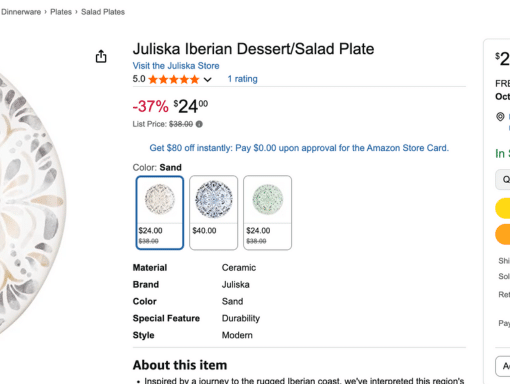
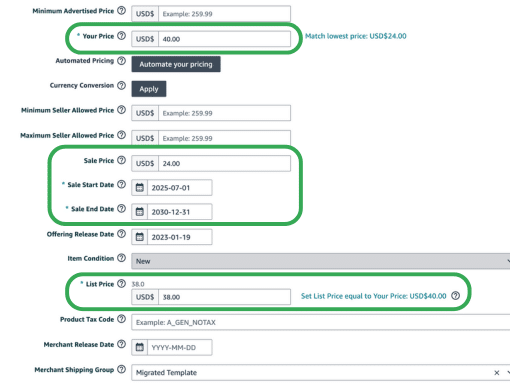
A Sale Price is the discounted price you set manually in Seller Central. To use it, you need to include a start date and end date.
When entered correctly, Amazon shows:
-
Your regular price (or verified reference price) crossed out.
-
Your new Sale Price below it, with a % savings message.
If your Sale Price isn’t showing correctly, it usually means Amazon doesn’t recognize a valid List or Reference Price to compare against.
4. List Price (MSRP)
The List Price is what most people think of as MSRP. You can enter it in Seller Central—but Amazon doesn’t guarantee it will show.
Why? Because the List Price must reflect substantial recent sales either from you or other retailers. If Amazon can’t verify it, they’ll ignore it.
5. Your Price
This one’s simple: Your Price is the regular selling price you set. It’s what customers see if you’re not running a sale.
6. Common Seller Issues
-
“My List Price isn’t showing.” Usually because you don’t have enough sales at that price or competitors are lower.
-
“Why doesn’t my Sale Price show as a discount?” Most often caused by a missing/invalid reference price.
-
“Why did my Was Price disappear?” Amazon recalculates automatically, so it can change based on recent sales.
7. Best Practices for Brands
-
Base your List Price on reality. If you don’t have verified sales at that price, Amazon won’t use it.
-
Plan ahead. Run at full price for long enough before promotions so Amazon recognizes it.
-
Check SKU Central regularly. Don’t assume Amazon is using your List Price—verify what they actually recognize.
-
Don’t inflate before discounts. Amazon tracks history, and fake discounts can hurt your account.
Q: What is Amazon’s Was Price based on?
A: The Was Price is calculated automatically by Amazon. It’s the median price customers paid over the last 90 days, not including promotions or coupons. You can’t set it yourself.
Q: Why isn’t my Sale Price showing as a discount?
A: Usually because Amazon doesn’t recognize a valid reference price (List Price or Was Price). Without one, your Sale Price will just show as the regular price with no strike-through.
Q: Can I set my own Reference Price?
A: Not directly. Amazon decides what the Reference Price is based on your List Price (if Amazon can verify it’s valid) or your Was Price (if enough sales data exists). Amazon doesn't consider a reference price as "verified" unless it can tell that price has been used in the past for real purchases.
Q: Why doesn’t my List Price appear on the product page?
A: Amazon only displays List Price if it can verify it with substantial recent sales from you or other retailers. If it looks inflated or unsupported, Amazon will ignore it.
To fix this, you can sell more units at the regular price first.
Q: How can I make sure my promotions display correctly?
A: Make sure you have consistent sales at your regular price before running a sale, enter accurate start and end dates for Sale Prices, and check SKU Central to confirm Amazon recognizes your reference price.
Wrapping It Up
Amazon doesn’t care what you say your product costs—it cares what your sales history proves. By understanding how Was Price, Reference Price, and Sale Price work (and how they connect to List Price and Your Price), you’ll avoid the common pitfalls that make discounts vanish or look confusing.
Get this right, and your promotions will display properly, build trust with customers, and actually drive the conversions you’re aiming for.