
If Amazon is telling you that your UPC codes do not match the products you’re trying to list, the first thing you need to figure out is whether those UPC codes are actually registered to your company.
This is where a lot of established brands get surprised.
They may have used the same UPC codes for years. The codes may already be printed on packaging, accepted by other retailers, and stored throughout the company’s inventory systems. Then the brand tries to create or update an Amazon listing and receives Error 8572.
What Amazon Error 8572 Usually Means
The error says that you are using UPCs, EANs, ISBNs, ASINs, or JAN codes that do not match the products you are trying to list.
Amazon may ask you to provide:
- Product name
- Manufacturer name
- Brand name
- The UPC, EAN, ISBN, or JAN
- A GS1 certificate
- Authorization from the manufacturer or brand if you are not the brand owner
For brand owners, Amazon may specifically ask for a valid and current GS1 certificate covering the GTIN range used by the listings.
Before you start opening cases and sending Amazon random documents, look up the UPC in GS1. That will show you the company information associated with the identifier and help you understand what Amazon is probably seeing.
What UPC, GTIN, and GS1 Mean
These terms are frequently used together, but they do not all mean exactly the same thing.
A GTIN is a Global Trade Item Number. It is the number used to identify a specific product or trade item.
A UPC is one common format used to display and scan a GTIN on retail products.
GS1 is the organization that manages the standards and registration system behind these identifiers. GS1 helps prevent different companies from assigning themselves the same numbers and allows the identifiers to be used across retailers, marketplaces, and other systems.
The part that creates problems on Amazon is the company relationship behind the number.
A UPC may scan correctly while still creating an Amazon listing error if the company information connected to the UPC does not match the company or brand Amazon expects.
This is separate from fields such as item package quantity and unit count. Those fields can create their own listing problems, so read our guide to understanding package quantity and unit count if Amazon is questioning the number of items or units included in the product.
Why Established Brands Discover UPC Problems Years Later
Many companies bought UPC codes from resellers instead of licensing them directly through GS1.
This was a common practice when getting identifiers directly from GS1 was more expensive or appeared more complicated. Companies found inexpensive codes through barcode websites, eBay sellers, and other third parties. The barcode worked, so the company assumed it owned the number.
What the company may have purchased was permission to use a number that remained registered to someone else.
That distinction may not become obvious until the brand:
- Creates a new Amazon listing
- Receives a product-ID mismatch error
- Has a listing suppressed
- Is asked to provide a GS1 certificate
- Tries to prove that the UPC belongs to the brand
At that point, the seller sees its own product packaging and assumes Amazon must be wrong. Sometimes Amazon does need to correct its system. Other times, Amazon is accurately seeing a registration problem that has existed for years.
The screenshot below shows the documentation Amazon requests when it displays Error 8572.
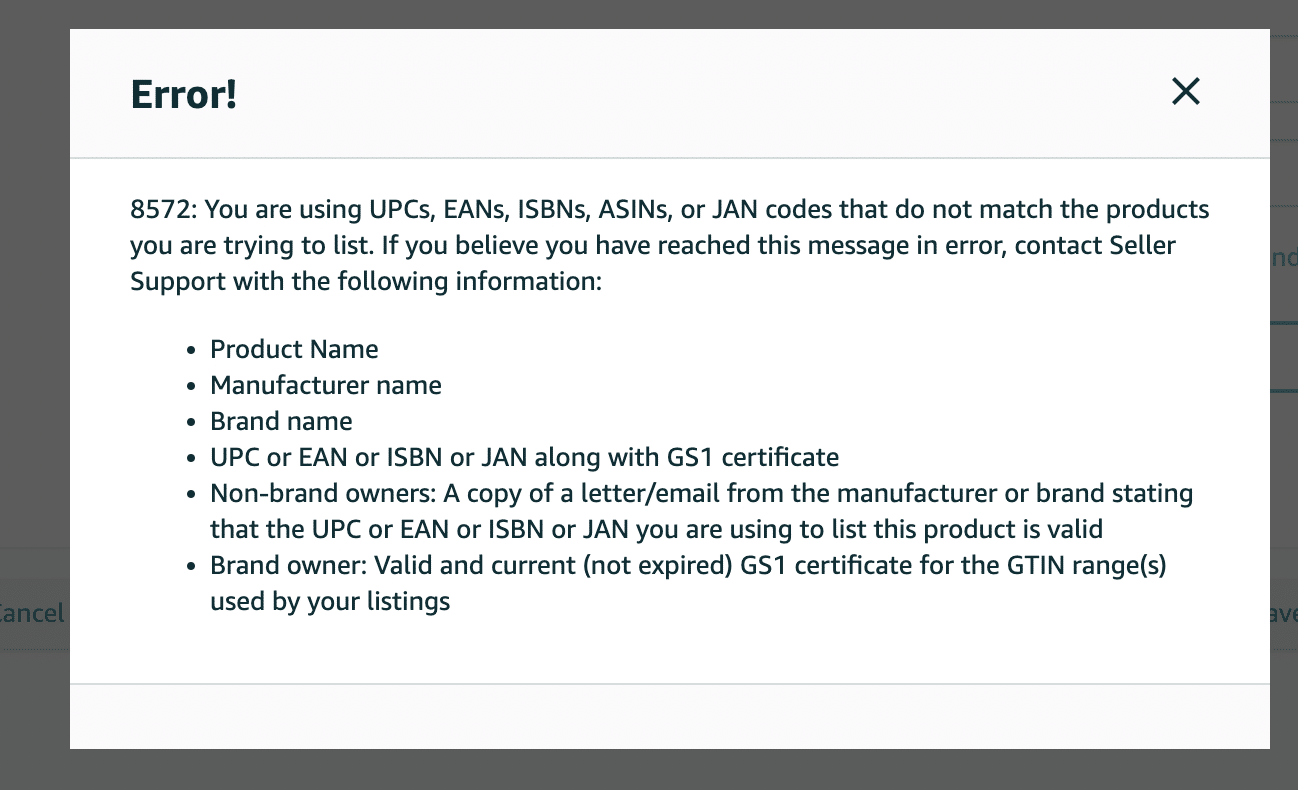
Image above: Amazon Error 8572 asks for the product details, the UPC or other identifier, and documentation showing ownership or authorization.
Amazon Error 8572: UPC Codes Do Not Match the Products You Are Trying to List
Error!
8572: You are using UPCs, EANs, ISBNs, ASINs, or JAN codes that do not match the products you are trying to list. If you believe you have reached this message in error, contact Seller Support with the following information:
Product Name
Manufacturer name
Brand name
UPC or EAN or ISBN or JAN along with GS1 certificate
Non-brand owners: A copy of a letter/email from the manufacturer or brand stating that the UPC or EAN or ISBN or JAN you are using to list this product is valid
Brand owner: Valid and current (not expired) GS1 certificate for the GTIN range(s) used by your listings
If you are seeing this message, Amazon is asking you to document the relationship between the product, the brand, and the UPC or other identifier being used on the listing.
How to Check a UPC in the GS1 Database
GS1 provides a public lookup tool where you can search a UPC or GTIN and review the company information associated with it.
Go to the official GS1 Database powered by Verified by GS1.
Step 1: Find the UPC Printed on the Product
Start with the UPC printed on the physical product or packaging.
Do not rely only on a number copied from an old spreadsheet, inventory system, or Amazon listing. You want to confirm the exact number that is physically printed on the product.
Be careful with leading zeros. A spreadsheet may have removed a zero from the beginning of the code.
Step 2: Open Verified by GS1
You can navigate through the GS1 website, but the easiest option is normally to search for “Verified by GS1” and open the official GS1 result.
The lookup tool gives you a place to enter the UPC or GTIN and review the available information connected to it.
Step 3: Complete the CAPTCHA
GS1 can be aggressive with CAPTCHA verification.
During the walkthrough, I had to identify bridges and complete multiple CAPTCHA prompts before the search worked. That is normal. It does not mean there is a problem with your UPC.
Step 4: Enter the UPC and Review the Result
Type in the complete UPC and run the search.
Depending on the information available, the result may show:
- Company name
- Company address
- Brand name
- Product description
- Other company or identifier information
Do not look only at the company name. The address can be just as important.
A Real UPC Lookup Example
During the video walkthrough, I first grabbed the teleprompter I use and tried to find a UPC on it. It did not have a UPC I could use for the demonstration, so I had to find a different product.
I then found another product with a UPC printed on it and entered that code into GS1. I had to work through the CAPTCHA, restart part of the example, and search again.
In the final lookup, the result showed a company called NE Systems. The result included brand information and a company-information section with the company name and address.
That is the same basic test you should perform with your product.
You are trying to answer three questions:
- Do I recognize the company name?
- Do I recognize the address?
- Can I document the relationship between that company and the brand on Amazon?
What Your GS1 Lookup Result Means
| What You See in GS1 | What It Probably Means | What to Do Next |
|---|---|---|
| The company name and address match your company | The UPC appears to be registered correctly | Download your GS1 certificate and provide it to Amazon with the requested product and brand information |
| The address matches, but the company name is different | The identifier may be registered under a legal company name, another business entity, or another brand your company owns | Provide the GS1 certificate and paperwork explaining the relationship between the names |
| You recognize neither the company name nor the address | The UPC was probably purchased from a reseller and is still registered to another company | Find the original barcode supplier, request documentation, and evaluate your alternatives |
| The information matches, but Amazon still shows an error | Amazon may need to correct the information in its own system | Submit the GS1 certificate and the requested supporting information to Seller Support |
Scenario 1: The Company Name and Address Match
This is the best result.
The UPC is connected to the company you expected, and the address also matches your records. That means the underlying registration appears to be correct.
If Amazon is still displaying a mismatch error, gather the documentation listed in the error and submit it through Seller Support.
Make it easy for the support representative to understand:
- Which product is affected
- Which UPC is affected
- Which company owns the identifier
- How the company is connected to the brand
- What you want Amazon to correct
Documents Amazon May Request for Error 8572
| Your Situation | Documentation to Prepare |
|---|---|
| Every seller receiving the error | Product name, manufacturer name, brand name, the affected UPC or other identifier, and a screenshot of the error |
| You are the brand owner | A valid and current GS1 certificate covering the GTIN or GTIN range used by the listing |
| You are not the brand owner | A letter or email from the manufacturer or brand stating that the identifier being used for the product is valid |
| The GS1 company name differs from the Amazon brand | The GS1 certificate plus paperwork explaining the relationship between the registered company and the brand |
| The UPC came from a reseller | The original purchase records and any authorization paperwork the reseller can provide |
How to Download a GS1 Certificate
If your company licensed the GTIN or Company Prefix through GS1, log in to the company’s GS1 account.
GS1’s current instructions direct users to:
Manage Account → View Licenses & Download Certificates
The certificate confirms your organization’s licensed GS1 Company Prefix or GS1 identifier. Retailers, marketplaces, distributors, and other partners may request it as proof that your company is the authorized licensee.
You can review the official GS1 instructions for printing a certificate.
If nobody at your company knows the login, try password recovery using likely company email addresses. If that does not work, contact GS1 and ask what it needs to help your company regain access.
This is another reason GS1 accounts should be controlled through company-owned contact information instead of an employee’s personal account.
The screenshot below shows where the Manage Account option appears in GS1.
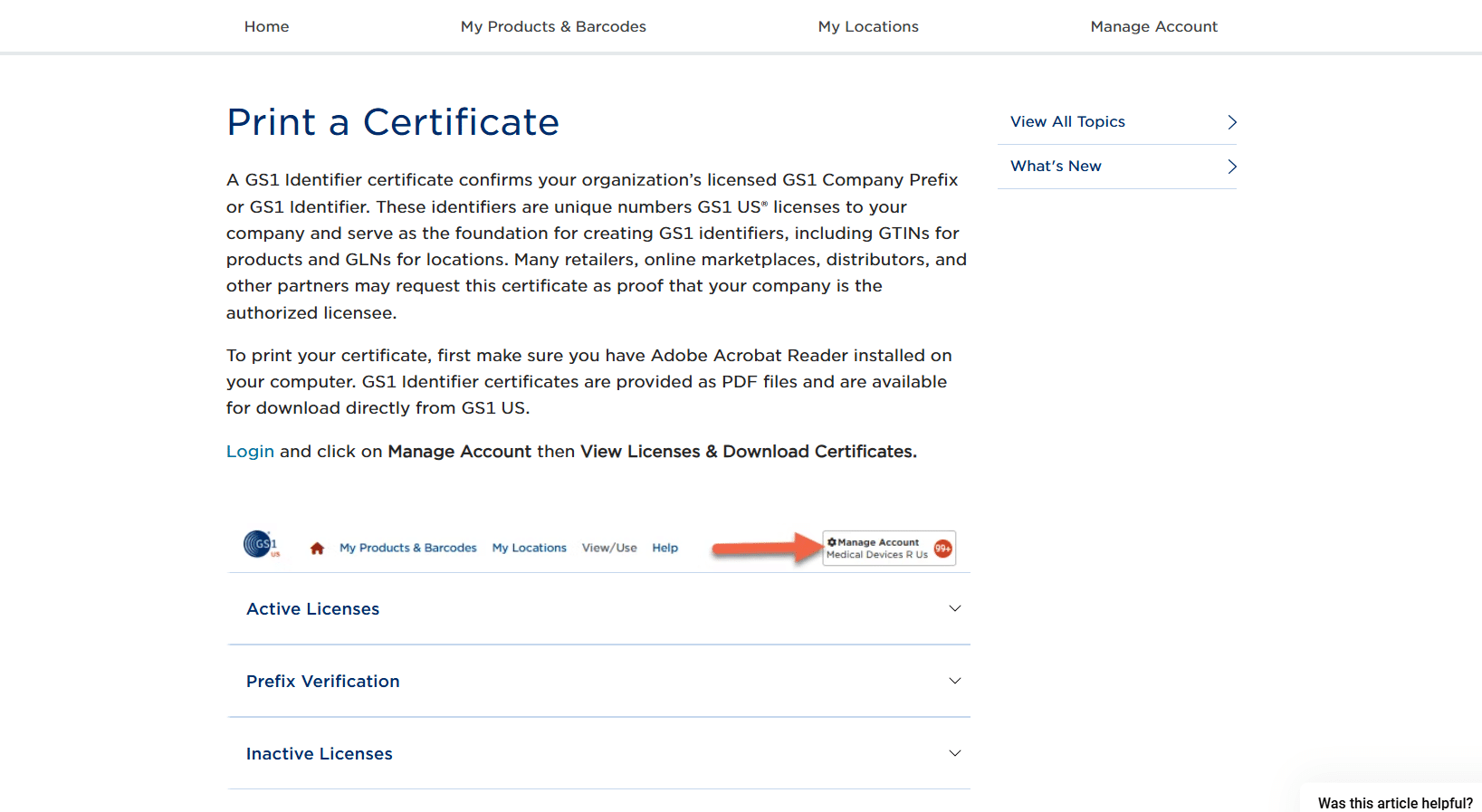
Image above: In GS1, open Manage Account and then select View Licenses & Download Certificates to retrieve the certificate Amazon may request.
Scenario 2: The Address Matches, but the Company Name Is Different
This is extremely common and is not automatically a problem.
The UPC may have been registered under:
- The company’s legal name instead of its public brand name
- A different business entity
- Another brand owned by the same company
- A previous company or brand name
For example, the Amazon listing may use the consumer-facing brand name while the GS1 certificate displays the legal name of the company behind that brand.
Amazon may not automatically understand that relationship.
In this situation, provide the GS1 certificate along with paperwork that explains the relationship between the company shown in GS1 and the brand shown on Amazon.
The important thing is that you recognize the company or address and can document why the names are different.
Do not immediately abandon a valid UPC just because the brand name and legal company name are not identical.
Scenario 3: You Do Not Recognize the Company Name or Address
This is the more serious mismatch.
If you do not recognize either the company name or the address, your company probably bought the UPC from a reseller.
That does not necessarily mean anyone at your company intentionally did something wrong. Buying inexpensive UPCs from third-party websites used to be a very common practice. The person who purchased the codes may have assumed the company was buying full ownership of the numbers.
The problem is that the identifiers may still be registered to the original company.
Start by checking old company records:
- Search email for the UPC number
- Search for “barcode,” “UPC,” “GTIN,” and “GS1”
- Review old invoices and purchasing records
- Ask employees who worked on packaging or retail setup
- Check whether a packaging vendor purchased the codes
- Identify the website or reseller that supplied them
If you find the original seller, contact that company and ask what documentation it can provide.
Some barcode resellers may be able to provide paperwork showing that your company is authorized to use the code. Sometimes Amazon accepts that paperwork.
Do not treat that as a guaranteed solution. The result depends on the specific identifier, documentation, product, and Amazon review.
What to Do When the UPC Is Genuinely Mismatched
Once you confirm that the identifier is registered to an unrelated company, there is not one universal answer.
Your next step depends on what you are trying to list, whether Amazon is already suppressing an existing listing, whether the original reseller can provide documentation, and how many new products you need to identify going forward.
| Situation | Possible Path Forward | What to Keep in Mind |
|---|---|---|
| GS1 information matches, but Amazon shows an error | Submit the GS1 certificate and the information requested in the error | Amazon may need to correct the identifier relationship in its system |
| The company name differs, but you recognize the address | Provide the certificate and paperwork explaining the company relationship | A different legal name or related brand does not automatically make the UPC invalid |
| The company and address are unrelated | Find the original reseller and request authorization documentation | Amazon may or may not accept the reseller’s documentation |
| You are preparing new products | License future identifiers directly through GS1 | This allows the new identifiers to be connected to your own company information |
| You have hundreds or thousands of SKUs | Compare a GS1 Company Prefix with an Amazon GTIN exemption | The right choice depends on your catalog and whether the products need UPCs outside Amazon |
Buying UPC Codes Directly From GS1
For new products going forward, I recommend getting your identifiers directly from GS1 instead of purchasing more codes from an unrelated reseller.
When you obtain the identifier directly from GS1, you can connect it to your company, brand name, and product description. That helps avoid the situation where Amazon looks up the code and finds a completely unrelated company.
As of August 2026, GS1 US lists a single GTIN for a one-time cost of $30 with no annual renewal fee.
You can review the current option to license a single GTIN directly from GS1 US.
When a GS1 Company Prefix Makes More Sense
If you need hundreds or thousands of UPC codes, buying individual identifiers may not make sense.
In that situation, you would normally evaluate a GS1 Company Prefix. The prefix allows the company to create multiple identifiers within its licensed range, but it comes with an annual fee.
This is especially relevant for brands with a large number of SKUs.
A clothing company is a good example. A company may have many products across different styles, sizes, and colors. That can quickly turn into hundreds or thousands of individual SKUs.
The screenshot below shows the GS1 purchase page for a single GTIN.
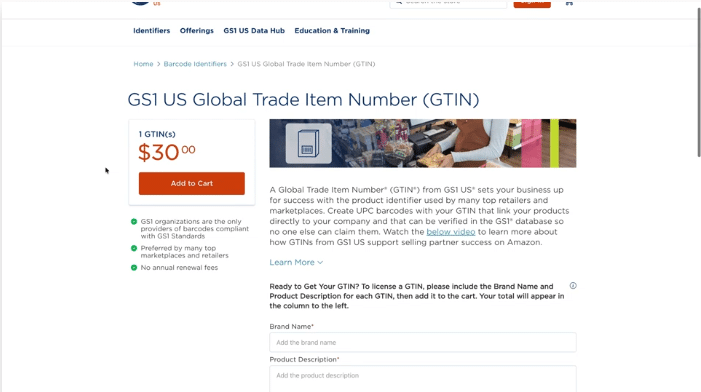
Image above: GS1 US offers a single GTIN for brands that only need one product identifier. Larger catalogs may need a Company Prefix instead.
How to Buy a UPC Directly From GS1
People normally say they are buying a UPC, but technically you are licensing a GTIN from GS1 and then generating the UPC barcode image connected to that number.
Here is how to do it.
Step 1: Determine How Many Product Identifiers You Need
Before purchasing anything, count how many separate products and product variations need their own barcodes.
Each distinct retail product normally needs a separate GTIN. That can include different:
- Sizes
- Colors
- Flavors
- Pack quantities
- Formulations
- Other product variations sold separately
For example, a shirt sold in three sizes and three colors may need nine separate identifiers. Do not buy one GTIN with the intention of using it across every variation.
If you only need one or a few identifiers, individual GS1 US GTINs may be the simplest option. If you need identifiers for a larger catalog, compare that with licensing a GS1 Company Prefix.
Step 2: Go to the Official GS1 US Website
Go to the official GS1 US barcode page and select either a single GS1 US GTIN or a GS1 Company Prefix.
Do not buy the code from an unrelated barcode reseller. The entire reason for going directly through GS1 is to connect the identifier to your company in the GS1 system.
Step 3: Enter the Brand and Product Information
If you are licensing a single GTIN, GS1 will ask for information about the product, including its brand name and product description.
Enter the brand name the way it actually appears on the product. The description should clearly identify the specific product receiving the code.
Do not enter a vague description such as “supplement” or “shirt” if you can provide something more specific. Include enough information to distinguish that product from the other items in your catalog.
Also make sure the company and contact information belong to the business that owns the brand. This is the information you may later need to verify when Amazon compares the listing with GS1.
Step 4: Add the License to Your Cart and Complete Checkout
Review the information, add the GTIN or Company Prefix to your cart, provide the requested contact information, accept the license agreement, and complete payment.
As of August 2026, GS1 US lists one individual GTIN at a one-time cost of $30 with no annual renewal fee.
A GS1 Company Prefix uses a different pricing structure. The cost depends on how many identifiers the prefix can create, and the prefix has an annual renewal fee.
Because GS1 can change its pricing, confirm the current amount on the official website before purchasing.
Step 5: Access the GTIN in GS1 US Data Hub
After checkout, GS1 sends a welcome email with access information for your GS1 account and GS1 US Data Hub.
If you licensed a single GTIN, the brand name and product description entered during checkout should already be connected to the product in Data Hub.
If you licensed a Company Prefix, purchasing the prefix does not automatically create all of your product barcodes. You will need to create each product in Data Hub, assign a GTIN from your prefix, and generate the appropriate barcode.
You can follow GS1’s official instructions for creating a product and generating a UPC-A barcode.
Step 6: Download the Barcode Image
Open the product under My Products & Barcodes in GS1 US Data Hub. Review the product information, generate the UPC-A barcode, and download the barcode image.
The GTIN is the identification number. The UPC-A barcode is the scannable image that represents that number on the product packaging.
Give the downloaded barcode file to the person designing or printing your packaging. Make sure they do not stretch, crop, recolor, or otherwise modify it in a way that could make it difficult to scan.
Step 7: Download and Save Your GS1 Certificate
After the identifier has been licensed, download the GS1 certificate and store it with your product records.
In GS1, go to:
Manage Account → View Licenses & Download Certificates
Save the certificate, purchase confirmation, GS1 login information, GTIN, and final barcode file somewhere your company can access later.
This documentation becomes important if Amazon asks you to prove that the identifier is connected to your company.
Before Printing the Barcode on Your Packaging
- Confirm that the brand name and product description are correct.
- Confirm that the GTIN is assigned to the correct product variation.
- Do not reuse the same GTIN for a different size, color, flavor, or pack quantity.
- Test the barcode before printing a large packaging run.
- Keep the GS1 certificate and account information under company control.
The biggest thing is to set it up correctly the first time. Fixing a mistake before the packaging is printed is much easier than discovering the problem after thousands of units have already been manufactured or Amazon starts asking for ownership documentation.
Single GTIN vs. Company Prefix vs. GTIN Exemption
| Option | Usually Makes Sense For | How It Works | What to Watch Out For |
|---|---|---|---|
| Single GS1 GTIN | A brand that only needs one or a small number of identifiers | The company licenses an individual identifier directly through GS1 | A separate identifier may be needed for each distinct product configuration |
| GS1 Company Prefix | A company that needs hundreds or thousands of identifiers | The company creates identifiers within its licensed prefix range | The prefix has an annual fee and should be sized for the company’s catalog |
| Amazon GTIN Exemption | An eligible Amazon catalog with a large number of SKUs or products that do not use UPCs | Amazon approves the brand or product type to create listings without entering a standard GTIN | It applies to Amazon and does not replace identifier requirements from other retailers |
| Reseller Documentation | An existing product already using a code registered to another company | The seller asks the original supplier for paperwork showing authorization to use the code | Amazon is not guaranteed to accept the documentation |
When a GTIN Exemption May Make More Sense
Some brands may be able to list products on Amazon without using normal UPC codes by applying for a GTIN exemption.
This can be worth considering when a brand has a very large number of SKUs.
A clothing company is a good example. A relatively small number of styles can turn into a large number of SKUs once the company adds all of its sizes and colors.
That does not mean every company with a large catalog should automatically use a GTIN exemption.
The decision depends on:
- Whether the products are also sold through other retailers
- Whether those retailers require UPCs
- Whether the products already have valid identifiers
- Whether the brand and product category qualify for an exemption
- How many SKUs the company needs to create
Our step-by-step Amazon GTIN exemption guide explains how the application works and where brands commonly run into problems.
You can also watch the related walkthrough on how to apply for an Amazon GTIN exemption and the separate explanation of how to decide whether a GTIN exemption makes sense.
Do not assume that a product without a UPC should automatically be listed under the Generic brand. Our guide explains why brands should be careful about listing products as Generic on Amazon.
Common UPC and GS1 Mistakes to Avoid
Assuming a Barcode That Scans Is Registered to Your Company
A code can scan successfully without being registered to your company.
Scanning proves that the barcode can be read. It does not prove that your company is the GS1 licensee connected to the number.
Looking Only at the Company Name
Always review the address too.
A different company name with an address you recognize may indicate that the code was registered under a legal name, another entity, or a related brand.
Sending Amazon Only a Screenshot
A screenshot of the GS1 result may help explain the situation, but Amazon may specifically request a valid GS1 certificate.
Read the error carefully and provide the documents it actually asks for.
Sending Unorganized Documents
Do not attach several unexplained files and expect the support representative to determine how they fit together.
Your case should clearly state:
- The error you received
- The product and UPC involved
- The company listed in GS1
- How that company is related to the Amazon brand
- Which document proves the relationship
- What you are asking Amazon to correct
Buying More Codes From an Unrelated Reseller
Once you discover this problem, do not repeat it for new products.
Get future identifiers directly through GS1 or determine whether a GTIN exemption is a better fit for your catalog.
Assuming the Same Solution Works for Every Product
A correct GS1 registration, a related legal company name, and a code registered to an unrelated reseller are three different situations.
Make sure you know which situation you are dealing with before deciding what to submit to Amazon.
Amazon UPC Error Checklist
| Step | What to Check |
|---|---|
| 1 | Confirm the UPC printed on the physical product or packaging |
| 2 | Search the full number in the official GS1 Database |
| 3 | Compare the company name and address with your records |
| 4 | Decide whether the result is an exact match, a related company, or an unrelated company |
| 5 | Download the GS1 certificate when your company controls the license |
| 6 | Gather paperwork explaining any difference between the registered company and the brand |
| 7 | Request manufacturer or brand authorization if you are not the brand owner |
| 8 | Search old emails and invoices if the code appears to have come from a reseller |
| 9 | Submit an organized Seller Support case with the error screenshot and documentation |
| 10 | Use directly licensed GS1 identifiers or an appropriate GTIN exemption for future products |
Frequently Asked Questions
How do I find out who owns a UPC code?
Enter the UPC or GTIN into the official GS1 Database. Review the company name, address, brand information, and any product details returned. Then compare those details with your company’s legal and brand records.
What does Amazon Error 8572 mean?
It generally means Amazon believes the UPC, EAN, ISBN, ASIN, or JAN does not match the product or brand being submitted. Amazon may ask for product details, a GS1 certificate, and documents proving the relationship between the identifier owner and the brand.
What should I do if the GS1 company name is different from my brand name?
Check the address and determine whether the GS1 company is your legal entity, parent company, subsidiary, previous business name, or another related company. If it is related, provide documents that clearly connect the legal entity to the brand.
What should I do if I recognize neither the company name nor the address?
Search old invoices and emails to identify where the UPC was purchased. Your company may have bought it from a barcode reseller. Ask the original supplier whether it can provide documentation showing your authorization to use the code, but do not assume Amazon will accept that documentation.
How do I print a GS1 certificate?
Log in to your GS1 account, open Manage Account, and select View Licenses & Download Certificates. If nobody at your company knows the login, try password recovery using likely company email addresses or contact GS1 for help regaining access.
How much does one GS1 GTIN cost?
As of August 2026, GS1 US lists a single GTIN at a one-time cost of $30 with no annual renewal fee. Company Prefix pricing and renewal requirements are different.
Should I buy a UPC or apply for a GTIN exemption?
That depends on your catalog and sales channels. A GS1 identifier is often the cleanest choice for a product sold across multiple retailers. A GTIN exemption may make more sense for an eligible Amazon catalog with a large number of SKUs, but it should be evaluated before you build the listings.
Stop Guessing and Check What Amazon Is Seeing
When Amazon says your UPC codes do not match your products, do not start by repeatedly submitting the same listing.
Look up the identifier in GS1 first.
Once you know the company name and address connected to the code, the situation normally falls into one of three categories:
- The information matches, and Amazon needs supporting documentation
- The company name differs, but the relationship can be explained
- The identifier belongs to an unrelated company, and you need to evaluate your alternatives
That lookup gives you the information you need to stop guessing and start working on the actual problem.
If you want a walkthrough, the video above covers this step-by-step. If you’ve got a quick question, leave a comment on the video. And if your situation is more complex and you want professional help, reach out to us at customerservice@fivestarcommerce.com or schedule an info call.