
Download The Amazon Letter of Authorization Template And Fill It Out As You Read
Input your email to be forwarded to the word doc template. This makes it easy to swap out the information and make sure you have everything you need for Amazon to approve it.
Not sure how to fill out the template? Watch the YouTube video or read the article below.
If Amazon asks you for a Letter of Authorization during seller account signup, a lot of brands get thrown off by it.
The reason is simple: Amazon is asking you to write a letter giving yourself permission to open your own seller account.
That feels strange the first time you see it.
Usually this makes brands wonder one of three things:
- “Does Amazon think I’m just a reseller?”
- “What am I actually supposed to say in this letter?”
- “Why would I be authorizing myself?”
What Amazon is typically trying to verify here is not something complicated. They want a short document on company letterhead that clearly shows the business and the person in the application are authorized and that the details in the letter match the details in the seller account application.
That matching part is where a lot of people mess this up.
This post walks through what Amazon is looking for, what details need to match, how to fill out the template correctly, and how to sign and submit it without creating an unnecessary rejection.
What Amazon Means by a Letter of Authorization
Amazon’s application guidance says:
“Letter of Authorisation should be on a business letter head containing business name and point of contact name as provided while registering.”
That sentence tells you most of what matters.
Amazon wants the Letter of Authorization to:
- be on your business letterhead (this basically just means to have your logo at the top)
- show the business name
- show the point of contact name
- match what was entered during registration
So this is really a matching-document exercise.
Amazon is not asking for a long explanation. They are not asking for a legal essay. They are asking for a clean document that confirms the company authorizes the named person to open and manage the seller account on the company’s behalf.
Why This Confuses Brands
The confusion usually happens because the same person may be:
- the representative of the company
- the point of contact in the seller application
- the signer on the Letter of Authorization
So yes, in many cases the person is effectively signing on behalf of the company to authorize that same person to open the account for that company.
That is normal.
It does not automatically mean Amazon thinks you are a reseller. In most cases, Amazon is just trying to connect the dots between:
- the business entity
- the seller account application
- the point of contact
- the submitted supporting documents
The Most Important Rule: Everything Needs to Match
The details in the Letter of Authorization need to match the seller account application.
The most important matching items are:
- Business name
- Business address
- Point of contact name
- Admin seller account email
- Company registration number
- Signer information
| Seller Application Field | LOA Field That Must Match | Common Mistake |
|---|---|---|
| Legal business name | Company name in LOA | Using brand name instead of legal entity |
| Business address | Address in LOA footer | Using warehouse or outdated address |
| Admin seller email | Email in LOA body | Using personal email instead |
| Contact person | Authorized person in LOA | Using a different employee |
| Company registration number | Registration number in LOA | Entering EIN instead |
How Recent the Letter Needs to Be
| Requirement | Amazon Expectation |
|---|---|
| Document date | Within the last 180 days |
| Submission format | PDF, scan, or image |
| Signature | Required |
| Business letterhead | Required |
What Amazon Does Not Want You to Submit
| Document Type | Why Amazon Rejects It |
|---|---|
| Invoices | Not proof of authorization |
| Inventory reports | Internal records |
| Distribution agreements | Different purpose |
| Retail receipts | Do not verify authority |
| Packing slips | Shipping document only |
| Purchase orders | Transaction document |
LOA Structure Overview
| Section | What Goes There |
|---|---|
| Header | Company logo and business letterhead |
| Date | Current date |
| Company information | Legal name, entity type, registration state |
| Authorization statement | Authorizing contact to manage seller account |
| Seller account details | Admin email, seller ID (if available) |
| Brand information | Brand name sold on Amazon |
| Signature block | Signer name, title, company address |
| Contact information | Website, email, phone |
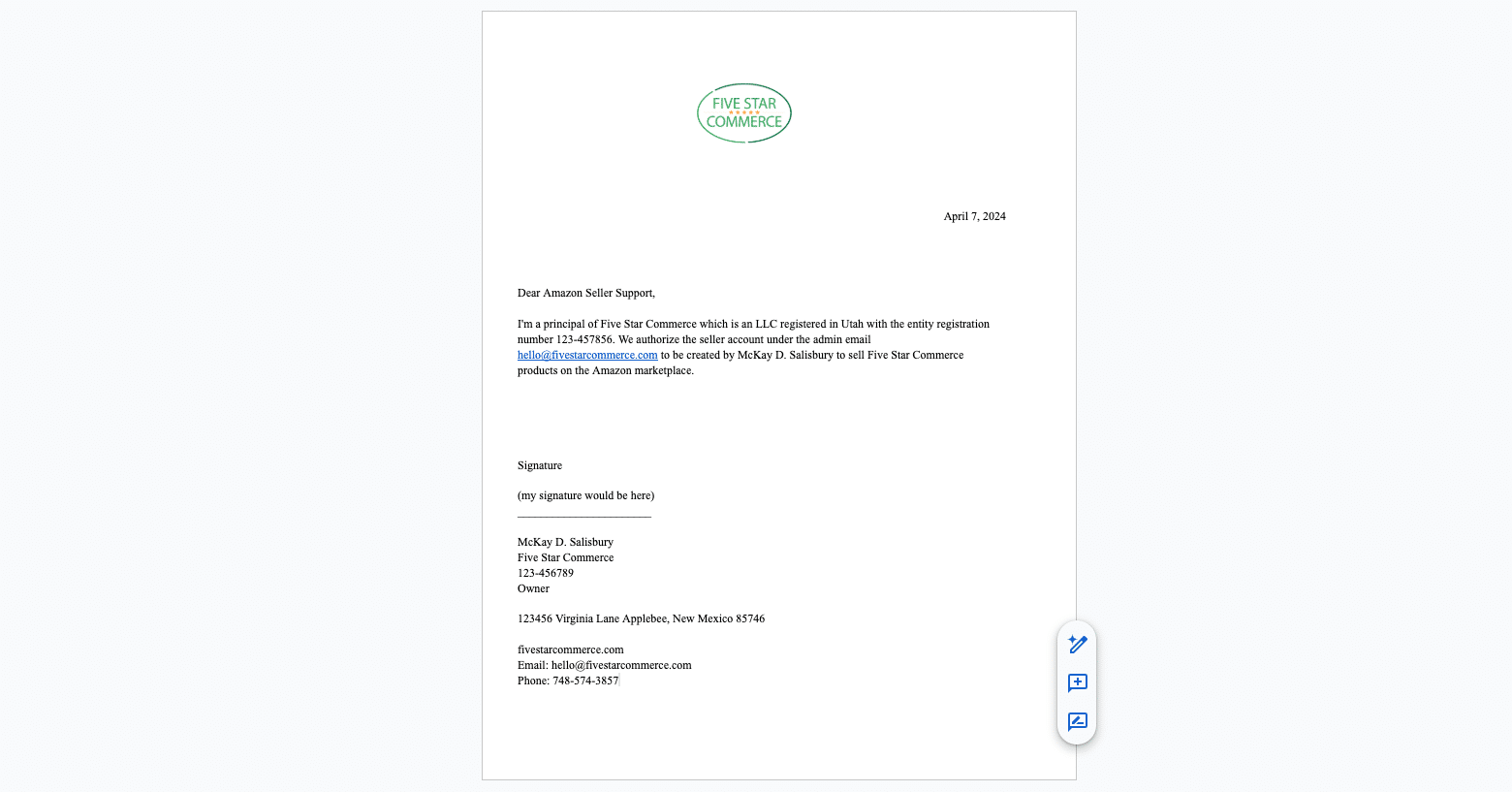
Image above shows an example Amazon Letter of Authorization template used during seller account verification.
Get The Amazon Letter of Authorization Template
Get the template now, swap in your information, sign it, and submit it to Amazon.
How to Fill Out the Template Step by Step
1. Add Your Company Logo
Add your company logo at the top so the document clearly appears on company letterhead.
2. Enter the Date
Use today’s date. Amazon expects the document to be within the last 180 days.
3. Enter the Legal Company Name
Use the exact legal company name used in your seller account application.
4. Enter the Entity Type and State
Identify the legal entity type and where the company is registered.
5. Enter the Company Registration Number
| Number Type | What It Is | Use for LOA? |
|---|---|---|
| EIN | Federal tax ID issued by IRS | No |
| State registration number | Assigned when business registered | Yes |
| Seller ID | Amazon account identifier | Optional |
6. Enter the Admin Seller Account Email
This should match the email used to start your seller account application.
7. Enter the Contact Person
The contact person in the LOA should match the point of contact in the seller account application.
8. Add the Brand Name
Include the brand name associated with the products you plan to sell.
9. Complete the Signature Section
The signature section should include:
- Signer name
- Signer title
- Company name
- Company address
- Company registration number
Common Reasons These Letters Get Rejected
| Issue | Why It Causes Rejection |
|---|---|
| Business name mismatch | Amazon cannot verify entity |
| Address mismatch | Identity conflict |
| Wrong contact person | Authorization unclear |
| Email mismatch | Account ownership unclear |
| Wrong registration number | Entity cannot be verified |
| Document older than 180 days | Outdated documentation |
| Missing signature | Not legally valid |
Signing the Letter Electronically
Most brands sign the LOA digitally.
Mac: Open the PDF in Preview → Create Signature → Place signature → Save.
Windows: Open with Adobe Acrobat Reader → Fill & Sign → Add signature → Save.
Final LOA Submission Checklist
| Requirement | Included? |
|---|---|
| Company letterhead | ✔ |
| Company logo | ✔ |
| Current date | ✔ |
| Legal business name | ✔ |
| Entity type and state | ✔ |
| Company registration number | ✔ |
| Admin seller email | ✔ |
| Point of contact | ✔ |
| Brand name | ✔ |
| Signer name and title | ✔ |
| Company address | ✔ |
| Signature | ✔ |
FAQ
Why is Amazon asking me to authorize myself?
Amazon is verifying that the person opening the seller account is authorized by the business entity.
Does this mean Amazon thinks I’m a reseller?
No. In many cases this is simply part of Amazon’s identity verification process.
Does the contact person need to match the application?
Yes. The contact name should match the seller account application.
Can I use my EIN as the company registration number?
Usually no. Amazon typically wants the state company registration number.
What if I don’t have a seller ID yet?
You can remove that section from the template.
Does the letter need to be signed?
Yes, the LOA should always be signed before uploading.
Wrap-Up
If Amazon asked you for a Letter of Authorization during seller account signup, the main thing is not to overthink it.
You usually just need a short, signed document on company letterhead that clearly identifies the business and matches the seller account application.
If your situation is more complex and you want help getting your Amazon account set up correctly, you can contact us at customerservice@fivestarcommerce.com.
Template is not linked anywhere. It is not linked on your YouTube either.
ya, it looks like there was an issue and the link wasn’t showing. That’s fixed now though!
Kindly Send Template Please. I see an errorr. So please send me on this email.
Get The Amazon Letter of Authorization Template
Hi Azan, it looks like you’re trying to edit the actual template. What you need to do is go to the template and then hover over “file” and then select “make a copy.” That will give you the editable version that you can change. I don’t have you make changes to the actual template because otherwise everyone else using the template would see your information. Let me know if you have any questions!
thanks for your support