
Amazon just announced a major product title change that affects almost every category.
Starting July 27, 2026, product titles in all categories except media will need to be 75 characters or less, including spaces. That is a big change because, for quite a while now, many categories have allowed much longer titles. A lot of sellers have built their listings around those longer titles.
At first glance, this sounds like Amazon is simply cutting title space dramatically. But that is not exactly what is happening.
Amazon is also adding a new field called Item Highlights. That field gives sellers an additional 125 characters for information that used to be packed into the title. Amazon says Item Highlights can be used for things like materials or recommended use cases that help customers compare options. Amazon also says this content is searchable and visible with titles in search results and on product detail pages.
So the practical way to think about this is:
- The product title is becoming the main, short product name.
- Item Highlights are becoming the secondary title-style information.
That means this is not necessarily a disaster. It is just a different way Amazon wants product information structured.
Quick Summary: What Sellers Need to Know
- Starting July 27, 2026: Amazon product titles in all categories except media need to be 75 characters or less, including spaces.
- New field: Amazon is adding Item Highlights, which give sellers another 125 characters.
- Item Highlights matter: Amazon says this content is searchable and visible with titles in search results and on product detail pages.
- Your listings stay active: Amazon says listings will not be pulled down just because the title is still over 75 characters.
- AI may rewrite titles: Titles over 75 characters may be updated gradually to Amazon’s AI recommendation after July 27.
- Brand owners get review time: Brand owners can review, modify, and approve AI-generated recommendations before implementation.
What Is Changing With Amazon Product Titles?
Amazon’s new rule is that, beginning July 27, 2026, titles in all categories except media will need to be 75 characters or fewer, including spaces. Media means things like DVDs and similar categories. For most physical product brands, this update will apply.
Amazon is also rolling out Item Highlights, which provide an additional 125 characters. According to Amazon, Item Highlights are meant for things like materials or recommended use cases that help customers compare options. Amazon also says this content is searchable and visible with titles in search results and on product detail pages.
You can read Amazon’s announcement here: Updates to improve your product titles begin on July 27. Amazon also created a seller discussion thread here: Engage With Amazon: Get your Product Title Update Questions Answered.
That searchable and visible part matters.
If Item Highlights were not searchable or visible, this would be a much more serious issue. But because Amazon is saying they are searchable and visible with titles, it sounds like Amazon is splitting what used to be one long title into two different pieces:
- Product Title: the concise item name.
- Item Highlights: supporting product details, use cases, materials, and comparison information.
Amazon has not described every exact display scenario yet. For example, it is still not totally clear whether Item Highlights will always look like a subtitle, appear under the title, appear next to the title, or display differently depending on the page or device. But Amazon’s language makes it sound like customers will see this information alongside the title in important shopping areas.
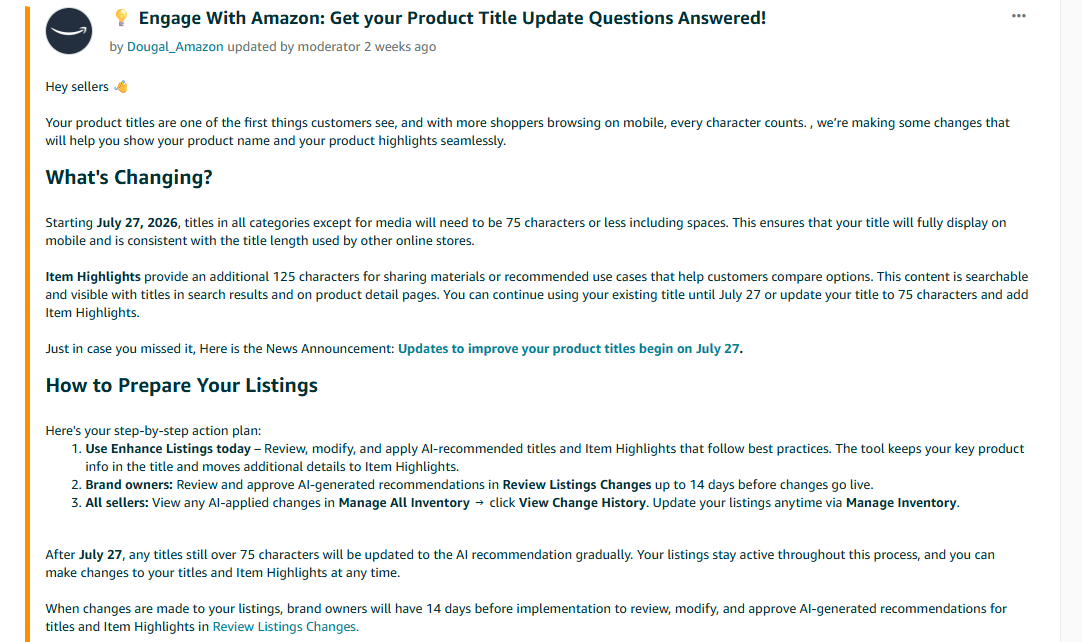
Image above: Amazon’s seller forum post explains the 75-character title limit and the new 125-character Item Highlights field.
Why Amazon Is Doing This
Amazon’s explanation is basically that more shoppers are browsing on mobile, and long titles often get cut off. When titles are too long, sellers do not really know which part customers are seeing, especially on mobile.
By forcing the title down to 75 characters, Amazon is trying to make the main product name cleaner and more predictable.
The important information about what the product is should go in the title. The extra information about use cases, materials, or supporting benefits should move to Item Highlights.
Amazon also seems to be trying to make product pages feel more consistent with other online shopping websites. Most ecommerce sites do not use giant keyword-packed titles the way Amazon sellers historically have. They use shorter names, then secondary fields for other details.
So this is partly about mobile display, partly about standardization, and partly about reducing overly long product titles.
Is This a Bad Change?
Not necessarily.
It is definitely extra work. If you have a large catalog, someone needs to review titles, shorten them, and decide what belongs in Item Highlights.
But the change itself is not automatically bad.
In some ways, it might be cleaner for customers. Long Amazon titles can be hard to read, especially when they are stuffed with every possible keyword, size, feature, and use case. A shorter title plus a separate highlight field could make listings easier to understand.
The big question is how well Amazon displays and indexes Item Highlights in practice.
Amazon says Item Highlights are searchable and visible with titles. If that works the way sellers hope, then this is less about losing title space and more about reorganizing title content.
What Happens If You Do Nothing?
Amazon says your listings are not going to get pulled down just because you do not update them before July 27.
That is important.
If your title is over 75 characters after July 27, Amazon says the title will be updated to the AI recommendation gradually. Your listings stay active throughout the process, and you can still make changes to titles and Item Highlights at any time.
So this is not the same as a compliance issue where your product immediately gets suppressed or removed.
But doing nothing still has risk.
The risk is that Amazon’s AI may rewrite your title in a way that you do not like.
Amazon says brand owners will have 14 days before implementation to review, modify, and approve AI-generated recommendations for titles and Item Highlights in Review Listings Changes.
That gives you a review window, but it also means you need to actually pay attention. If you have a lot of ASINs, it is easy to miss changes, especially if your team is not regularly checking Seller Central.
What Sellers Should Do Now
Here is what I would do if you are managing Amazon listings for a brand.
| Step | What to Do | Why It Matters |
|---|---|---|
| 1 | Pull a list of active ASINs and current titles. | You need to know which titles are over 75 characters before you can prioritize updates. |
| 2 | Identify titles over 75 characters. | These are the listings most likely to be affected by Amazon’s AI recommendations. |
| 3 | Rewrite the title around the core product name. | The title should quickly tell customers what the product is. |
| 4 | Move secondary details into Item Highlights. | Use the new 125-character field for use cases, materials, and supporting benefits. |
| 5 | Review AI recommendations before approving them. | AI can create inaccurate titles or include language that may not be allowed for your category. |
| 6 | Monitor change history after July 27. | You want to catch any AI-applied changes that hurt clarity, accuracy, or compliance. |
1. Audit Your Current Titles
Start by pulling a list of your active ASINs and reviewing the current product titles.
You are looking for anything over 75 characters.
For smaller catalogs, you can do this manually. For larger catalogs, you probably want to export the listings and use a spreadsheet to count title length.
The key is not just finding titles that are too long. You also want to identify why they are too long.
Usually, long titles include some mix of:
- Brand name
- Product type
- Material
- Size
- Color
- Pack count
- Compatibility
- Primary use case
- Secondary use case
- Claims or benefits
- Keyword variations
- Old SEO stuffing
The new structure forces you to decide what truly belongs in the product name and what should move into Item Highlights.
2. Decide What Must Stay in the 75-Character Title
The title should still clearly answer the customer’s first question:
What is this product?
You generally want the title to include the most essential product-identifying information.
That might include:
- Brand
- Core product type
- Primary differentiator
- Size, color, flavor, or variation-specific detail if needed
- Pack count if it affects what the customer is buying
- Critical compatibility information if the product depends on it
But you will not be able to include everything anymore.
That means you need to make decisions.
For example, if you sell a stainless steel insulated water bottle, the main title probably needs to say that it is a stainless steel insulated water bottle. It may also need to include the brand and maybe a major feature like BPA-free.
But it probably does not need to include every use case, every temperature claim, and every lifestyle phrase in the title itself.
3. Move Secondary Information Into Item Highlights
Amazon’s example uses this title:
Before, 92 characters:
“Premium Stainless Steel Insulated Water Bottle – Keeps Drinks Cold 24 Hours, Hot 12 Hours, BPA-Free”
After, 62 characters:
“Premium Stainless Steel Insulated Water Bottle – BPA-Free”
Item Highlight, 98 characters:
“Keeps drinks cold 24 hours, hot 12 hours. Ideal for gym, office, and outdoor adventures.”
That example shows the kind of split Amazon is looking for.
The actual title keeps the core product name and one product feature: BPA-Free.
The Item Highlight moves the temperature performance and use cases: cold 24 hours, hot 12 hours, gym, office, outdoor adventures.
You could argue about whether BPA-Free should be in the title or in Item Highlights. There may be products where you would make a different decision. But Amazon’s example gives us a pretty good sense of how they are thinking.
They seem to want the title to identify the product and the Item Highlights to explain why someone might want it or how they might use it.
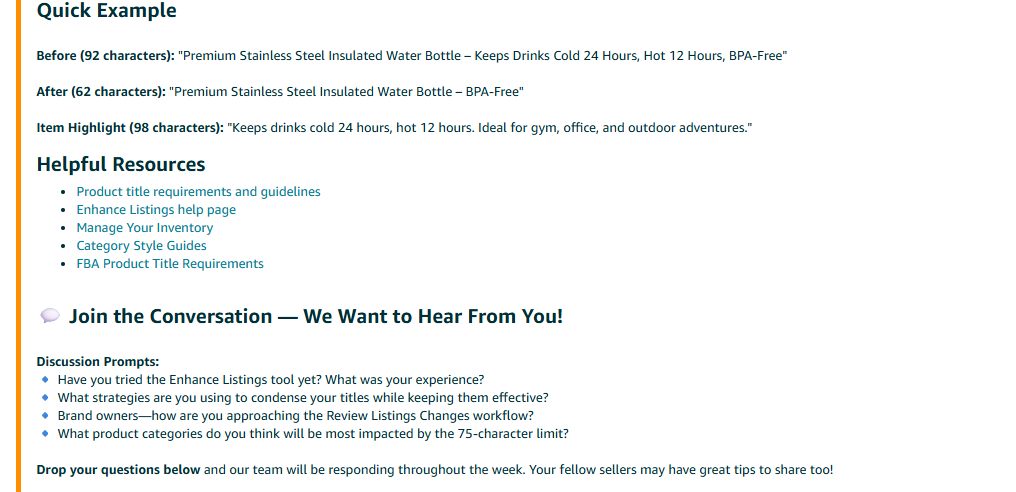
Image above: Amazon’s example shows how a long product title can be shortened while supporting details move into Item Highlights.
4. Use Enhance Listings and Review Listings Changes
Amazon is pointing sellers toward Enhance Listings and Review Listings Changes.
Amazon’s recommended action plan is:
- Use Enhance Listings today to review, modify, and apply AI-recommended titles and Item Highlights.
- Brand owners should review and approve AI-generated recommendations in Review Listings Changes up to 14 days before changes go live.
- All sellers can view AI-applied changes in Manage All Inventory by clicking View Change History. Sellers can update listings anytime through Manage Inventory.
You can also use Amazon’s Manage Inventory tools to search, view, and update product listing information: Use Manage Inventory and Manage All Inventory.
That does not mean you should blindly accept Amazon’s recommendations.
It means you should look at them.
Amazon’s AI-generated titles may be helpful as a starting point, but you still need to review them like a human who actually understands the product, the category, and the compliance rules.
Be Careful With AI Recommendations
One seller concern that came up is what happens if Amazon’s AI recommends language that violates policy.
That is a real concern.
This happens a lot in sensitive categories, especially dietary supplements and other regulated or semi-regulated product types. AI may suggest a phrase that sounds good from a marketing perspective but is not allowed under Amazon’s rules or under the rules for that product category.
If Amazon’s AI recommends a restricted word, a medical claim, or something else you are not allowed to say, you should not assume it is safe just because Amazon suggested it.
You are still responsible for your listing content.
So when reviewing AI-generated titles or Item Highlights, check for:
- Restricted words
- Disease claims
- Drug-like claims
- Unsupported performance claims
- Incorrect materials
- Incorrect compatibility
- Wrong pack counts
- Claims that your packaging or documentation does not support
- Brand or trademark issues
- Anything that could confuse customers
For supplements, topical products, children’s products, medical-adjacent products, pesticides, hazmat-related items, and other sensitive categories, this review matters even more.
If your brand is dealing with compliance-heavy Amazon issues, this is the same kind of situation where it helps to understand how Amazon reviews listing claims, documents, and approvals. We have more Amazon compliance articles here: Amazon Compliance articles from Five Star Commerce.
Do not just approve an AI recommendation because it makes the title shorter.
How to Think About Title Strategy Under the New Rule
The old Amazon title strategy was often:
Put as much relevant information in the title as possible.
The new strategy is more like:
Use the title for the clean product name, then use Item Highlights for the most important secondary details.
That changes how you prioritize.
| Put This in the Product Title | Move This to Item Highlights |
|---|---|
| Brand name, if important for recognition. | Use cases such as gym, office, camping, travel, home, or commercial use. |
| Core product type, such as insulated water bottle, cutting board, supplement, or replacement filter. | Supporting benefits such as keeps drinks cold, easy to clean, reusable, or designed for outdoor use. |
| Critical size, color, flavor, model number, or pack count when needed to identify what the customer is buying. | Materials, secondary features, or comparison details that help shoppers choose between options. |
| The most important product-identifying keyword. | Helpful secondary keywords that still read naturally and help customers compare products. |
The Title Should Be the Product Name
The title needs to be clear enough that a shopper can immediately understand what the item is.
For example:
“Premium Stainless Steel Insulated Water Bottle – BPA-Free”
That title tells the customer the product type and one key feature.
It does not try to say everything.
Item Highlights Should Carry the Supporting Details
The Item Highlights field is where you can add the details that are useful, searchable, and customer-facing, but not absolutely necessary in the main product name.
For example:
“Keeps drinks cold 24 hours, hot 12 hours. Ideal for gym, office, and outdoor adventures.”
This gives Amazon and the customer more context without overloading the product title.
Some Categories Will Be Harder Than Others
Some sellers have already pointed out that certain categories require a lot of specific information in the title.
That is a fair concern.
There are categories where the title has historically needed to include important details like compatibility, size, model number, quantity, color, material, or compliance-related information. Getting all of that into 75 characters may be difficult.
In many cases, Item Highlights may solve part of that problem. If Amazon truly displays and indexes those highlights with the title, sellers can move a lot of supporting information there.
But there may still be edge cases where 75 characters is tight.
If your category requires specific information, do not remove required details just to make the title cleaner. You need to balance Amazon’s title length rule with category-specific requirements and customer clarity.
This is especially important for brands working through catalog setup, listing issues, Brand Registry, or category-specific requirements. We have more Amazon catalog and listing articles here: Amazon Catalog & Listings articles from Five Star Commerce. If you are also dealing with Brand Registry or control issues, this article may help: How Amazon Brand Registry Works and What It Doesn’t Do.
Should You Update Now or Wait?
You can continue using your existing title until July 27, 2026, or update your title to 75 characters and add Item Highlights now.
For most brands, I would not wait until the last minute.
There is no need to panic, but there is also no reason to let Amazon’s AI make the first move if your team can handle the updates now.
Updating earlier gives you more control.
It also gives you time to:
- Review your whole catalog
- Prioritize best-selling ASINs first
- Rewrite titles thoughtfully
- Add Item Highlights
- Check AI recommendations
- Avoid policy issues
- See how the new format looks on live listings
- Make adjustments before enforcement starts
If you have hundreds or thousands of SKUs, this should probably be treated as a catalog cleanup project.
A Practical Before-and-After Framework
When rewriting titles, do not just cut characters randomly.
Use a structure like this.
Step 1: Identify the Core Product Name
Ask:
- What would a customer call this product?
- What is the clearest product type?
- Does the brand need to be included?
- Is there a size, color, flavor, pack count, or model number that must be in the title?
Start with the information that defines the product.
Step 2: Remove Repetition and Filler
A lot of Amazon titles are long because they repeat similar ideas.
For example, “Premium,” “High Quality,” “Durable,” “Professional Grade,” and “Best” may not all be needed.
Also be careful with generic lifestyle phrases. If they are not essential to identifying the product, they may belong in Item Highlights instead.
Step 3: Move Use Cases to Item Highlights
Use cases are often perfect for Item Highlights.
Examples:
- Ideal for gym, office, and travel
- Great for camping, hiking, and outdoor use
- Designed for home, restaurant, or commercial kitchens
- Compatible with specific use situations
In Amazon’s own example, “Ideal for gym, office, and outdoor adventures” goes into Item Highlights, not the title.
Step 4: Move Supporting Benefits to Item Highlights
Benefits can also move into Item Highlights, especially when they are not the main product identifier.
Examples:
- Keeps drinks cold 24 hours
- Hot 12 hours
- BPA-free
- Made with stainless steel
- Easy to clean
- Reusable
Some of these may still belong in the title depending on the product. But the point is that you now have another field for them.
Step 5: Check the Character Count
The title needs to be 75 characters or fewer, including spaces.
Item Highlights give you 125 characters.
That is not a lot of room, so you still need to write carefully.
Do not assume you can move a 125-character chunk of keyword stuffing into Item Highlights and call it good. It should still read naturally and help customers compare options.
What This Means for SEO
Amazon says Item Highlights are searchable. That is a key point.
If Item Highlights are searchable, then some of the terms sellers used to put into titles may still be indexed when moved into the new field.
That said, I would be careful about making overly specific ranking assumptions too early.
Amazon has said the content is searchable. But that does not automatically tell us exactly how much weight Item Highlights will carry compared with titles, bullet points, backend search terms, or other listing fields.
So I would not treat Item Highlights as a perfect one-to-one replacement for title keywords yet.
The safest approach is:
- Keep the most important product-identifying terms in the title.
- Move secondary but still useful search terms into Item Highlights.
- Make sure bullet points, A+ Content, backend search terms, and other listing content are also well-structured.
- Monitor performance after changes.
- Do not overreact to one field.
If you are also reviewing listing images, A+ Content, or other conversion assets as part of a catalog cleanup, here are a couple of related Five Star Commerce resources: Amazon Listing Image Design Portfolio and Amazon A+ Content Design Portfolio.
What Brand Owners Need to Watch
Brand owners should pay special attention to Review Listings Changes.
Amazon says brand owners will have 14 days before implementation to review, modify, and approve AI-generated recommendations for titles and Item Highlights.
That means someone on your team should know:
- Where to find Review Listings Changes
- How often to check it
- Who has authority to approve or reject changes
- What compliance rules apply to your category
- Which ASINs are highest priority
For larger brands, this should not be left to whoever happens to log in that day.
You may want a simple internal process:
- Pull ASINs with titles over 75 characters.
- Prioritize best sellers and high-risk categories.
- Review Amazon’s AI recommendations.
- Edit manually where needed.
- Check for compliance language.
- Approve only after review.
- Document what changed.
- Monitor performance.
What All Sellers Should Watch
Even if you are not the brand owner, Amazon says all sellers can view AI-applied changes in Manage All Inventory by clicking View Change History. Sellers can update listings any time through Manage Inventory.
That is important because AI-applied changes may affect your listings even if you are not actively editing them.
If you see a title change that hurts clarity, introduces an error, or creates a compliance concern, you should fix it.
Common Mistakes to Avoid
| Do This | Don’t Do This |
|---|---|
| Rewrite titles around the clearest product name. | Randomly delete words until the title fits under 75 characters. |
| Use Item Highlights for use cases, materials, and supporting benefits. | Treat Item Highlights like a leftover keyword dump. |
| Review AI-generated recommendations before approving them. | Assume Amazon’s AI suggestion is automatically safe or accurate. |
| Keep critical product identifiers in the title when customers need them. | Remove size, pack count, model number, flavor, or compatibility details when they are essential to the buying decision. |
| Monitor View Change History after Amazon starts applying updates. | Ignore listing changes after July 27 and assume everything still looks right. |
Mistake 1: Waiting Until July 27
Your listings may stay active, but that does not mean waiting is smart.
If Amazon’s AI starts gradually updating long titles after July 27, you may end up reacting to changes instead of controlling them.
Mistake 2: Blindly Accepting AI Titles
AI recommendations can be useful, but they can also be wrong.
They may misunderstand your product, remove an important keyword, include a claim you should not make, or prioritize the wrong feature.
Review everything.
Mistake 3: Treating Item Highlights Like a Junk Drawer
Item Highlights should not just be a pile of leftover keywords.
Amazon says they are for materials or recommended use cases that help customers compare options. Use them that way.
Mistake 4: Removing Critical Variation Information
If size, color, flavor, pack count, or model number is critical to customer understanding, be very careful before removing it from the title.
A shorter title that causes customer confusion is not a win.
Mistake 5: Ignoring Category-Specific Requirements
Some categories have extra title expectations or compliance considerations.
Do not assume the 75-character rule is the only rule that matters.
Example: How Amazon Wants Sellers to Split the Information
Amazon’s example is useful because it shows the logic behind the change.
Before:
“Premium Stainless Steel Insulated Water Bottle – Keeps Drinks Cold 24 Hours, Hot 12 Hours, BPA-Free”
This is 92 characters.
After:
“Premium Stainless Steel Insulated Water Bottle – BPA-Free”
This is 62 characters.
Item Highlight:
“Keeps drinks cold 24 hours, hot 12 hours. Ideal for gym, office, and outdoor adventures.”
This is 98 characters.
The product title keeps the core item identity. The Item Highlight keeps the performance details and use cases.
That is probably the model sellers should follow unless there is a strong reason not to.
My Take on the Update
This is one of those Amazon changes that sounds worse at first than it may actually be.
Yes, 75 characters is much shorter than what sellers are used to.
But Amazon is not simply deleting the other 125 characters. They are creating a new place for that information and saying it will be searchable and visible with titles.
So the actual work is not just “shorten every title.”
The work is:
- Separate the real product name from the supporting product details.
- Put the most important identifying information in the title.
- Put the use cases, materials, and comparison details into Item Highlights.
- Review AI recommendations carefully.
- Make sure nothing creates a policy or customer confusion issue.
For listing writers, agencies, and internal ecommerce teams, this means the standard listing workflow needs to change. Going forward, titles and Item Highlights should probably be written together.
Instead of writing one long Amazon title, you are writing:
- A 75-character title.
- A 125-character Item Highlight.
That is the new format sellers need to get used to.
FAQ
When does Amazon’s 75-character title limit start?
Amazon says the update begins July 27, 2026. Starting then, titles in all categories except media need to be 75 characters or less, including spaces.
Does this apply to every category?
Amazon says it applies to all categories except media. For most physical product brands, this update will apply.
What are Item Highlights?
Item Highlights are a new field that gives sellers an additional 125 characters for details such as materials or recommended use cases. Amazon says this content is searchable and visible with titles in search results and on product detail pages.
Will my listing be removed if I do not update the title?
Amazon says listings will stay active throughout the process. After July 27, titles still over 75 characters will be updated to the AI recommendation gradually.
Should I trust Amazon’s AI title recommendations?
Use them as a starting point, not as something to approve blindly. You should review them for accuracy, important keywords, customer clarity, and policy compliance.
How long do brand owners have to review AI-generated recommendations?
Amazon says brand owners will have 14 days before implementation to review, modify, and approve AI-generated recommendations in Review Listings Changes.
Can I update my titles before July 27?
Yes. Amazon says sellers can continue using existing titles until July 27 or update titles to 75 characters and add Item Highlights now.
What should go in the product title versus Item Highlights?
The title should focus on the core product name and the most important identifying information. Item Highlights should contain supporting details like materials, use cases, performance details, and comparison information.
Final Thoughts
This update adds work, but it is manageable.
The main thing is not to think of this as simply losing title space. Think of it as Amazon splitting the old long title into two fields: a shorter product title and a separate Item Highlights field.
If you have only a few listings, start reviewing them now and rewrite anything over 75 characters.
If you have a large catalog, pull your titles into a spreadsheet, identify everything over the limit, prioritize your most important ASINs, and begin updating them before Amazon’s AI starts doing it for you.
And whatever you do, do not blindly approve AI-generated titles without checking them first. Amazon may suggest the change, but you are still responsible for the accuracy and compliance of your listing content.
If you want a walkthrough, the video above covers this step-by-step. If you’ve got a quick question, leave a comment on the video. And if your situation is more complex and you want professional help, reach out to us at customerservice@fivestarcommerce.com or schedule an info call using the “Schedule info call” button on our website.