
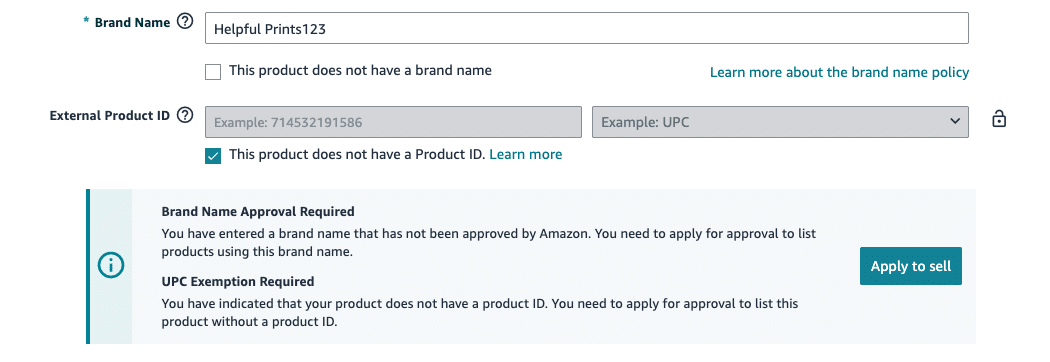
When you’re creating a new Amazon listing, there’s a moment where things often go sideways.
You type in your brand name. Amazon throws an error. You’re blocked from moving forward.
And then you see a checkbox that says something like:
“This product does not have a brand name.”
You check it. The error disappears. The listing goes through.
At that moment, it feels like you just solved a small technical issue. In reality, you may have just locked your product into one of the most painful catalog mistakes on Amazon: listing as generic.
If you haven’t launched yet, this article can save you months of frustration later. If you already have products live as generic, every month you wait makes the fix harder and more expensive.
What we’re going to cover
- Why the brand name field matters more than most sellers realize
- What Amazon actually means by “Brand Name Approval Required”
- Why sellers end up choosing generic even when they shouldn’t
- What happens when you try to fix a generic listing later
- Why creating a new ASIN is such a big deal
- What to do if your brand name isn’t printed on your product
The brand name field (what sellers don’t realize they’re touching)
Every Amazon listing has a required backend field called Brand Name.
When you’re creating a new ASIN, this field looks editable. But once the listing is created, it becomes locked. You’ll usually see it grayed out with a small lock icon.
This is Amazon’s way of saying: this value is part of the product’s identity and is not meant to change.
Amazon prioritizes catalog stability over seller convenience. Changing a brand name later is not treated like editing text on a website. It’s treated like a rebrand.
There are rare exceptions, but most sellers will never qualify for them.
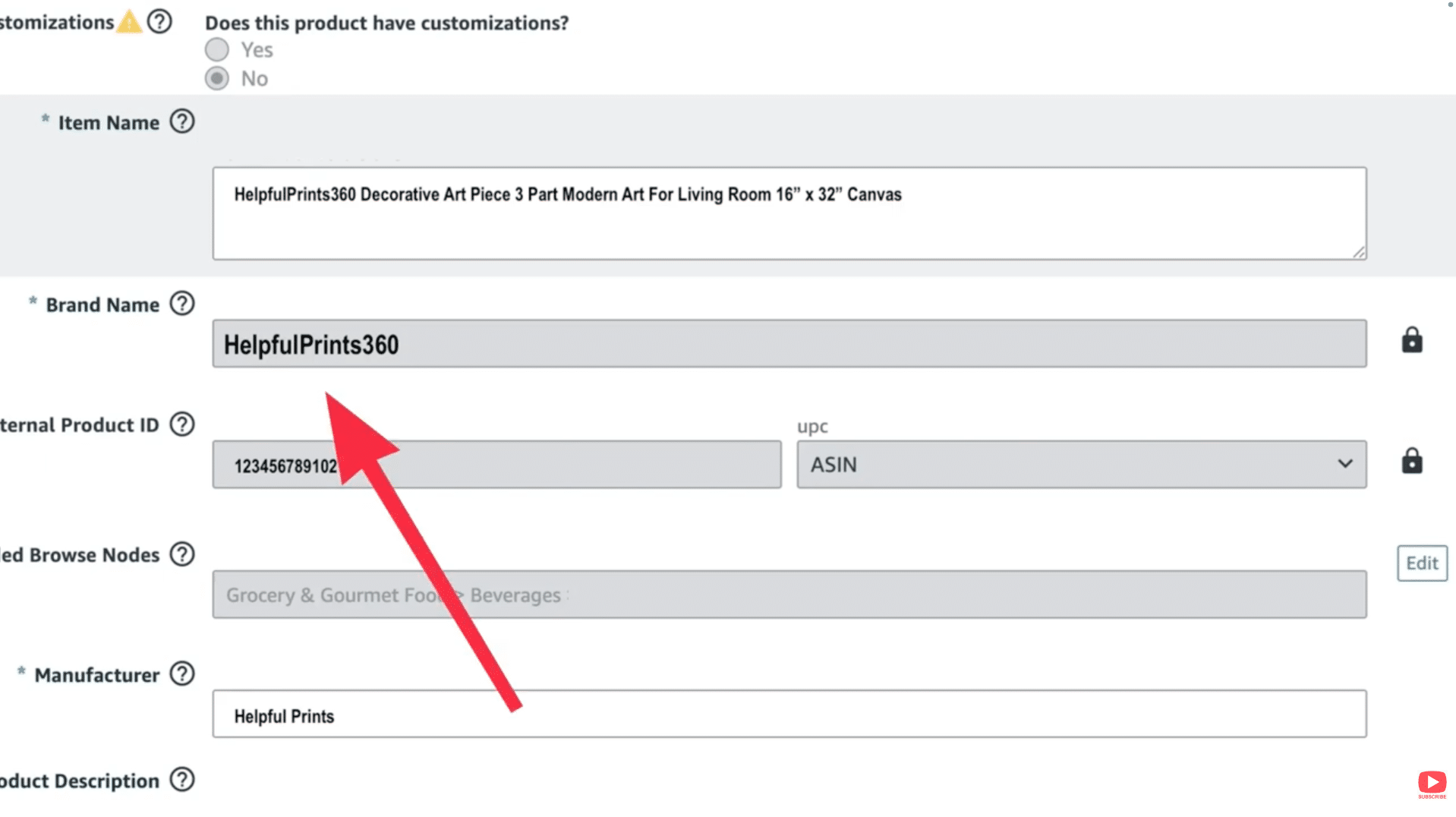
Image above: The brand name field during listing creation, before the ASIN exists.
The “Brand Name Approval Required” moment
This is where most generic listings are created.
You type in your brand name and Amazon returns an error saying approval is required. For brand owners, this feels ridiculous. “Why do I need permission to use my own brand name?”
What Amazon is actually doing is verifying that:
- The brand name is real
- It’s being used consistently
- You’re not creating duplicate or misleading catalog data
This process is called brand name approval (also called catalog authorization). It is not the same as Brand Registry which requires a trademark from the USPTO (or an international equivalent).
If you are brand registered, this approval is given automatically (you don't need to get brand name approval is you're already brand registered). If not, it’s a one-time process.
Why sellers choose “generic” instead
Brand name approval takes time. It can be confusing. Sometimes applications get rejected with vague explanations.
So sellers see the checkbox:
“This product does not have a brand name.”
Checking it auto-fills the brand field with Generic. The error disappears. The listing goes live.
It feels like a harmless workaround. It isn’t.

What actually breaks when you stay generic
| Area | Generic Listing | Branded Listing |
|---|---|---|
| Brand Registry | Not eligible | Eligible |
| A+ Content | No | Yes |
| Sponsored Brand Ads | No | Yes |
| Amazon Vine | No | Yes |
| Referral Fee Discount (New Sellers) | No | Yes |
| Listing Protection | Very limited | Strong |
Customers do see “generic” at the top of the listing. It’s subtle, but it hurts trust and conversion.
Even worse, generic listings are easier to hijack. Other sellers can attach offers or compete directly, and your protection is much weaker.
“I’ll just fix it later” — what really happens
Once a product is listed as generic, the brand name field is locked. Flat file uploads won’t work. Seller Support usually responds with some version of: “The brand name on an existing ASIN cannot be changed. You must create a new ASIN.” That’s not a small inconvenience.

Why a new ASIN is so costly
- Reviews do not transfer
- Sales history does not transfer
- Ranking does not transfer
If a UPC was used, it’s permanently tied to the old ASIN. You can’t reuse it.
If inventory is already in FBA, Amazon will not move it to the new ASIN. You either sell it out under the old listing or pay removal fees, relabel, and reship.
That’s where this mistake gets expensive.
“But my brand isn’t on my product”
This is one of the biggest misconceptions.
Amazon does not require your brand name to be printed on every unit.
They only need to see it once in approval photos to verify that the brand exists and is being used intentionally.
If you don’t have branded packaging:
- Create one box just for approval
- Order a custom vinyl logo decal (Etsy works great)
- Apply it cleanly to a plain box
- Place the product inside and take clear photos
If you’re using a GTIN exemption, you don’t need a barcode. If you’re using a UPC, it must be printed and registered to your company with GS1 (GS1 is the organization that manages all the UPC codes in the world).
Not having branding on your product does not mean you should list as generic.
Rare exceptions (and why you don’t want to rely on them)
We’ve had rare cases where a long-running generic listing was changed to a branded one.
Those situations took months and thousands of dollars in labor, and only worked because of very specific conditions.
This is not a position you want to be in.
We see brands every month that made this mistake early and now have to unwind it.
The bottom line
Listing as generic feels like a shortcut. In almost every case, it turns into a long-term problem.
Apply for brand name approval. Get brand registered when possible. List under your real brand name from day one.
If you want a walkthrough, the video above covers this step-by-step. If you’ve got a quick question, leave a comment on the video. And if your situation is more complex and you want professional help, reach out to us at customerservice@fivestarcommerce.com or schedule an info call using the “Schedule info call” button on our website.