Why Your Amazon Ads Have Low Impressions
You launch a product. You set up an Amazon ad campaign. You come back a couple days later and see something like 17 impressions and $0 spend.
Most brands immediately assume their bids are too low or their budget is too small. In most cases, neither is the real problem.
What’s usually happening is Amazon is lowering your bids in the background before your ads even enter the auction — and it’s caused by a default campaign setting that almost everyone skips.
Fix that, and impressions often increase very quickly. But there are exceptions, and those matter too.
Low Impressions vs. No Impressions
| What You’re Seeing | This Usually Means | Category |
|---|---|---|
| Some impressions, little/no spend | Bid suppression, low relevance, or bids too low to win auctions | Low impressions |
| Spend is happening, but no sales | Conversion problem (listing, price, offer, or product-market fit) | Performance issue |
| Zero impressions | Eligibility / Buy Box / status / approval issue | Structural issue |
Before changing anything, it’s important to separate two different problems:
- Low impressions: Ads are showing occasionally, but barely. You might see a handful per day and little or no spend.
- No impressions at all: Zero impressions. Nothing is showing.
These are caused by different issues. Most brands with new products fall into the low impressions category, which is what we’ll focus on first.
The Most Common Reason New Products Get Low Impressions
Most brands experiencing this are advertising a brand new product with:
- No sales history
- Few or zero reviews
- No conversion data
Amazon doesn’t just want to get paid for clicks — it wants to show ads that are likely to convert.
If Amazon doesn’t trust that your product will convert, it becomes extremely conservative about how often it shows your ads. This happens even if your listing is well optimized and your bids look high.
This is where the campaign bidding strategy becomes the real problem.
The Hidden Campaign Setting That Quietly Kills Impressions
When you create a Sponsored Products campaign, Amazon asks you to choose a Sponsored Products campaign bidding strategy.
You have three options:
- Dynamic bids – up and down
- Dynamic bids – down only
- Fixed bids
| Bidding Strategy | Amazon’s Claim | What Typically Happens (Especially for New Products) |
|---|---|---|
| Dynamic bids – up & down | Amazon raises bids when conversion is likely and lowers them when it isn’t | Unstable CPCs + bid suppression when Amazon doesn’t trust the ASIN yet |
| Dynamic bids – down only | Amazon lowers bids when conversion is less likely | Still suppresses bids on new products; impressions often limited early |
| Fixed bids | Amazon uses your exact bid and manual adjustments | More predictable visibility; often higher initial ACOS while data builds |
Most campaigns default to dynamic bidding. That’s where the problem starts.
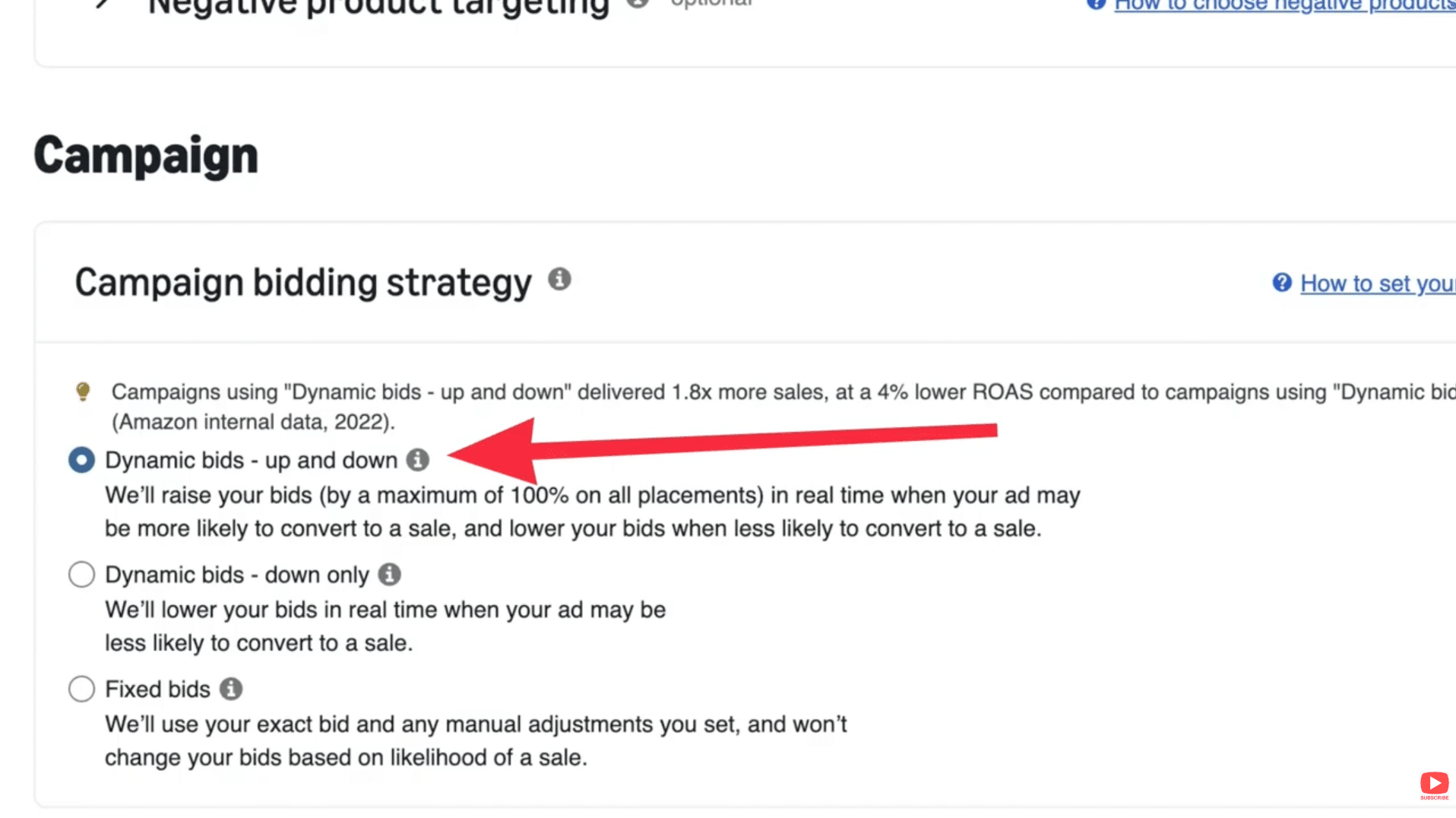
Image above: The default campaign bidding strategy "Dynamic bids - up and down" suppresses new products.
Why Dynamic Bidding Suppresses New Products
Dynamic bidding adjusts your bids based on how likely Amazon thinks your product is to convert.
If your product is new, Amazon sees:
- No conversion history
- No sales velocity
- Few or no reviews
So Amazon assumes your product is unlikely to convert — and it quietly lowers your bids in real time, even if you manually set them high.
From your side, it looks like your ads just aren’t being shown.
| Situation Amazon Sees | Amazon’s Internal Assumption | What Amazon Does to Your Bid | What You See |
|---|---|---|---|
| New ASIN | No sales history → low conversion probability | Bid is lowered in real time before entering auctions | Low impressions, little/no spend |
| Few or no reviews | Shoppers won’t trust it yet | Bid is reduced more aggressively | Ads “feel” like they aren’t running |
| Weak CTR | Ad isn’t compelling / not relevant | Lower priority in auctions; bid adjustments hurt visibility | Impressions stay stuck even after bid increases |
| Dynamic bidding enabled | Amazon is allowed to intervene | Your manual bid becomes a “starting point,” not the final bid | Confusion: “My bids are high, why no impressions?” |
The Fastest Fix: Switch to Fixed Bids
If you’re dealing with low impressions on a new product, the fastest fix is to switch the campaign to Fixed Bids.
Fixed bids force Amazon to use the bid you actually set instead of adjusting it behind the scenes.
This does two things immediately:
- Your ads enter more auctions
- You start getting real impression volume
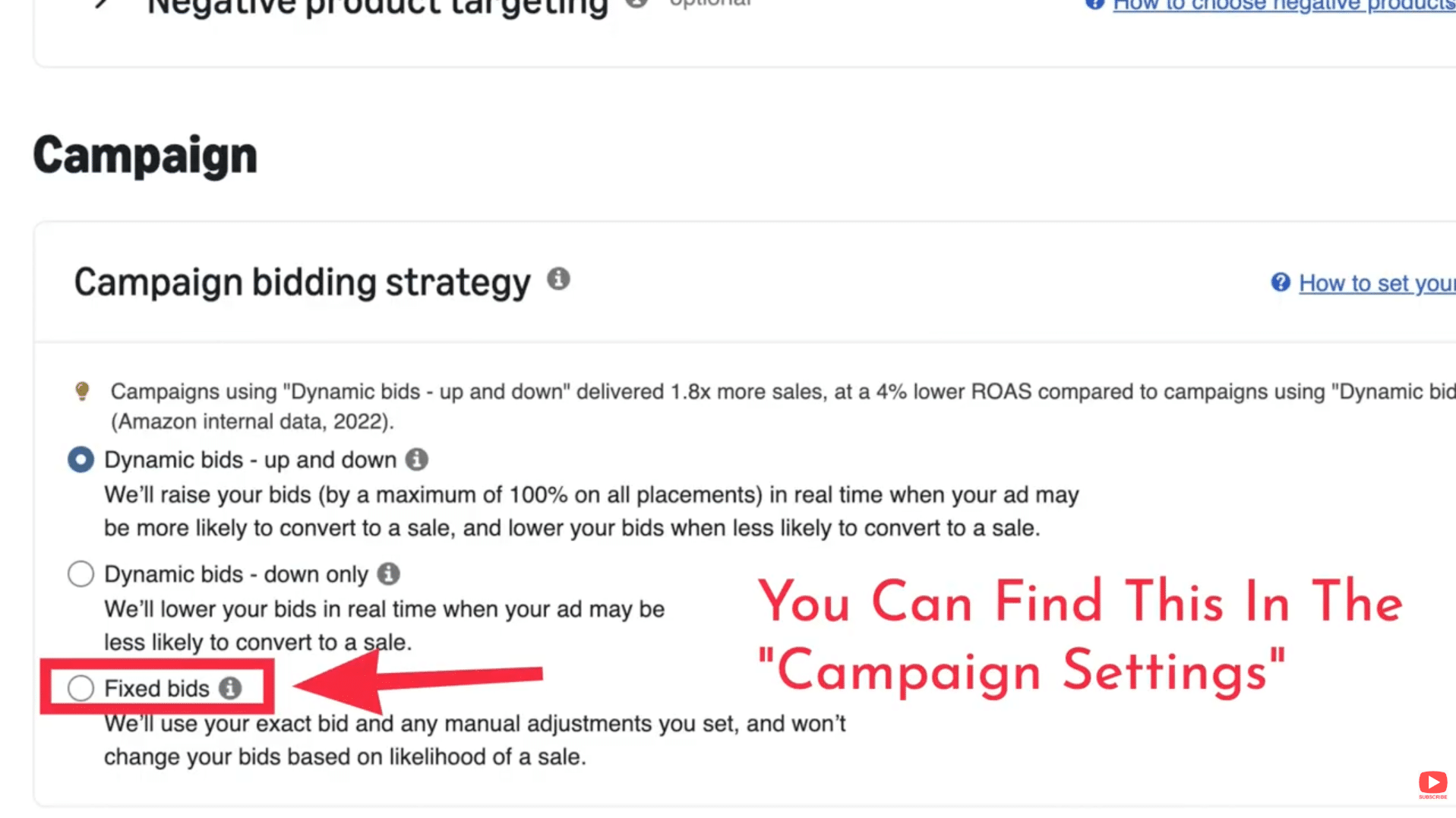
Image above: Fixed bidding prevents Amazon from overriding the bids you manually set.
Important Tradeoff to Understand
When you switch to fixed bids, ACOS is often high at first. That’s normal.
The goal early on is not efficiency — it’s giving Amazon enough data to understand that customers will actually buy your product.
As conversions come in, Amazon assigns higher relevance, impressions increase naturally, and CPCs often come down.
Why Amazon Ads Don’t Spend the Full Budget
Many brands expect Amazon to spend their entire daily budget, similar to Facebook ads. That’s not how Amazon works.
Amazon charges per click, not per impression. Your daily budget is simply a maximum cap, not a spending target.
Raising the budget alone does not force Amazon to show your ads.

Image above: Small budgets spread across many campaigns often limit impression volume.
If Impressions Are Still Low After Switching to Fixed Bids
If impressions are still barely moving, work through this checklist.
| Check This First | If This Is True | Then Do This |
|---|---|---|
| Keyword bids | Your bids are below Amazon’s suggested range | Raise bids and watch impressions over the next several hours |
| Daily budget | Budget can’t support multiple clicks/day | Increase budget or consolidate spend into fewer campaigns |
| Listing keywords | Target keywords are missing from title/bullets | Add keywords to the listing so Amazon considers you relevant |
| Match types | You’re only using exact match on competitive terms | Add phrase/broad match to widen reach early on |
1. Check Your Bids
If your bids are well below Amazon’s suggested range, impressions will be limited.
2. Check Your Budgets
Your campaign needs enough budget to cover several clicks per day. If budget is split across too many campaigns, pause some and focus spend.
3. Check Listing Relevance
If a keyword isn’t in your listing, Amazon may not consider your product relevant enough to show ads for it. Your most important keywords should be in the title.
4. Check Match Types
Exact match only campaigns are often too restrictive for new products. Adding phrase or broad match can significantly increase impressions.
The “No Impressions at All” Scenario
If impressions are zero, this is usually not a bidding strategy issue.
Confirm Your SKUs Are Delivering
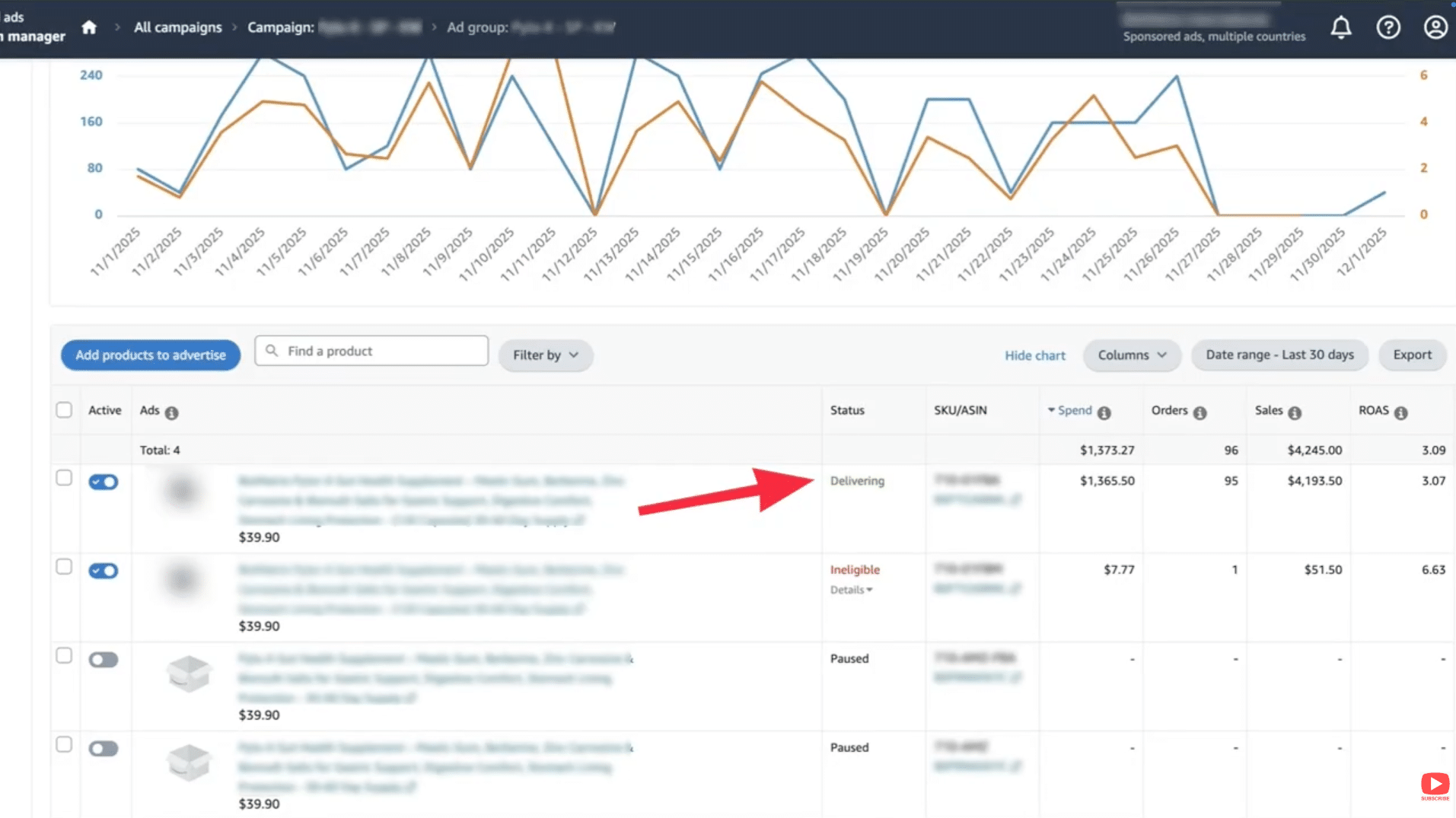
Image above: Check to see if your SKUs are delivering.
Check Buy Box Ownership
If you are not winning the Buy Box, Sponsored Products ads will not run — even if you are the only seller.

Image above: These images indicate if a seller is winning the buybox.
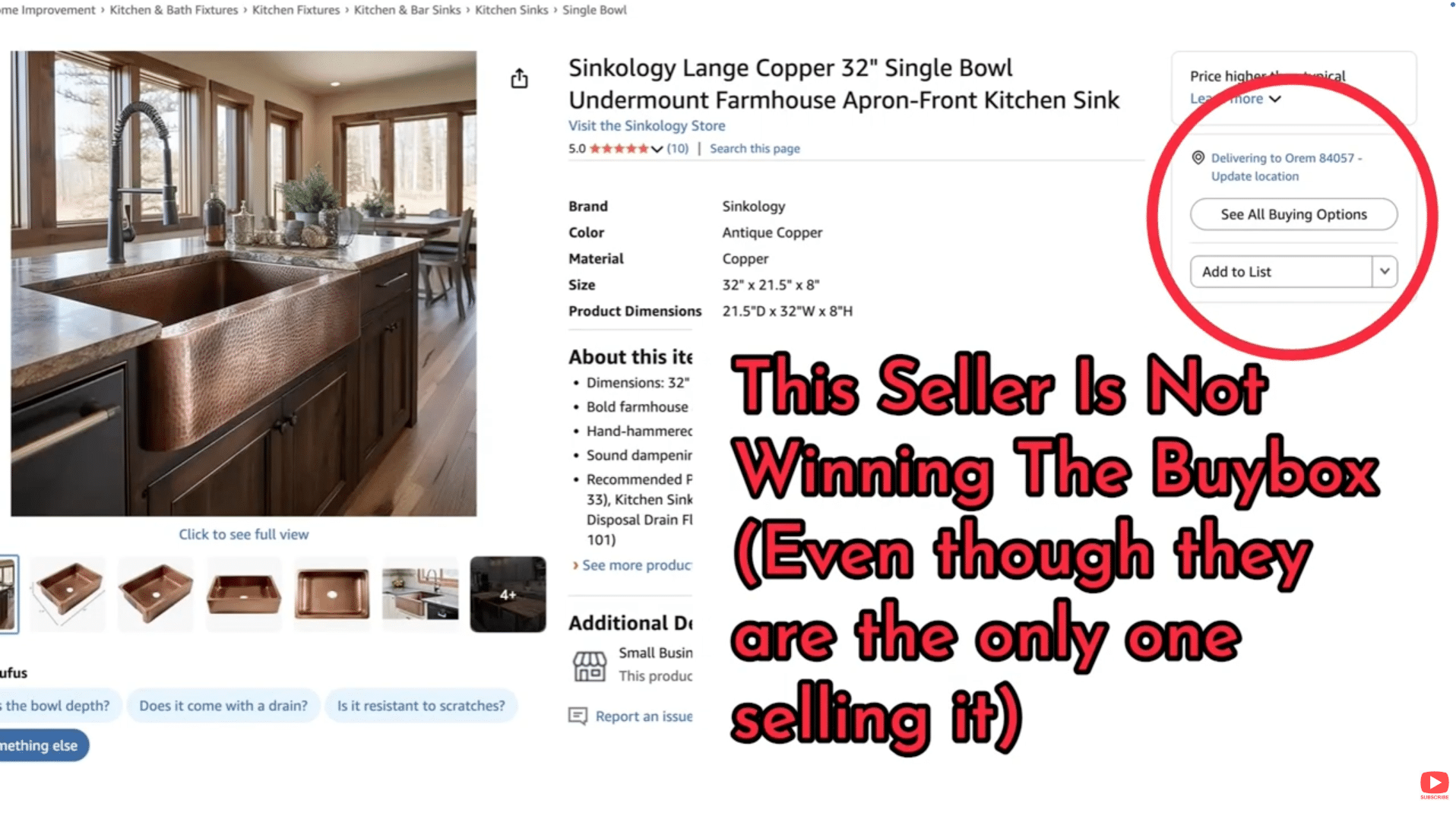
Image above: A seller is not winning the buybox.
Check for Ineligible or Restricted Products
Some products can be sold on Amazon but cannot be advertised due to category or content restrictions.
If you see “Ineligible,” review the details and contact Amazon Advertising Support if needed.
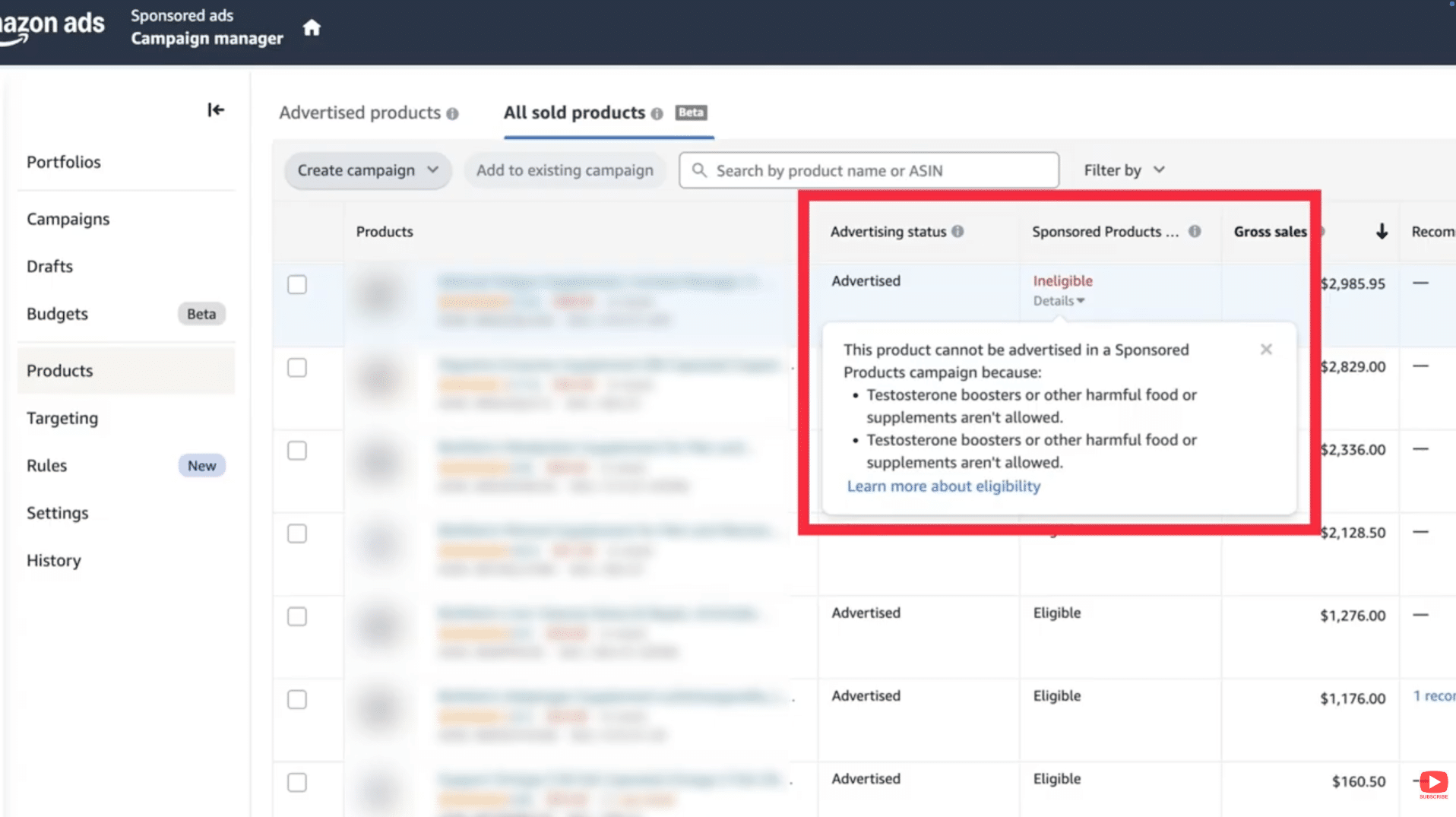
Image above: Example of a product marked ineligible for advertising.
Check Creative Approval for Video or Brand Ads

Image above: Ads with unapproved creative will not receive impressions.
When Everything Is Correct and Impressions Are Still Slow
At this point, Amazon is reacting to performance signals:
- Low click-through rate
- Weak conversion rate
- No reviews
These tell Amazon not to prioritize your ads yet. Improving images, pricing, and early traffic sources can help Amazon gain confidence.
Final Takeaway
If your Amazon ads have low impressions, the most common cause is Amazon lowering your bids in the background due to dynamic bidding.
Switching to Fixed Bids gives you control back and usually increases impressions quickly. Once the product proves itself, efficiency comes later.
Next Steps
If you want a walkthrough, the video above covers this step-by-step. If you’ve got a quick question, leave a comment on the video and I’ll try to point you in the right direction.
If your situation is more complex and you want professional help, you can reach us at customerservice@fivestarcommerce.com or learn more about Five Star Commerce.