Brand Approval Without Branded Packaging? Here’s a Simple Workaround
A lot of brands run into the same frustrating problem when they try to list a product on Amazon for the first time.
You go to create the listing.
You type in your brand name.
And Amazon shows a message like:
“Brand name approval required.”
(or sometimes Error 5665 – Brand not approved)
So you click apply.
And then you see the requirement:
Amazon asks you to upload photos showing your brand name permanently affixed to the product or its packaging.
For many brands, that’s easy. Their logo is already printed on the product or box.
But sometimes that’s not the case.
Many brands have already manufactured their inventory, and their packaging doesn’t include the brand name yet.
Now it feels like the only options are:
- Reprint all packaging
- Remanufacture the product
- Or list the product as generic
None of those are good solutions.
The good news is there’s a simple workaround that usually works, costs very little, and doesn’t require redesigning your packaging or delaying your launch.
Let’s walk through how it works and the details that determine whether your application gets approved the first time.
What Amazon Is Actually Checking During Brand Approval
When Amazon asks for photos showing the brand name on your product or packaging, many brands assume something that isn’t actually true.
They assume every product they sell must permanently have the brand name printed on it.
That’s not what Amazon is checking.
Amazon is simply verifying that:
- The brand name exists
- The brand name is real
- The seller is using that brand name on a physical product or package
Once Amazon approves the brand name, you can create listings under that brand name whenever you want.
In practice, this approval step is usually a one-time verification.
What Sellers Often Assume vs What Amazon Is Actually Checking
| What Sellers Often Assume | What Amazon Is Actually Checking |
|---|---|
| Every product must always have branding printed on it | Amazon only verifies the brand once |
| Packaging must be redesigned before launching | You only need one compliant example |
| The brand must appear on the product itself | Packaging can qualify |
| This requirement repeats for every listing | Usually a one-time approval |
One Thing You Should Not Do
When Amazon asks for brand approval, you’ll see a checkbox that says:
“This product does not have a brand name.”
If you check that box, Amazon will automatically list the product as Generic.
That allows you to create the listing without brand approval — but most brands should not do this.
Generic Listing vs Branded Listing
| Generic Listing | Branded Listing |
|---|---|
| No brand approval required | Requires brand approval |
| Harder to build brand identity | Supports long-term brand building |
| Catalog ownership problems later | Cleaner listing ownership |
| Difficult to switch later | Compatible with Brand Registry |
If you want to build a real brand on Amazon, listing as generic usually creates more problems than it solves.
The Simple Workaround: Use a Custom Vinyl Decal
The easiest solution is surprisingly simple.
You use the box you already have and add a custom vinyl decal with your brand name.
Step 1: Use Your Existing Packaging
Start with the packaging you already have.
Often this is just a plain box.
If you are using UPC codes, that box likely already has the UPC printed on it.
If you’re not using UPC codes, that’s also fine.
Step 2: Order a Custom Vinyl Decal
Next, go to Etsy and order a custom vinyl decal with your brand name.

Image above: Example Etsy listing where sellers offer custom vinyl decals. These are commonly used for one-off branding examples during Amazon brand approval.
Etsy works well because many sellers there specialize in small custom orders. Traditional print shops usually won’t produce just one unit.
When ordering the decal, make sure the brand name matches exactly what you’re applying for in Seller Central.
Important details:
- Spelling must match exactly
- Punctuation must match
- Special characters must match
Capitalization usually doesn’t matter, but everything else must match perfectly.
If you already have a trademark, make sure the brand name also matches the trademark.

Image above: Example trademark record showing how the brand name must match exactly.
Step 3: Apply the Vinyl Decal
Once the decal arrives, apply it to your packaging.
The goal is to make the branding look clean and professional.
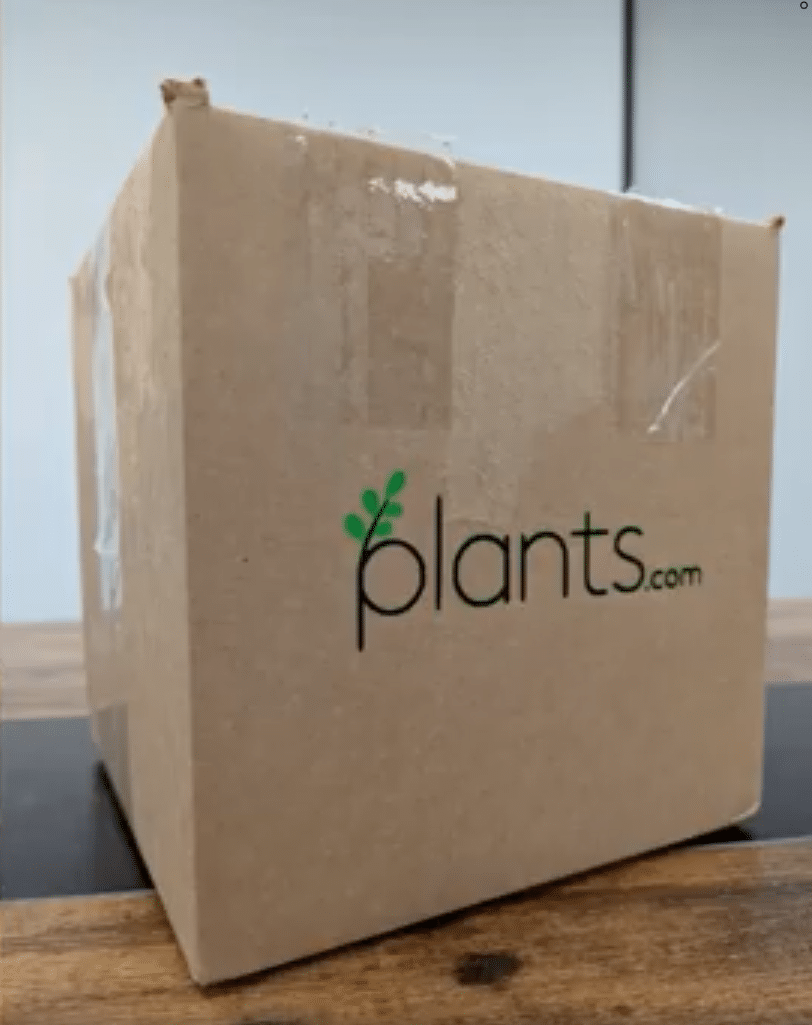
Image above: Example of a vinyl decal applied to a plain box to create branded packaging for brand approval photos.
Tips:
- Avoid wrinkles
- Avoid bubbles
- Make sure edges aren’t peeling
- Apply the decal straight
It’s often worth ordering two or three decals in case the first one doesn’t go on perfectly.
Alternative Option: Order One Custom Printed Box
If you’re worried about whether vinyl counts as permanently affixed, there’s another option.
You can order one custom printed box with your brand name printed directly on it.
Etsy is often the easiest place to do this because sellers allow very small order quantities.
Vinyl Decal vs Custom Box
| Option | Cost | Difficulty | Reliability |
|---|---|---|---|
| Vinyl Decal | Very low | Very easy | Usually works |
| Custom Printed Box | Slightly higher | Moderate | Very reliable |
If You Are Not Using UPC Codes
When creating the listing, you can check the box that says the product does not have a product ID, and Amazon will allow you to apply for a GTIN exemption.
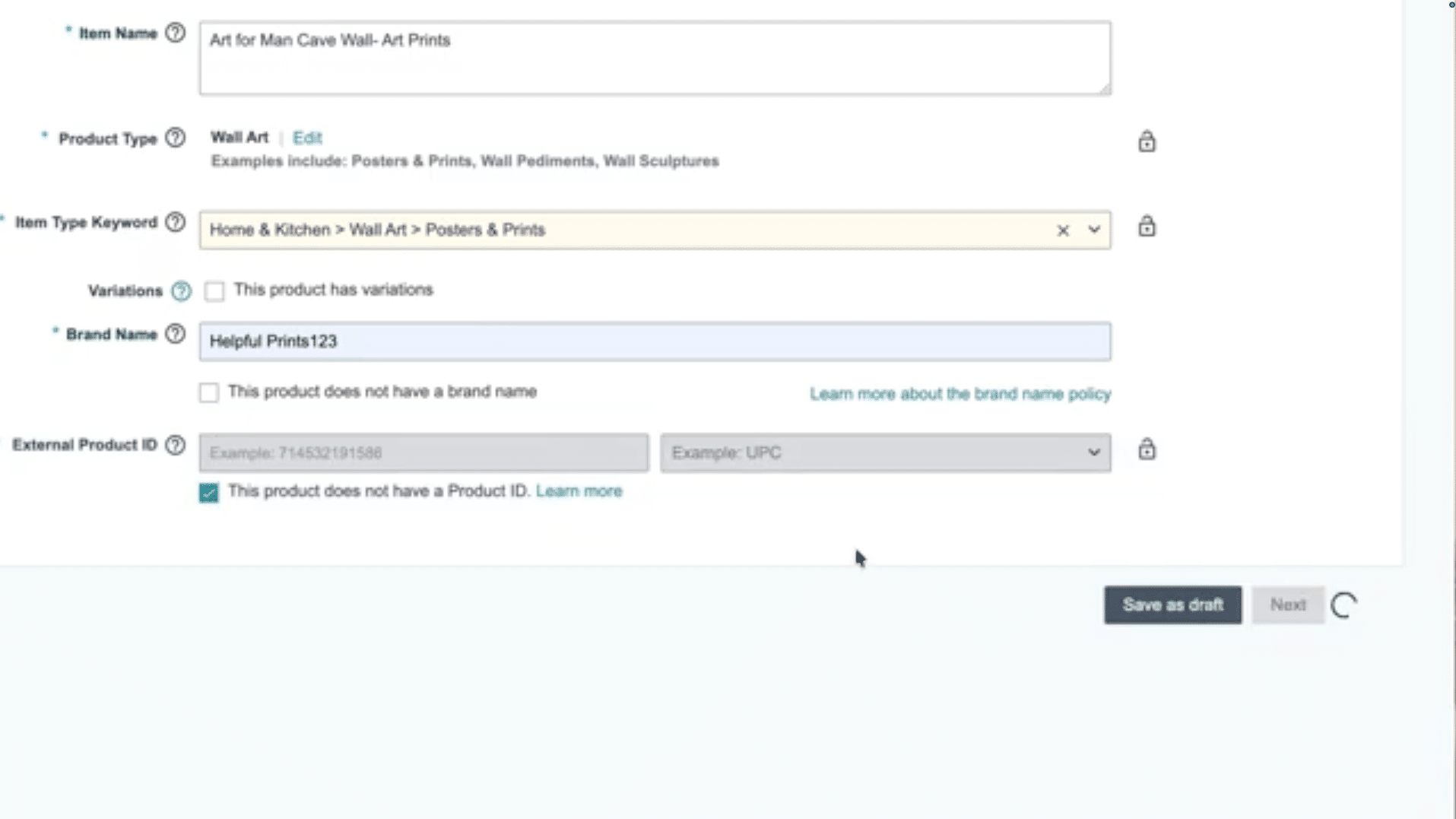
Image above: The “product does not have a product ID” option in Amazon Seller Central when applying for a GTIN exemption.
Photo Requirements for Brand Approval
Even if the packaging is correct, bad photos are one of the most common reasons applications get rejected.
Amazon wants to see real, unedited photos of a real product.
Do not:
- Edit images in Canva
- Remove backgrounds
- Use mockups
- Digitally add the logo
Brand Approval Photo Checklist
| Requirement | Why It Matters |
|---|---|
| Real photos | Amazon rejects edited images |
| Entire product visible | Reviewers must see the full item |
| Multiple angles | Shows packaging context |
| Brand name readable | Prevents rejection for blurry text |
| Natural lighting | Makes the photo look authentic |
Common Reasons Brand Approval Gets Rejected
| Issue | Why It Causes Rejection |
|---|---|
| Brand name mismatch | Amazon checks exact spelling |
| Blurry images | Logo cannot be read |
| Poorly applied decal | Looks temporary |
| UPC mismatch | GS1 registration does not match |
| Edited photos | Amazon rejects mockups |
What Happens After Brand Approval
Once Amazon approves your brand name, you can create listings under that brand name whenever you want.
Amazon typically does not require this process again.
At that point many brands begin looking at Brand Registry, which unlocks tools such as:
- A+ Content
- Sponsored Brand ads
- Brand Stores
- Additional brand protection tools
Brand Approval vs Brand Registry
| Feature | Brand Approval | Brand Registry |
|---|---|---|
| Allows listing under brand | ✔ | ✔ |
| Requires trademark | ✖ | ✔ |
| A+ Content | ✖ | ✔ |
| Sponsored Brand Ads | ✖ | ✔ |
| Brand Store | ✖ | ✔ |
Final Thoughts
If your inventory is already manufactured and your packaging doesn’t include your brand name, you usually don’t need to remanufacture products or redesign your packaging.
You typically just need one compliant example showing your brand name on a product or box so Amazon can verify the brand exists.
Using a custom vinyl decal or a single custom printed box is often enough to satisfy that requirement.
If you get the details right — clear photos, exact brand name match, and correct UPC registration — the approval process is usually quick and straightforward.
If your situation is more complex and you want help applying this to your brand, email customerservice@fivestarcommerce.com or schedule an info call using the “Schedule info call” button on our website.