
Reactivating an old Amazon seller account is not always as simple as updating a few details and clicking “Submit.”
In this case, a client had a seller account that had been dormant for approximately 10 years. Getting it back into working order meant identifying the correct account, updating identity and payment information, completing a security checklist, and navigating support responses that did not seem to address the problem.
The account was eventually reactivated, but the entire process took roughly two weeks.
Amazon Seller Account Reactivation Case Study: At a Glance
| Account situation | Seller account had been dormant for approximately 10 years. |
| Initial problem | The first account we accessed appeared to be an old Amazon Product Ads account rather than the actual Seller Central account. |
| Seller account status | Deactivated. |
| Major issues we addressed | Identity information, contact information, account security, payment information, and Amazon support follow-up. |
| Additional complication | The account could not be upgraded to a Professional selling plan while it was deactivated. |
| Resolution | Amazon reviewed the submission and reactivated the account. |
| Approximate timeline | About a week and a half to two weeks from beginning to reactivation. |
The First Problem: We Were Looking at the Wrong Account
Before we could address the deactivation, we had to figure out why the account looked so unusual.
When the client initially gave us access, the dashboard displayed “Amazon Product Ads” instead of “Amazon Seller Central.” The navigation menu also had very few options. There was no Manage Inventory page, which immediately raised questions about whether we were in the right place.
The dashboard showed a “Healthy” account status, but that did not tell us whether the client’s actual seller account was active.
Based on the branding and limited functionality, we concluded that we were looking at some kind of legacy advertising account, not the seller account we needed to reactivate.
After discussing the account’s history with the client, we located the actual seller account, which had been opened about a decade earlier.
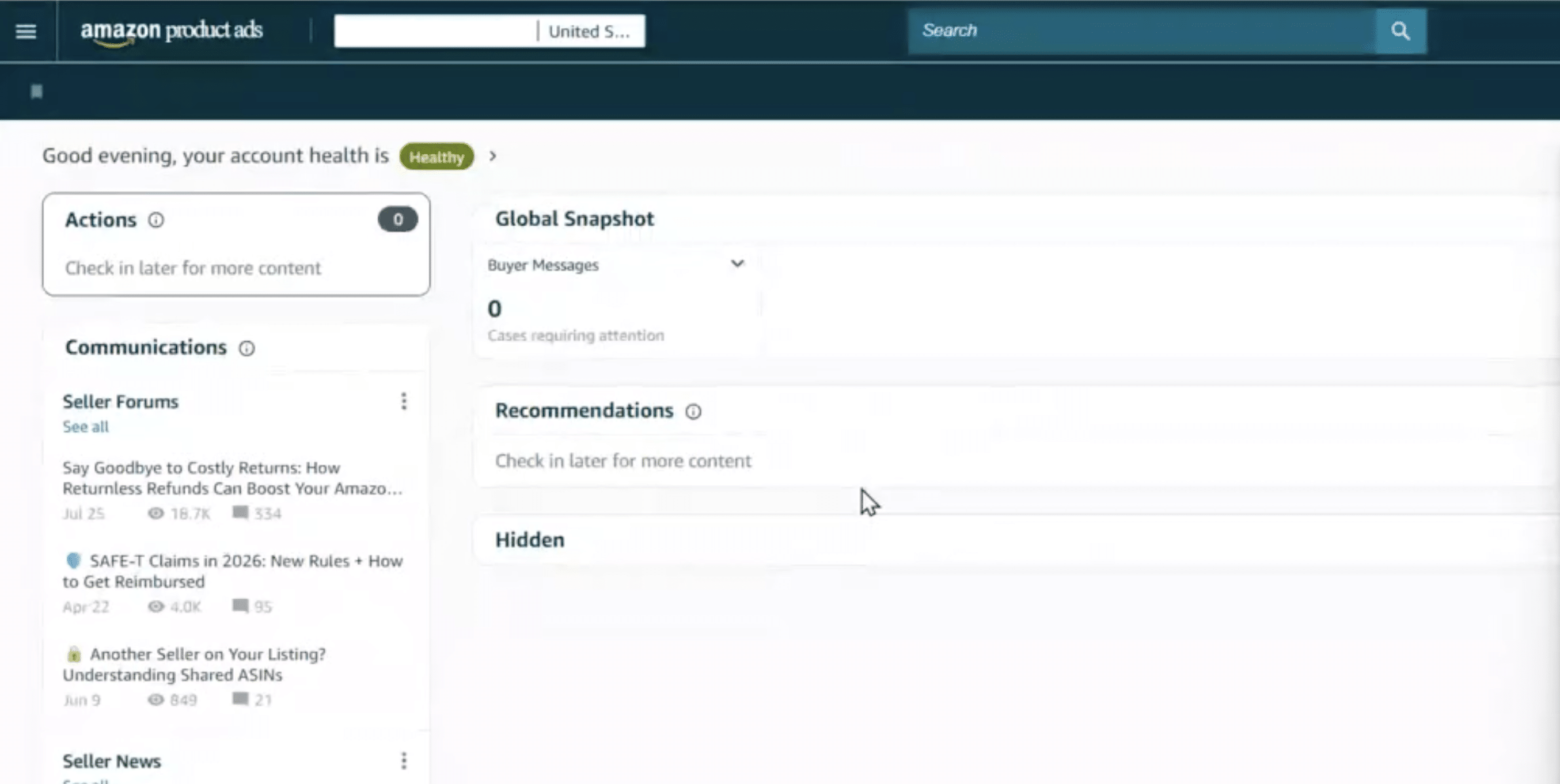
Image above: This was the first account we accessed. Notice that it says Amazon Product Ads and shows a Healthy status, even though this was not the seller account we actually needed to reactivate.
The Actual Seller Account Was Deactivated
Once we accessed the correct account, the situation became clearer. Seller Central displayed a “Deactivated” status and a prompt to reactivate the account.
The account itself also looked different from a modern North American seller account. Because it was so old, some of the account structure reflected the way Amazon’s systems had worked years earlier.
That is something you can run into with dormant accounts. If an account has not been used for many years, you should not necessarily expect every screen or setting to behave exactly like a newly created account.
We also could not upgrade the account to a Professional selling plan because the deactivation was blocking that change. Reactivation had to come first.

Image above: The actual seller account showed as Deactivated and required us to complete Amazon’s reactivation process before we could move forward.
Updating the Account’s Identity and Contact Information
The next step was to bring the account information up to date.
For each working session, the client shared their screen while we guided them through the necessary changes. This allowed the client to make updates directly and provide the personal information Amazon requested.
We started with contact and identity details.
The client entered information including their driver’s license and date of birth, along with the other information Amazon was requesting, and then submitted the updated information for verification.
This is fairly common when you get into a very old account. Some of the information Amazon requires today may never have been collected when the account was originally created.
That was an important step, but it was not the entire solution.
As we continued reviewing the account, we found a separate set of requirements in the Account Health section.
The Account Health Checklist Pointed to a Security Concern
Inside Account Health, a notification stated:
“Your account has been deactivated.”
It instructed the seller to address the account health issues to reactivate the account.
The confusing part was that we could not find performance notifications explaining the underlying problem, and the client was not receiving related emails.
The client had already tried asking Amazon for more information several times without getting a useful response.
At that point, we had to work from the instructions that were actually visible in the account.

Image above: Amazon confirmed that the account was deactivated, but this notification still did not clearly explain what had originally caused the problem.
Farther down the page, we found a checklist that gave us a much clearer direction.
Amazon wanted the seller to complete several security-related actions:
| Amazon Requested | What This Meant in This Case |
|---|---|
| Change the login email | The client changed the email address associated with the account. |
| Change the password | The password was replaced with a new, unique password. |
| Run a virus scan | Amazon asked the seller to confirm that the device used to access the account was not infected with malware. |
| Review account details | The seller was asked to check the account for unauthorized changes and make sure the information was current. |
| Review important account areas | This included storefront information, listings and orders, notification preferences, and secondary-user permissions. |
| Do not share credentials | The seller had to confirm that account credentials would not be shared with other people. |
| Maintain account security | The seller confirmed responsibility for keeping the account identifiers and credentials secure. |
These were security-focused requirements, not simply requests to refresh an old account’s identity documents.
Amazon did not explicitly confirm why the account had been deactivated.
Based on the checklist Amazon presented, our working theory was that at some point during those years of inactivity, Amazon’s systems had flagged the account because it believed somebody may have accessed it improperly.
That was our interpretation of the requirements Amazon showed us. Amazon never gave us a clear statement confirming that this was the original cause.
Practically speaking, though, we did not need Amazon to give us a perfect explanation before taking action. We had a checklist directly in the account telling us what Amazon wanted completed, so we worked through it.
Payment Information Created Another Roadblock
While reviewing the rest of the account, we also updated the credit card and bank account information.
During that process, an “Invalid charge method” message appeared.
That indicated there was another problem involving the payment information associated with the old account.
We entered updated card information, but we could not finish going through every part of the account during that same working session.
So we had to stop and come back a few days later.
This is one of the reasons this case took multiple working sessions. We were not dealing with one isolated problem. Identity information, account security, payment details, and the deactivated status all needed attention as we worked through the account.
Completing Amazon’s Checklist Did Not Immediately Resolve the Case
After completing the security steps, we submitted a response through the account’s reactivation workflow.
We explained that we had gone through Amazon’s checklist and completed the requested actions.
That included changing the email address and changing the password. These were actual changes the client made to the account, not simply statements we added to an appeal.

Image above: This was the submission confirming that the seller had completed Amazon’s requested security actions, including changing the login credentials and reviewing the account for unauthorized changes.
Amazon’s response was unexpected.
The team replied that the case was not related to seller identity verification and that it could not help.
That was confusing because we had submitted the information through the section that specifically invited us to provide new information in response to the account’s requirements.
We had not just sent an unrelated question to a random support address.
Rather than starting over with a completely different explanation, we responded again and clarified what had happened.
We essentially told them: this submission is in response to the checklist Amazon displayed in the account, we completed each of the requested actions, and if this is not the correct team, please forward the case to the team that can review it.
We Also Used an Additional Support Channel
While continuing the existing case, we pursued another support route available to us as an agency through an Amazon program.
In this case, the escalation process involved submitting a spreadsheet explaining the account issue and everything we had already done.
We outlined the deactivation, our suspicion that the security checklist related to a previous unauthorized-access concern, the steps the seller had completed, and the confusing response we received after submitting the checklist.
Part of that escalation process asked us to provide the account’s merchant token.
There was another problem: we could not find a merchant token anywhere in the account.
The account was on an Individual selling plan, and because the account was deactivated, we could not upgrade it to Professional first.
So instead of inventing information or getting stuck on that field, we explained the situation in the escalation.
We told the support team that the account was deactivated, that we could not upgrade it, and that the merchant token was not available to us in the account.
The additional support team acknowledged the request and told us it was looking into the issue.
At roughly the same time, the regular support team also acknowledged the follow-up we had sent through the original case.
This extra escalation route is not something every seller automatically has access to. Five Star Commerce can recommend qualifying new seller accounts for certain Amazon programs that may provide additional support resources. You can read more about those Amazon program benefits here.
The Result: Amazon Reactivated the Account
After those follow-ups, Amazon sent the confirmation we had been working toward:
“Your submission has been reviewed, and your account has been reactivated.”
From beginning to end, the process took approximately a week and a half to two weeks.
By that point, this is everything we had worked through:
What We Had to Work Through Before Reactivation
| Step | Issue | What We Did |
|---|---|---|
| 1 | Wrong account | Determined that the first login appeared to be an old Amazon Product Ads account and located the actual seller account. |
| 2 | Outdated identity information | Updated the client’s contact and identity information, including the information Amazon requested for verification. |
| 3 | Account security requirements | Worked through Amazon’s security checklist, including changing the email and password and reviewing the account for unauthorized changes. |
| 4 | Payment information | Updated the credit card and bank account information and encountered an Invalid charge method message. |
| 5 | Support response did not match the submission | Explained that we had completed the checklist Amazon itself displayed and asked for the case to be forwarded to the correct team if necessary. |
| 6 | Additional escalation | Used an additional Amazon support channel available to us through an agency program and documented the situation in a spreadsheet. |
| 7 | Merchant token unavailable | Explained that we could not locate the merchant token and could not upgrade the deactivated Individual account to Professional in order to obtain it. |
| 8 | Final review | Amazon reviewed the submission and notified us that the account had been reactivated. |
Both support routes were active before the account was restored, so we cannot say with certainty that one particular escalation was solely responsible for the reactivation.
What we can say is that this was not a one-message fix.
What Sellers Can Learn From This Case
The biggest lesson is to work through the account that is actually in front of you rather than assuming every deactivation follows the same process.
Even the first login in this case was misleading.
The first dashboard showed a healthy status, but it turned out to be what appeared to be an old Amazon Product Ads account rather than the seller account we needed.
Once we found the correct seller account, the visible requirements inside the account became more useful than trying to get Amazon to perfectly explain what had happened years earlier.
The security checklist gave us concrete actions we could take.
The support correspondence mattered too.
When Amazon’s response did not seem to match what we had submitted, we did not simply assume the process was over. We clarified why we were submitting the information, explained that we had completed Amazon’s own checklist, and asked for the case to be routed appropriately.
Then we continued pursuing another available support route while that case was still being reviewed.
If you are dealing with something similar, I would not assume your account has the same underlying problem or that it will take exactly the same amount of time.
What to Keep Track of During an Amazon Account Reactivation
| Keep Track Of | Why It Matters |
|---|---|
| What Amazon is asking you to do | Work from the actual instructions shown in your account rather than assuming your situation is identical to another seller’s. |
| Information you have updated | Older accounts may require multiple pieces of contact, identity, payment, or security information to be brought up to date. |
| Documents and security steps completed | You want to be able to clearly tell Amazon which requested actions have already been completed. |
| What you submitted to support | This makes it easier to respond if another support representative reviews the case later. |
| Amazon’s responses | Support responses can sometimes seem disconnected from the original issue, so keeping the history helps you explain the case clearly. |
| What still needs review | Complex reactivations can involve several separate issues rather than one single problem. |
Older and unusual accounts can require some detective work. The process may also involve several Amazon systems or support teams rather than one clean workflow.
That is why these cases often require somebody to sit down, look through the actual account, and decide what the next logical step is instead of repeatedly sending the same generic support request.
If you want to compare doing that work internally versus getting outside help, we have a more detailed breakdown of hiring an Amazon agency versus doing it yourself.
Frequently Asked Questions
How long did it take to reactivate this Amazon seller account?
In this case, the entire process took approximately a week and a half to two weeks. That included finding the correct seller account, updating identity and payment information, completing Amazon’s security requirements, communicating with support, and using an additional escalation channel. Another seller’s timeline may be different depending on the account and the issues involved.
Why was this Amazon seller account deactivated?
Amazon never clearly confirmed the original reason for the deactivation. Based on the security checklist shown inside the account, our working theory was that Amazon may have detected or suspected unauthorized access at some point while the account was inactive. We treated that as an inference, not a confirmed finding from Amazon.
What did Amazon require the seller to do before reactivation?
Amazon’s checklist asked the seller to change the login email, change the password, run a virus scan, review the account for unauthorized changes, check important account details and permissions, and confirm that account credentials would be kept secure.
Did updating the identity information reactivate the account?
No. Updating the client’s identity and contact information was only one part of the process. We also had to address the security checklist, update payment information, respond to support, and continue following up before the account was reactivated.
What did the “Invalid charge method” message mean in this case?
We encountered the message while updating the payment information on the old account. It indicated that there was a problem involving the charge method associated with the account, so we updated the card and continued reviewing the rest of the account.
Why couldn’t the account be upgraded to a Professional selling plan first?
The seller account was already deactivated, and the deactivation prevented us from upgrading the account to a Professional selling plan. We had to work through the reactivation issues before that upgrade could happen.
What happened when Amazon support said it was the wrong team?
We responded and explained that we had submitted the information directly in response to Amazon’s own checklist. We confirmed that the requested steps had been completed and asked that the case be forwarded to the appropriate team if the person reviewing it could not handle the issue.
Did the additional support escalation cause the account to be reactivated?
We cannot say that with certainty. Both the regular support case and the additional escalation were active before Amazon restored the account. We know that Amazon reviewed the submission and reactivated the account, but we cannot prove that one specific support route was solely responsible.
Should every deactivated Amazon account follow these same steps?
No. This was one unusual account that had been dormant for roughly 10 years. The useful lesson is to work from the requirements actually shown inside your own Seller Central account rather than assuming every deactivation has the same cause or solution.
Final Takeaway
This was a multi-step reactivation, not a one-message fix.
The account had been dormant for roughly 10 years. We first had to identify the correct account, update old information, work through Amazon’s security requirements, address payment details, respond to confusing support messages, and use another escalation route before the account was finally restored.
If you want a walkthrough, the video above covers this step-by-step. If you’ve got a quick question, leave a comment on the video. And if your situation is more complex and you want professional help, reach out to us at customerservice@fivestarcommerce.com or schedule an info call using the “Schedule info call” button on our website.