Do You Need Liability Insurance for Amazon FBA? (When You Do and Don’t)
If you sell on Amazon—or are preparing to—you’ve probably seen warnings about liability insurance and wondered whether you actually need it yet.
The short answer is this: Amazon does not require liability insurance just because you’re an Amazon seller. There is a very specific trigger that makes it mandatory. Until you hit that trigger, insurance is optional, even though Amazon strongly encourages it.
This article walks through:
- The exact point when Amazon requires liability insurance
- How Amazon calculates the sales threshold (and where sellers get confused)
- What liability insurance typically costs for different product categories
- Where to shop for insurance when the time comes
- Why this requirement usually shows up at the right stage of business growth
This is written for established product brands—not side-hustle sellers—who want to understand the rule before Amazon puts them on the clock.
When Liability Insurance Becomes Mandatory on Amazon
Amazon does not require liability insurance just for opening a Seller Central account.
Insurance becomes mandatory when both of the following are true:
- You exceed $10,000 in gross sales
- That happens in a single calendar month
Once that threshold is crossed, Amazon may ask you to:
- Obtain commercial liability insurance
- Upload a Certificate of Insurance (COI)
- Complete the process within 30 days
At that point, insurance is no longer optional. Amazon expects compliance, and delays can lead to listing or account-level issues.
| Situation | Is Insurance Required? | Why |
|---|---|---|
| New Amazon seller with low sales | No | Amazon does not require insurance just for having a seller account. |
| $9,500 in gross sales this month | No | You have not crossed the $10,000 threshold in a single month. |
| $10,200 in gross sales in one month | Yes | Amazon requires insurance once you exceed $10,000 in gross proceeds in a single month. |
| $20,000 one month, $5,000 the next | Yes | The requirement is triggered by any single qualifying month. It is not based on averages. |
| Amazon explicitly requests proof of insurance | Yes | Amazon can request proof of insurance regardless of whether you have crossed $10,000 in a month. |
One strong month is enough
This rule is not based on averages.
Amazon used to look at an average over multiple months, but that is no longer the case. Each month stands on its own.
That means:
- A seasonal spike
- A successful product launch
- A holiday promotion
- One unusually strong sales month
Any one of those can trigger the insurance requirement, even if sales drop back below $10,000 the following month.
This is why it matters to understand the rule before it happens.
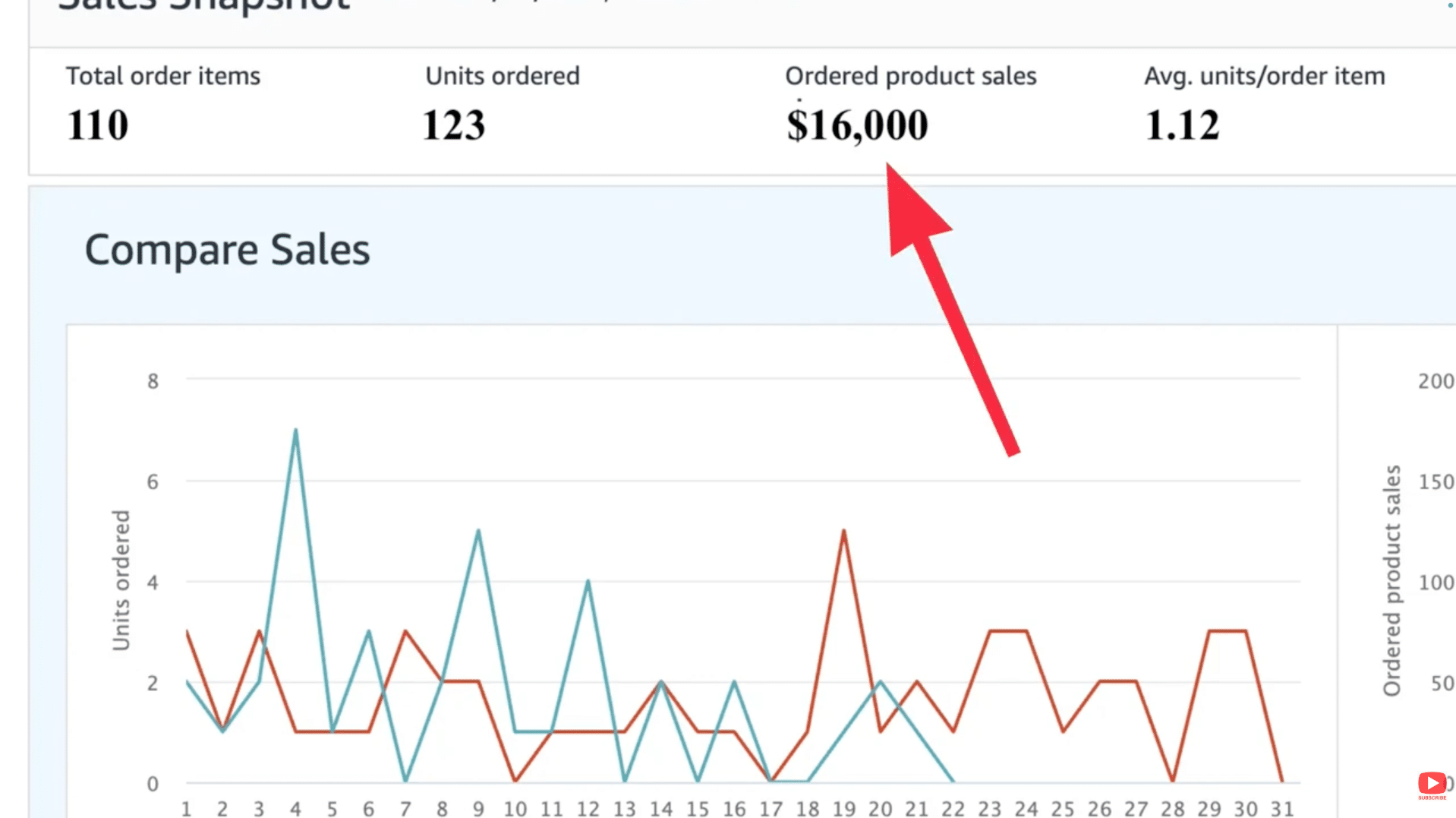
Image above: Even a single strong month can trigger Amazon’s insurance requirement.
What Counts Toward the $10,000 Threshold (and What Doesn’t)
| Included in Amazon’s $10,000 Calculation | Not Included (Does Not Reduce the Number) |
|---|---|
| What customers actually paid in that month (after discounts) | Amazon referral fees |
| Gross proceeds collected from orders in that month | FBA fees |
| Order value paid by buyers (not profit) | PPC / ad spend |
| Revenue totals that reflect discounts/promotional rebates | Cost of goods sold |
| Sales totals based on actual payments (not “pre-discount” dashboard views) | Refunds issued later |
Amazon looks at gross sales, not profit.
If customers paid $10,000 or more for your products in a single month, you’ve crossed the threshold.
That number is not reduced by:
- Amazon referral or FBA fees
- Advertising spend
- Cost of goods sold
- Refunds issued later
Promotions and discounts are where sellers get confused
This is one of the most common misunderstandings.
For example:
- Your dashboard might show $16,000 in sales
- You ran a 50% off promotion
- Customers actually paid $8,000
In that situation, you did not cross the $10,000 threshold.
The requirement is based on what customers actually paid, not the inflated pre-discount number Amazon sometimes displays.
How to check the real number Amazon uses
If your dashboard looks like it crossed $10,000 and you were running promotions, it’s worth verifying.
You can do this by going to Payments → Reports Repository, selecting the month, and choosing Summary as the report type. The report shows promotional rebates, which you subtract from the dashboard number.
This is the number that matters for the insurance requirement.
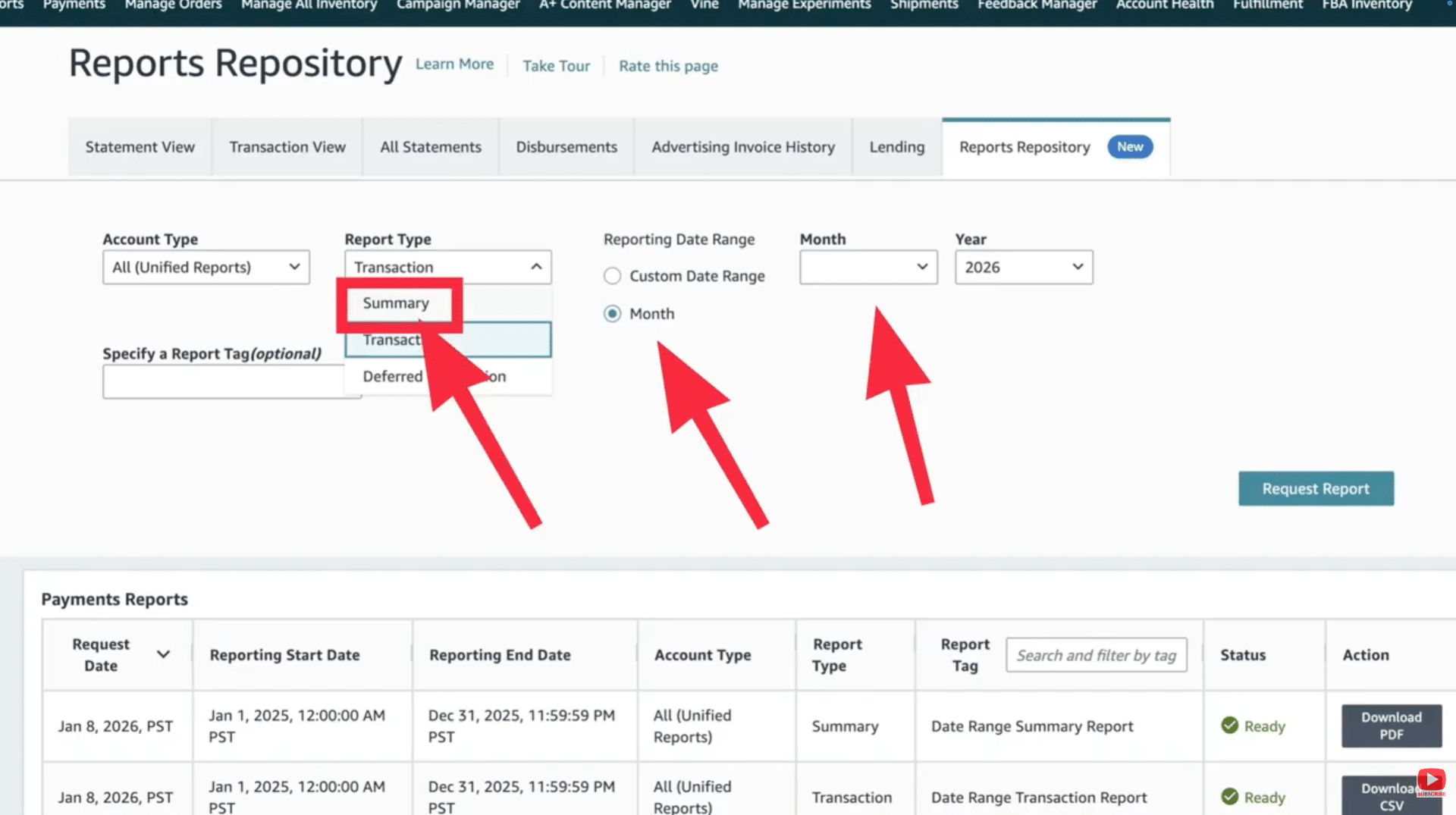
Image above: The summary report shows what customers actually paid after promotions.
Situations Where Insurance Is Not Yet Required
You do not need liability insurance if:
- You have never exceeded $10,000 in gross sales in a single month
- Amazon has not specifically requested proof of insurance
Until one of those happens, insurance remains optional from Amazon’s perspective.
That said, optional does not mean pointless—and we’ll get to that next.
What Liability Insurance Typically Costs for Amazon Sellers
For most sellers, the cost is much lower than expected.
Low-risk product categories
For standard, low-risk physical products like home goods, apparel, accessories, and general consumer products, policies commonly land in the:
- $400–$1,000 per year range
- Roughly $40–$100 per month
Higher-risk product categories
Costs increase for higher-risk products, including:
- Food products
- Supplements and ingestibles
- Chemicals
- Children’s products
- Electronics with batteries
For these, it’s common to see:
- $1,200–$3,000 per year
If you know you’re in one of these categories, getting quotes ahead of time can help you plan without being forced into a rushed decision later.
Where to Shop for Liability Insurance
Specialized e-commerce insurance brokers
Many Amazon sellers work with brokers who specialize in e-commerce and marketplace businesses.
One name that comes up frequently is Ashlin Hadden Insurance, which focuses on Amazon and e-commerce brands.
Amazon’s Insurance Accelerator
Amazon also offers the Insurance Accelerator, which runs through Marsh.

Image above: Amazon’s Insurance Accelerator is managed through Marsh inside Seller Central.
Inside Seller Central, you can fill out a form, receive quotes from approved providers, and purchase a policy designed to meet Amazon’s requirements.
You can access it here: Amazon Insurance Accelerator.
It can be convenient, but it’s still smart to compare options instead of defaulting to a single source.
Why Liability Insurance Isn’t Just an Amazon Checkbox
Once your sales reach the point where Amazon requires insurance, that usually lines up with when it genuinely makes sense to have it.
At that scale, a product defect, customer injury, or property damage claim can escalate quickly.
Liability insurance is what covers:
- Legal defense costs
- Settlements or judgments
- Claims that would otherwise be paid out of pocket
Without insurance, a single serious claim can be financially devastating for a growing brand.
So while the requirement feels like compliance, it’s also a sign your business has reached a stage where protection is appropriate.
Final Thought
The key takeaways are simple:
- You do not need liability insurance just for being an Amazon seller
- You do need it once you exceed $10,000 in gross sales in a single month
- For most brands, the cost is predictable and reasonable
- Understanding the rule early prevents rushed decisions later
If you want a walkthrough, the video above covers this step-by-step. And if you’ve got a quick question about your situation, leave a comment on the video and I’ll try to point you in the right direction.